1.1 - System Requirements
System requirements, architecture, and preparation guides for setting up Appvance IQ.
- AIQ Architecture Overview
- Appvance IQ Production System Requirements
- Appvance IQ Load Generator Table
- AIQ Install Preparation Checklist - System Requirements
- AIQ Required Ports
- Appvance IQ Data Flow Diagram
- AIQ Onsite Trial Requirements
- On-Prem Trial Checklist
AIQ Architecture Overview
AIQ Architecture Overview
AIQ includes controller, execution, data, and reporting components that work together to design, run, and analyze tests. Exact deployment details vary by environment, but the same core responsibilities apply.
Core components
- AIQ Controller: coordinates projects, scenarios, executions, users, and reporting.
- Test Nodes: provide execution capacity for browser, service, mobile, or performance runs.
- Data services: store configuration, execution data, results, and operational test data.
- Integrations: connect AIQ with systems such as Jira, source control, or external services where configured.
Operational notes
- Size Test Nodes based on execution type, browser count, and expected load.
- Keep browser, driver, and operating-system support aligned with the AIQ release.
- Monitor controller, database, and node health during large executions.
- Document environment-specific ports, certificates, proxies, and integration endpoints.
Last updated: September 18, 2026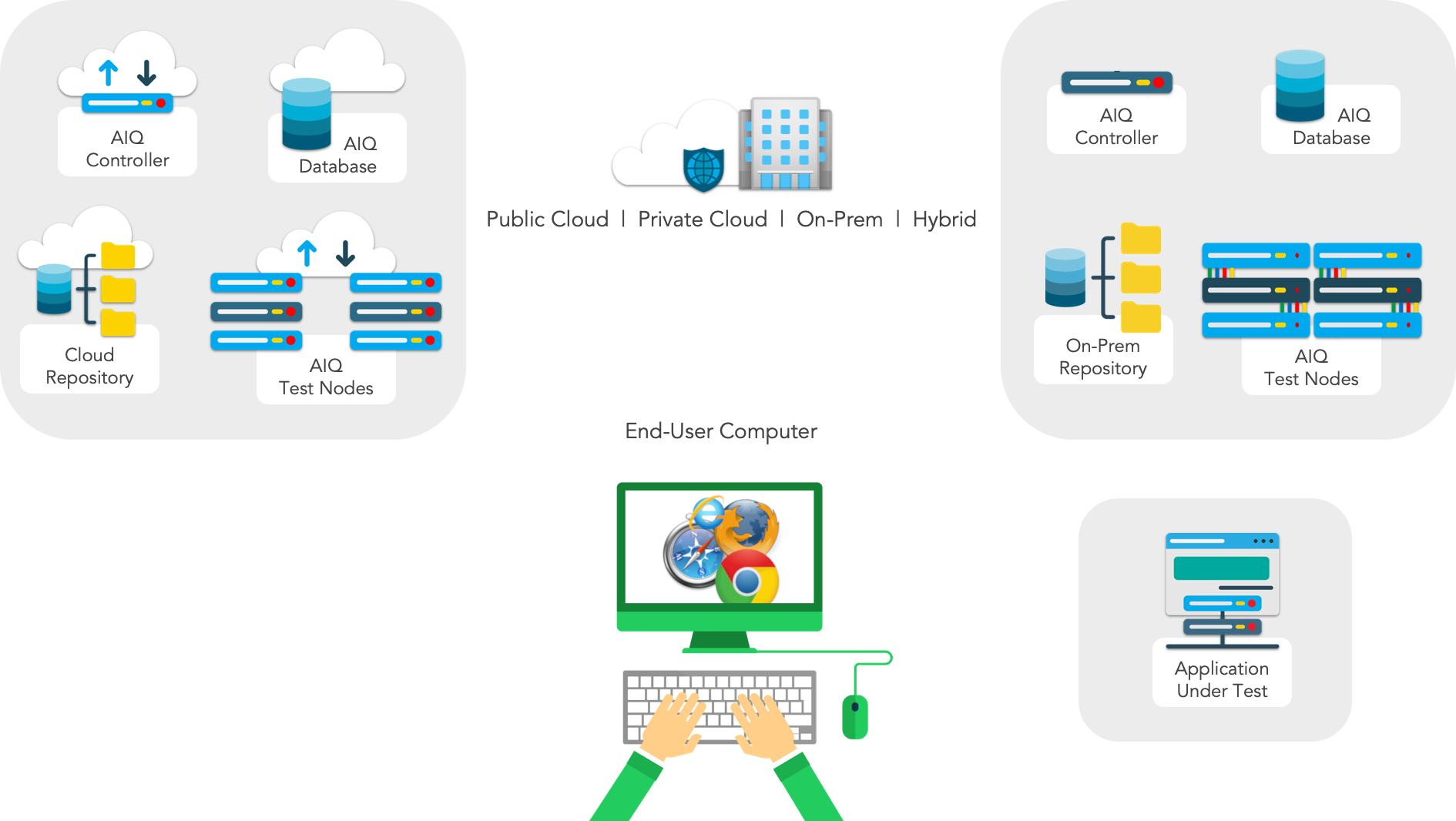
Appvance IQ Production System Requirements
Appvance IQ Production System Requirements
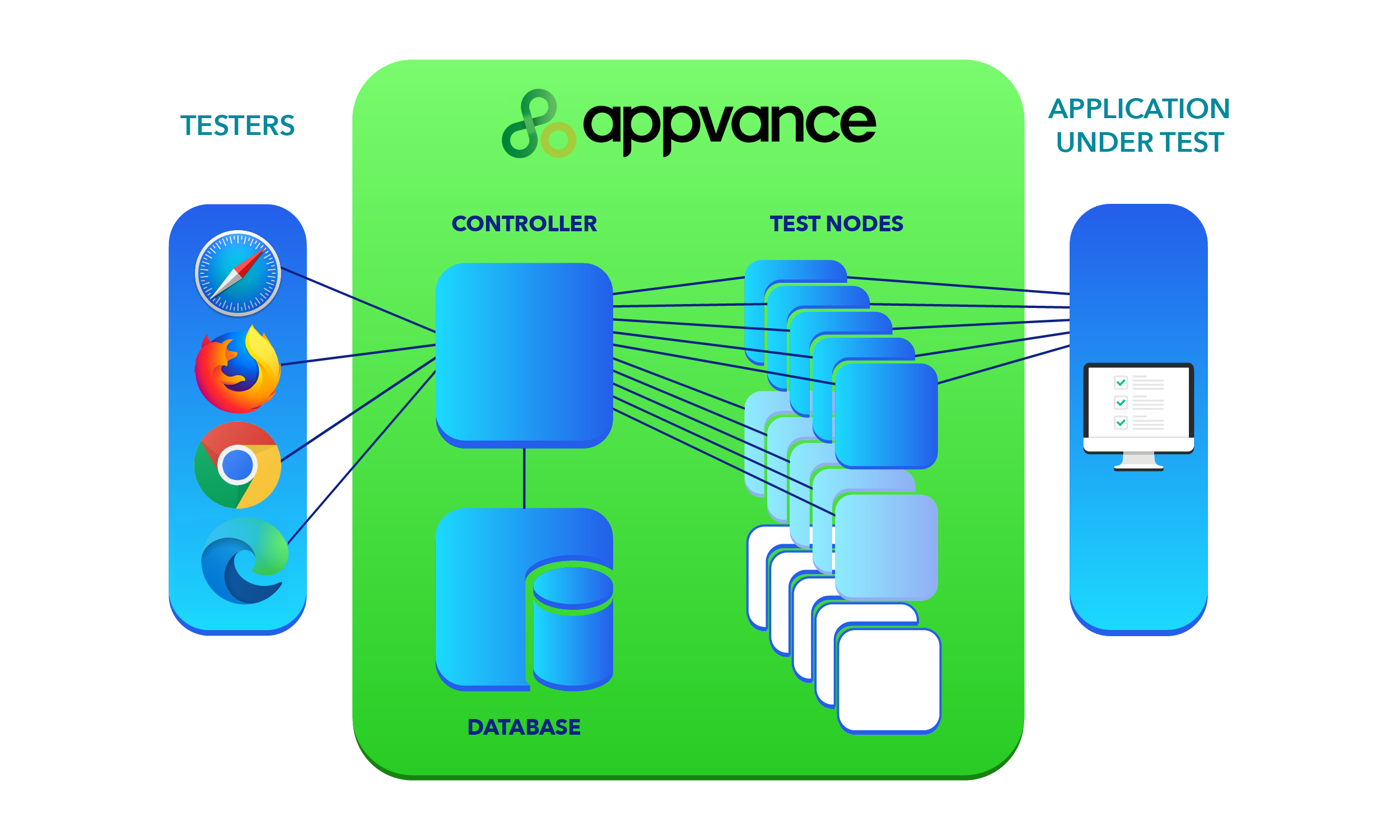
- Testers - Browsers accessing Appvance IQ via a browser.
- Appvance IQ Controller - The Controller is the primary point of communication and information exchange for Appvance IQ. Runs on an individual machine.
- Database - The relational database is required to store test results. Both the Controller and the Test Nodes write to the database. Results are generated from data the Controller reads from the database.
- Appvance Test Node(s) - Runs on individual machines. Test Nodes are also known as Load Generators. The Controller provides tests to each Test Node to run.
- Repository - Stores all test components, including scenarios, scripts and data files. The Repository can use local file storage or point to a source control repository.
- Application Under Test (AUT) - The application being tested by AIQ.
These are the recommended configurations and hardware sizing for AIQ production level systems.
Controller
The AIQ Controller is the primary point of communication and information exchange for Appvance IQ.
Minimum Recommended System Configuration
Linux
- Ubuntu Server 20.24 / 22.04
- 8+ CPU Cores minimum
- 64 GB RAM
- 200 GB SSD
Note: This is regardless of cloud provider (Azure, Google Cloud, etc). - Java GraalVM 11 (64-bit)
Cloud Equivalents
Size | AWS | Azure | Google Cloud |
|---|---|---|---|
Medium Deployment | c5.2xlarge | Standard_D8_v3 | n1-standard-8 |
Large Deployment | c5.4xlarge | Standard_D16_v3 / Standard_D32_v3 | n1-standard-16 / n1-standard-32 |
- SSD io HD (not gp)
EBS should be set to IO1 with 3000-5000 IOPS
Installing the Controller on a Windows machine is no longer a supported configuration.
Test Node
Appvance Test Node(s) run on individual machines. Test Nodes are also known as Load Generators. The Controller provides tests for each Test Node to run.
Sizing of the Test Node is dependent on the number of concurrent tests you want to run. The more concurrent tests, the more CPU and memory required. Refer to the Test Node Capacity Load Generator Table below.
Minimum Recommended System Configuration
Windows
- Windows Server 2022 or newer
- 8+ CPU Cores
- 16 GB RAM (bare minimum - 64GB+ memory recommended for production-level testing)
- 60 GB SSD
- Java GraalVM 11 (64-bit)
Cloud Equivalents
Size | AWS | Azure | Google Cloud |
|---|---|---|---|
Medium Deployment | c5.2xlarge | Standard_D8_v3 | n1-standard-16 |
Large Deployment | c5.4xlarge | Standard_D16_v3 (AISG 5 or more browsers) | n1-standard-32 (AISG 5 or more browsers) |
EBS should be set to IO1 - 5000 IOPS
AI Script Generation (AISG) Considerations
Performance of the AISG process is highly dependent on the resources available to your test node as well as configuration choices that you make. Here are some general guidelines.
This information also applies to Cloud AISG Executions using Kubernete (K8) which will be supported in future releases of AIQ.
What follows are some general highlights. See the Resource Considerations section of the AISG documentation for more information.
RAM | AWS |
|---|---|
16 GB | Up to 5 headless browsers |
32 GB | Up to 10 headless browsers |
64 GB | Up to 20 headless browsers |
- RAM and disk space may need to be adjusted depending on depending on the web page complexity and how many hours the AISG execution needs to run. For example, web pages with endless scrolls or tables with check boxes may take a long time to run.
- The AISG execution should not be run for more than 48 hours. If it does, the recommendation is to adjust your setup. For example, use more browsers, or exclude some pages from scan. As an additional way to improve the execution time, it is recommended that you make use of SmartTags. A general guideline is that this should be considered for web pages with 1000 elements on the page. See SmartTag Workbench for more information.
- Repository performance also impacts AISG executions. If you are running AISG, you are required to use only AWS S3 Bucket or Google Storage to save files. GIT storage is not supported for AISG executions due to performance limitations.
Test Node Capacity Load Generator Table
Estimated capacity per server or VM. This can vary greatly with application complexity.
Refer to the table below to determine Test Node capacity and configuration needs:
CPU Cores | Minimum Memory | Minimum UX-Level Browsers | Max likely UX-Level Browsers | HAR Protocol Level VU | JMeter Protocol Level tests |
|---|---|---|---|---|---|
8 | 16 GB | 8 | 16 | 250 | 40 |
12 | 24 GB | 12 | 24 | 500 | 60 |
16 | 32 GB | 16 | 32 | 1000 | 80 |
32 | 64 GB | 32 | 32 | 2500 | 160 |
64 | 128 GB | 32 | 64 | 5000 | 320 |
128 | 256 GB | 32 | 64 | 10000 | 640 |
Using the latest Chrome browser, poor linear scalability is experienced after 30 browsers regardless of the size of the test node.
Example System Requirement Calculation
If a test specification requires UX tests to run 1000 virtual users, and each test node has an 8 Core CPU with 12 GB RAM, then 20 test nodes are required.
Calculated as:
- Test Nodes Required = Total Virtual Users / Virtual Users per Test Node
- (from the above example) 20 Test Nodes = 1000 Virtual Users / 50 Virtual Users per Test Node
Security Port Requirements
Following are the list of ports that need to be open in the server that will host Appvance IQ.
These port configurations apply to both the Controller and the Test Nodes.
Port | Description |
|---|---|
3306 | Port access between AIQ Controller and MySQL service/server (if applicable) |
9095 -9100 | From end-user computer outbound to AIQ Controller (required only for recording HTTP traffic from end-user computer) |
8080 | HTTP port. Outbound access from the Controller and between all Test Nodes (Either 8080 or 8443 is required, not both) |
8443 | HTTPS port. Outbound access from the Controller and between all Test Nodes (Either 8080 or 8443 is required, not both) |
9090 | Test Designer port, required for internal use within Controller and Test Nodes (not external) |
9091 | Test Designer port, required for internal use within Controller and Test Nodes (not external) |
8090 | Security Testing required only within the controller and test nodes (internal to each system only) |
8079 | Java processes shutdown port required only within the controller and test nodes (internal to each system only) |
In addition to these ports, the Database must be enabled to allow incoming connections from Controller (recommended on same box for trials) and Test Node machines.
Database
A relational database is required to store test results. Both the Controller and the Test Nodes write to the database. Results are generated from data the Controller reads from the database.
Recommended Configuration
- MySQL Server (needs to be run as RDS or a standalone server)
- MySQL database is required to store test results
- The AIQ Controller and Test Nodes read and write to the database
- The Database must be enabled to allow incoming connections from Controller and TestNode machines
- Minimum 200 GB HD auto-increment
- Should old data no longer be required, data can be dropped and/or backed up and dropped
AWS Examples
- RDS db.t3.medium / Auto-increment 100 GB HD
- RDS t2.xlarge / Auto-increment 200 GB HD
Repository
The Repository Stores all test components, including scenarios, scripts and data files. The Repository can use local file storage or point to a source control repository.
Supported repository types are:
- Amazon S3
- Git (most Git variations are supported: GitHub, GitLab, Azures Git)
- Azure blob
- Google Storage *
- SFTP **
- FTP **
Certain repository types are not optimal for certain types of tests. For example, Appvance does not recommend using Git to store your images if your are using the Visual Accessor functionality. This is due to Git not being designed to handle large amounts of binary files efficiently.
* Support for Google Storage with AIQ 5.3.0
** Starting with AIQ 5.3.0, SFTP and FTP will no longer be supported repository types.
Browsers
Browsers accessing Appvance IQ via a browser. AIQ supports the latest versions of the following browsers:
- Apple Safari
- Google Chrome
- Microsoft Edge
- Mozilla Firefox
AIQ no longer supports the use of Internet Explorer. Contact support@appvance.ai for questions regarding alternate browser versions.
End User Systems
Minimum Recommended System Configuration
- 6+ CPU Cores (at least Intel® Xeon E5 Class processor) **
- 8+ GB Memory**
- Java GraalVM 11 (included with Appvance IQ end-user setup)
- End user must have administrator permission to install AIQ's Test Designer (proxy) as well as the ability to modify system environment variables during the setup process.
Network Configuration
The end user systems will access AIQ only from a browser. The following ports must not be in use, and must permit internet access
Port | Description | Requirement |
|---|---|---|
8080 | 8443 | HTTP navigation to server | Must permit internet access (not blocked by firewall for outbound traffic) |
9090 | 9091 | Test Designer client (internally open only) | Must not be in use. |
Designer Proxy
End user machines must have permissions to install a proxy in the browser. You must have the Designer Proxy installed before you can begin using AIQ. You will be prompted by AIQ to install the proxy.
Test Designer folder (AIQ 4.10.x and earlier)
- Windows default path:
C:\TestDesigner - Mac default path:
$HOME/TestDesigner
Test Designer folder (AIQ 5.0.0+)
- Windows default path:
C:\WebDesigner - Mac default path:
$HOME/WebDesigner
Anti-Virus Recommendations
The Appvance IQ installation package is sizable and the vast majority of the contents will never change between installations or upgrades. Because of this, you can exclude the AIQinstallation folder the from the scheduled daily / weekly / monthly scans. Doing so will reduce the time and resources devoted to these scans. Also if these folders are not excluded, you may see some unexpected behavior in AIQ.
For example, this may impact scenario executions, specially on DS and DS3 engines that write many temporary files for requests and responses.
Following are some of the top Anti-virus programs from which the files and folders of Appvance IQ should be excluded:
- AVG Anti-virus
- Avast Anti-virus
- Kaspersky Anti-virus
- McAfee Virus Scan
- Norton Anti-virus
- Symantec Endpoint protection
- Windows Defender
Questions or need support?
Contact us at support@appvance.ai or by submitting a support request at https://appvance.ai/support,
See Contacts and Resources for additional options to contact Appance Support.
Last updated: May 14, 2025
If you have any feedback on this topic, please contact us at documentation@appvance.ai
Appvance IQ Load Generator Table
Estimated capacity per server or VM (varies greatly with application complexity)
Assumes E7 or newer Intel cores or EPYC AMD cores @3Ghz+.
Refer to the table below to determine Test Node capacity and configuration needs:
CPU Cores | Minimum Memory | Minimum UX-Level Browsers | Max likely UX-Level Browsers | HAR Protocol Level VU | JMeter Protocol Level tests |
|---|---|---|---|---|---|
4 | 8 GB | 4 | 8 | 100 | 20 |
6 | 12 GB | 6 | 12 | 150 | 30 |
8 | 16 GB | 8 | 16 | 250 | 40 |
12 | 24 GB | 12 | 24 | 500 | 60 |
16 | 32 GB | 16 | 32 | 1000 | 80 |
32 | 64 GB | 32 | 32 | 2500 | 160 |
64 | 128 GB | 32 | 64 | 5000 | 320 |
128 | 256 GB | 32 | 64 | 10000 | 640 |
Using the latest Chrome browser, poor linear scalability is experienced after 30 browsers regardless of the size of the test node.
Example System Requirement Calculation
If a test specification requires UX tests to run 1000 virtual users, and each test node has an 8 Core CPU with 12 GB RAM, then 20 test nodes are required.
Calculated as:
- Test Nodes Required = Total Virtual Users / Virtual Users per Test Node
- (from the above example) 20 Test Nodes = 1000 Virtual Users / 50 Virtual Users per Test Node
Last updated: July 17, 2024
If you have any feedback on this topic, please contact us at documentation@appvance.ai
AIQ Install Preparation Checklist - System Requirements
AIQ Install Preparation Checklist - System Requirements
Use this checklist before installing or upgrading AIQ. This copy is scoped to system requirements and should stay aligned with the installation-and-configuration checklist to avoid duplicate or conflicting guidance.
System readiness checks
- Confirm supported operating systems, CPU, memory, disk, database, Java/runtime, browser, and network requirements.
- Identify Controller, database, Test Node, browser/device, and integration hosts.
- Validate ports, DNS, certificates, firewall rules, proxy requirements, and service accounts.
- Confirm storage planning for logs, reports, execution evidence, screenshots, videos, and database growth.
- Document backup, recovery, monitoring, and maintenance-window expectations.
Duplicate-content note
This page overlaps with the install checklist under Installation and Configuration. Keep this version focused on requirements and consolidate procedural install steps into the installation checklist when possible.
Last updated: October 9, 2026
AIQ Required Ports
Recommended guidance
AIQ required ports should be reviewed before installation, upgrades, Test Node deployment, integrations, and troubleshooting. Port requirements may vary by deployment model, environment, proxy, database, repository, browser execution, and integrations.
Review checklist
- Application server, database, Test Node, repository, browser, and integration traffic.
- Inbound versus outbound direction and source/destination hosts.
- Firewall, security group, proxy, DNS, and certificate requirements.
- Port conflicts with existing services on the same host.
- Customer network policies and approved change windows.
Troubleshooting workflow
- Confirm the exact AIQ component that cannot connect.
- Check whether the port is listening on the expected host.
- Validate routing and firewall rules from the source host.
- Document approved port changes and retest the affected AIQ workflow.
Last updated: October 6, 2026
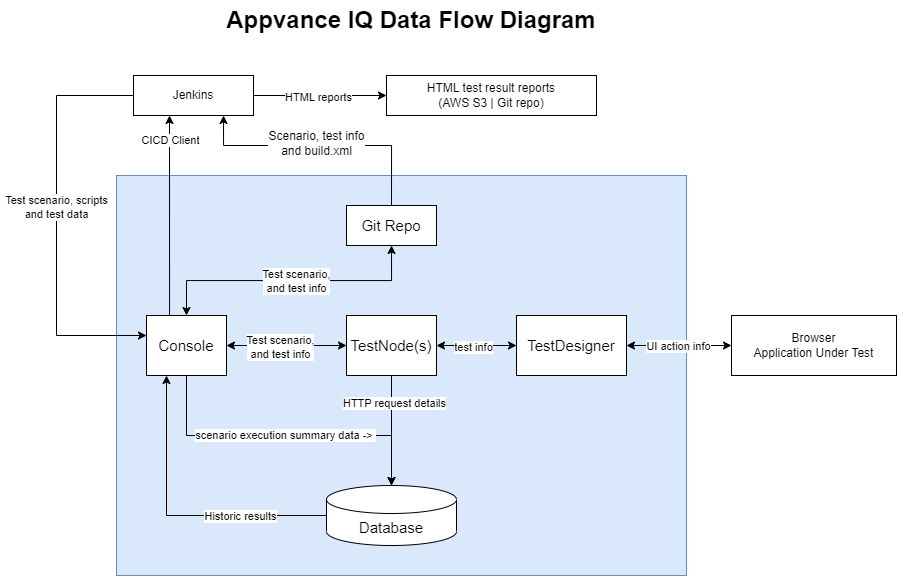
Appvance IQ Data Flow Diagram
Last updated: April 20, 2023
If you have any feedback on this topic, please contact us at documentation@appvance.ai
AIQ Onsite Trial Requirements
The AIQ trial is a self contained instance that runs on Windows and has the database installed locally. It is designed for proof of value testing of AIQ.
Trial parameters:
- Up to four users accessing the Controller from their own browser.
- One hundred parallel API-level tests.
- Five to ten parallel UX (GUI) level tests.
Values based on maximum trial configuration recommendation. UX-level test capacity is also impacted by web site's browser memory footprint and CPU load.
Controller
The AIQ Controller is the primary point of communication and information exchange for Appvance IQ.
Windows
- #5FBC5E or newer
- 6+ CPU Cores
- 16+ GB Memory
- 100 GB SSD
- Java GraalVM 11 (64-bit)
Installing the Controller on a Windows machine is only supported for AIQ trials. For production level systems, the Controller must be install on Linux.
Test Nodes
Appvance Test Node(s) run on individual machines. Test Nodes are also known as Load Generators. The Controller provides tests for each Test Node to run.
Sizing of the Test Node is dependent on the number of concurrent tests you want to run. The more concurrent tests, the more CPU and memory required. Refer to the Test Node Capacity Load Generator Table below.
- Windows Server 2022 or newer
- 6+ CPU Cores
- 16+ GB Memory
- 100 GB SSD
- Java GraalVM 11 (64-bit)
Test Node Capacity Load Generator Table
Estimated capacity per server or VM (varies greatly with application complexity)
Assumes E7 or newer Intel cores or EPYC AMD cores @3Ghz+.
Refer to the table below to determine Test Node capacity and configuration needs:
CPU Cores | Minimum Memory | Minimum UX-Level Browsers | Max likely UX-Level Browsers | HAR Protocol Level VU | JMeter Protocol Level tests |
|---|---|---|---|---|---|
4 | 8 GB | 4 | 8 | 100 | 20 |
6 | 12 GB | 6 | 12 | 150 | 30 |
8 | 16 GB | 8 | 16 | 250 | 40 |
12 | 24 GB | 12 | 24 | 500 | 60 |
16 | 32 GB | 16 | 32 | 1000 | 80 |
32 | 64 GB | 32 | 32 | 2500 | 160 |
64 | 128 GB | 32 | 64 | 5000 | 320 |
128 | 256 GB | 32 | 64 | 10000 | 640 |
Using the latest Chrome browser, poor linear scalability is experienced after 30 browsers regardless of the size of the test node.
Example System Requirement Calculation
If a test specification requires UX tests to run 1000 virtual users, and each test node has an 8 Core CPU with 12 GB RAM, then 20 test nodes are required.
Calculated as:
- Test Nodes Required = Total Virtual Users / Virtual Users per Test Node
- (from the above example) 20 Test Nodes = 1000 Virtual Users / 50 Virtual Users per Test Node
Repository
The Repository can use the local file storage on the Controller or any other supported repository type such as Git or SVN.
Browsers
Browsers accessing Appvance IQ via a browser. AIQ supports the latest versions of the following browsers:
- Apple Safari
- Google Chrome
- Microsoft Edge
- Mozilla Firefox
AIQ no longer supports the use of Internet Explorer. Contact support@appvance.ai for questions regarding alternate browser versions.
End-User System
- 6+ CPU Cores (at least Intel® Xeon E5 Class processor)
- 8+ GB Memory
- Java GraalVM 11 (included with Appvance IQ end-user setup)
Network Configuration
The end user systems will access AIQ only from a browser. The following ports must not be in use, and must permit internet access.
Port | Description | Requirement |
|---|---|---|
8080 | 8443 | HTTP navigation to server | Must permit internet access (not blocked by firewall for outbound traffic) |
9090 | 9091 | Test Designer client (internally open only) | Must not be in use. |
Designer Proxy
End user machines must have permissions to install a proxy in the browser. You must have the Designer Proxy installed before you can begin using AIQ. You will be prompted by AIQ to install the proxy.
Test Designer folder (AIQ 4.10.x and earlier)
- Windows default path:
C:\TestDesigner - Mac default path:
$HOME/TestDesigner Test Designer folder (AIQ 5.0.0+)
- Windows default path:
C:\WebDesigner - Mac default path:
$HOME/WebDesigner
Security Port Requirements
Following are the list of ports that need to be open in the server that will host Appvance IQ.
These port configurations apply to both the Controller and the Test Nodes.
Port | Description |
|---|---|
3306 | Port access between AIQ Controller and MySQL service/server (if applicable) |
9095 -9100 | From end-user computer outbound to AIQ Controller (required only for recording HTTP traffic from end-user computer) |
8080 | HTTP port. Outbound access from the Controller and between all Test Nodes (Either 8080 or 8443 is required, not both) |
8443 | HTTPS port. Outbound access from the Controller and between all Test Nodes (Either 8080 or 8443 is required, not both) |
9090 | Test Designer port, required for internal use within Controller and Test Nodes (not external) |
9091 | Test Designer port, required for internal use within Controller and Test Nodes (not external) |
8090 | Security Testing required only within the controller and test nodes (internal to each system only) |
8079 | Java processes shutdown port required only within the controller and test nodes (internal to each system only) |
In addition to these ports, the Database must be enabled to allow incoming connections from Controller (recommended on same box for trials) and Test Node machines.
You may also use our compatibility check utility to determine the readiness of your machines.
Anti-Virus Recommendations
The Appvance IQ installation package is sizable and the vast majority of the contents will never change between installations or upgrades. Because of this, you can exclude the AIQinstallation folder the from the scheduled daily / weekly / monthly scans. Doing so will reduce the time and resources devoted to these scans. Also if these folders are not excluded, you may see some unexpected behavior in AIQ.
For example, this may impact scenario executions, specially on DS and DS3 engines that write many temporary files for requests and responses.
Following are some of the top Anti-virus programs from which the files and folders of Appvance IQ should be excluded:
- AVG Anti-virus
- Avast Anti-virus
- Kaspersky Anti-virus
- McAfee Virus Scan
- Norton Anti-virus
- Symantec Endpoint protection
- Windows Defender
Last updated: May 14, 2025
If you have any feedback on this topic, please contact us at documentation@appvance.ai
On-Prem Trial Checklist
Use the following checklist to prepare all applicable systems for an on-premises trial
Review the Appvance IQ Onsite Trial System Requirements
Step 2 | Install Checklist
Download comprehensive checklist here