# The Coverage Map

The AISG **Coverage Map** shows the multiple paths the AI can take while interacting with the application being tested. It lets you visualize the **health of the application** and understand all potential user flows — including areas plagued by errors that may need rework.
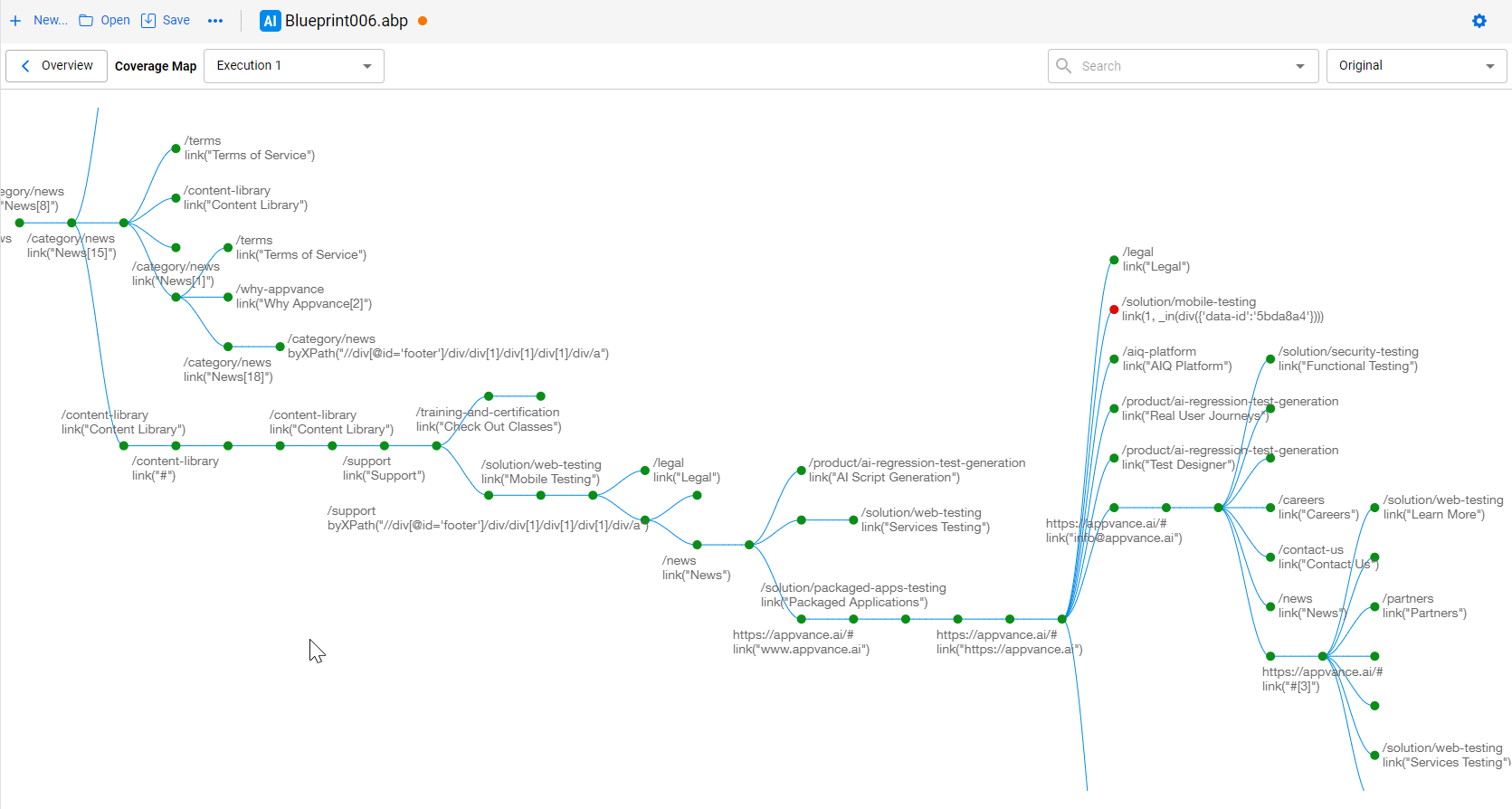
<div id="bkmrk-the-aisg-coverage-ma-1" style="background-color:#f4f6f8;border:1px solid #dde3e9;border-radius:8px;padding:12px;margin:18px 0;text-align:center;">![Coverage Map](https://docs.appvance.net/Content/Resources/Images/AISG/AIQ5_CoverageMap00_52.png)*The AISG Coverage Map in AIQ 5.2+.*

</div>### Three coverage map types (AIQ 5.2.0+)

<table id="bkmrk-type-what-it-shows-o" style="width:100%;border-collapse:collapse;margin:14px 0;"><thead><tr style="background-color:#1A1A1A;"><th style="padding:10px;color:#fff;text-align:left;border:1px solid #333;">Type</th><th style="padding:10px;color:#fff;text-align:left;border:1px solid #333;">What it shows</th></tr></thead><tbody style="background-color:#fff;"><tr><td style="padding:9px;border:1px solid #ddd;;color:#1A1A1A;">&gt;**Original**</td><td style="padding:9px;border:1px solid #ddd;;color:#1A1A1A;">&gt;The default visualization — the view used in previous versions of AIQ.</td></tr><tr style="background-color:#f7f9fa;"><td style="padding:9px;border:1px solid #ddd;;color:#1A1A1A;">&gt;**Extended Potential**</td><td style="padding:9px;border:1px solid #ddd;;color:#1A1A1A;">&gt;Enhanced view with more page states and relationships the AI *learned about* — even paths it did not actually navigate.</td></tr><tr><td style="padding:9px;border:1px solid #ddd;;color:#1A1A1A;">&gt;**Actual Path**</td><td style="padding:9px;border:1px solid #ddd;;color:#1A1A1A;">&gt;The exact path the AI followed through the application — great for tracking AI training and generating precise DS scripts.</td></tr></tbody></table>

<div id="bkmrk-note%3A-to-take-advant" style="background-color:#FFF3E0;border-left:5px solid #2872FA;border-radius:6px;padding:14px 18px;margin:16px 0;color:#1A1A1A;">**Note:** to take advantage of the new Coverage Map types, you must **rerun any existing 5.0.x executions on 5.2.0**. Opening a 5.0.x `.abpt` file alone is not enough.

</div>### Node colors and their meaning

<table id="bkmrk-color-meaning-whiten" style="width:100%;border-collapse:collapse;margin:14px 0;"><thead><tr style="background-color:#2872FA;"><th style="padding:10px;color:#fff;text-align:left;border:1px solid #1d5fd6;">Color</th><th style="padding:10px;color:#fff;text-align:left;border:1px solid #1d5fd6;">Meaning</th></tr></thead><tbody style="background-color:#fff;"><tr><td style="padding:9px;border:1px solid #ddd;background-color:#fff;">White</td><td style="padding:9px;border:1px solid #ddd;;color:#1A1A1A;">&gt;Not executed</td></tr><tr style="background-color:#f7f9fa;"><td style="padding:9px;border:1px solid #ddd;background-color:#eaf7ea;">Green</td><td style="padding:9px;border:1px solid #ddd;;color:#1A1A1A;">&gt;Executed with no errors</td></tr><tr><td style="padding:9px;border:1px solid #ddd;background-color:#fff8e6;">Yellow</td><td style="padding:9px;border:1px solid #ddd;;color:#1A1A1A;">&gt;Executed with a non-critical error (e.g. a 500 error)</td></tr><tr style="background-color:#f7f9fa;"><td style="padding:9px;border:1px solid #ddd;background-color:#fdecea;">Red</td><td style="padding:9px;border:1px solid #ddd;;color:#1A1A1A;">&gt;Executed with a critical error (e.g. a 404 error)</td></tr><tr><td style="padding:9px;border:1px solid #ddd;background-color:#eaf2ff;">Blue</td><td style="padding:9px;border:1px solid #ddd;;color:#1A1A1A;">&gt;The execution path from the start point</td></tr></tbody></table>

### Interacting with the map

- **Zoom in / out** to see more detail, including the actions and accessors associated with a node.
- Explore the map **in real time** while the blueprint is still running.
- **Click a node** to see its actions and accessors, plus their exact location in the application.
- **Generate DS Script** — creates a script with the steps the AI took to reach a specific page.
- Use the **Request tab** to see the associated requests.
- **Search URLs** in the map; click a result to see the page state details.
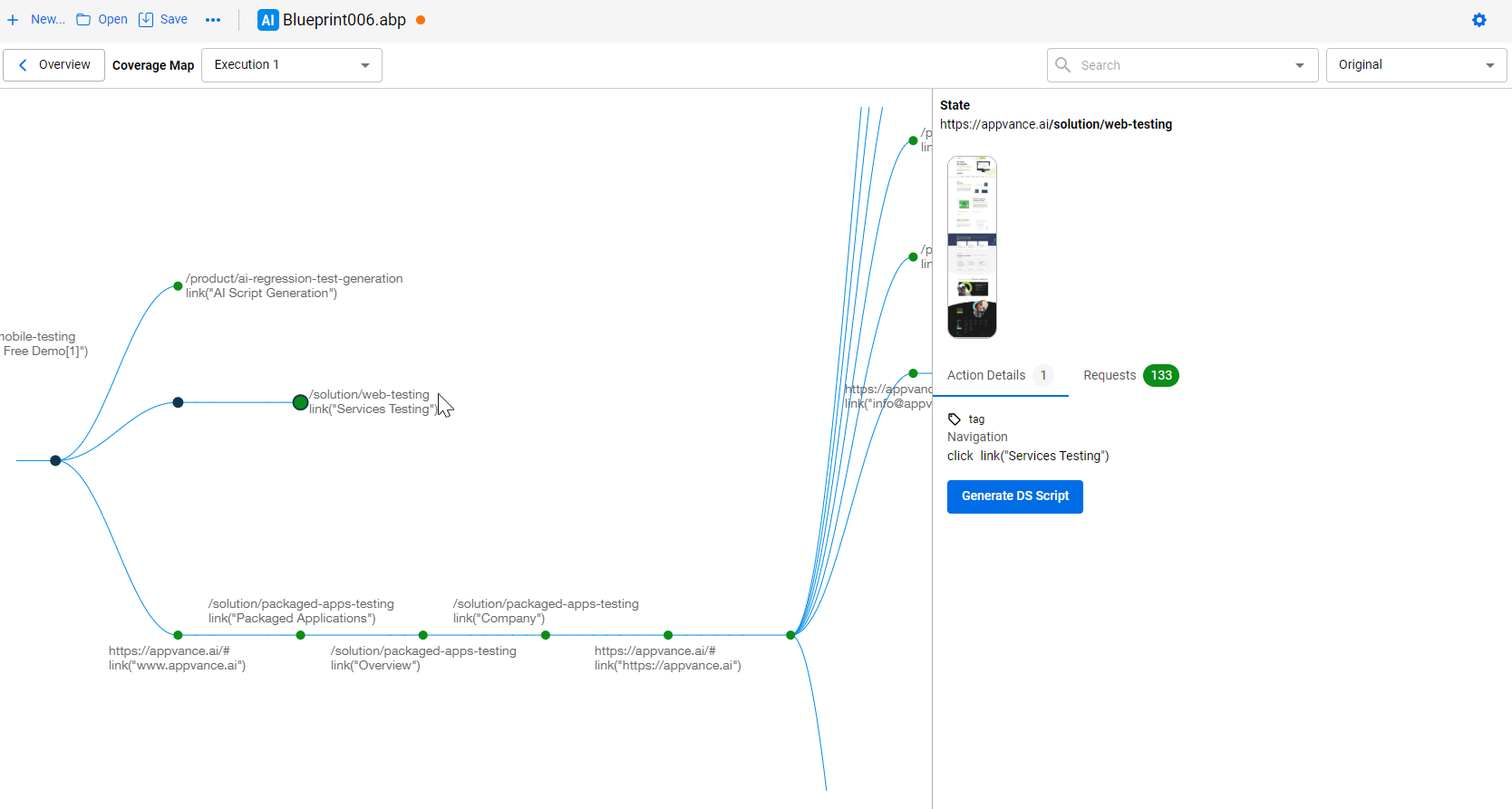
<div id="bkmrk-node-details-with-ac" style="background-color:#f4f6f8;border:1px solid #dde3e9;border-radius:8px;padding:12px;margin:18px 0;text-align:center;">![Node details](https://docs.appvance.net/Content/Resources/Images/AISG/AIQ5_CoverageMap02.png)*Node details with actions, accessors, and Generate DS Script.*

</div>### Filtering requests

You can filter out specific requests or errors (e.g. 404s) from the Coverage Map. The filter is saved to the Blueprint (`.abpt`) file so the requests won’t display on future executions. To hide a request, right-click it and select **Hide URL** — it moves to the **Hidden Requests** list, visible per node or per execution.

Source: [Exploring the Coverage Map (docs.appvance.net)](https://docs.appvance.net/Content/AIQ/AI3/AISG_ExploringBPCoverageMap.htm)