# Web Designer

There are major changes and enhancements to the user interface for creating, maintaining and executing web tests in the 5.0.0 release of AIQ.

This document is meant as a quick start guide to help acquaint you with the new Web Designer and explain the basic components in the interface.  
  
[You can watch a video introducing you to the features and benefits of the new Web Designer.](../../Resources/Video/WebDesignerIntroVideo.mp4)

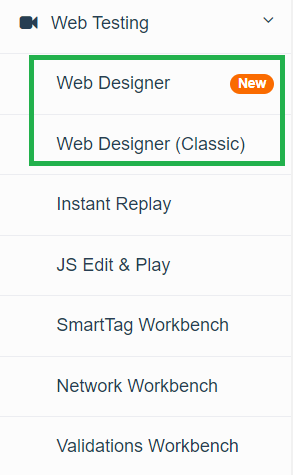
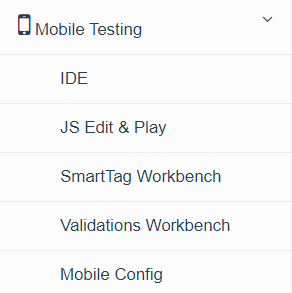
Here is a comparison between the Web Testing menu options in AIQ 5.0 and previous AIQ releases.

<table id="bkmrk-aiq-5.0.0-aiq%C2%A04.10.x" style="width: 100%;"><colgroup><col style="width: 312px;"></col><col></col></colgroup><tbody><tr><th>AIQ 5.0.0

</th><th>AIQ 4.10.x (and older)

</th></tr><tr><td>![](https://docs.appvance.net/uploads/images/gallery/2026-07/scaled-1680-/7dZMk1QDS6b1CN7p-7aca16411fdc.png)

</td><td>![](https://docs.appvance.net/uploads/images/gallery/2026-07/scaled-1680-/6sgIS5TCNqJ6bblh-155dd342d8a1.png)

</td></tr></tbody></table>

- **Web Designer** is the new user interface.
- **Web Designer (Classic)** is Deprecated.

See [Web Testing User Interface Overview for an explanation of the differences between the new and classic interfaces.](https://docs.appvance.net/Content/AIQ/AIQ5WebDesigner/WebDesigner_NewUI_Intro.htm)

For your convenience, the information about the new Web Designer interface is included in the [**AIQ 5.0.0 Release Summary**](../../Resources/PDF%20Attachments/AIQ500_ReleaseSummary.pdf). This document also contains the AIQ 5.0.0 Release Notes, which includes information about the AIQ 5.0.0 release.

---

Last updated: September 17, 2024

If you have any feedback on this topic, please contact us at <documentation@appvance.ai>