# Glass Box
# Glass Box
# Java Enterprise Application Monitoring with Glassbox
Glassbox is a utility that monitors Java enterprise applications (WAR or EAR.) Glassbox identifies thread contention, excess memory usage, and slow database connections. Appvance IQ(AIQ) integrates with Glassbox to correlate monitored performance problems to AIQ's load test operations. Used in combination, AIQ and Glassbox deliver root cause analysis and mitigation of performance bottlenecks in Java enterprise applications.
Glassbox locates the reasons for an enterprise application failure, performance bottleneck, or functional issue without requiring changes or instrumentation to your application. Glassbox uses Aspect-Oriented Programming (AOP) and Java Management technology. Glassbox is safe to use in production environments. Glassbox uses less than 1% of your server's CPU bandwidth. Glassbox supports Apache Tomcat, IBM WebSphere, Oracle BEA WebLogic, RedHat JBoss, and Jetty.
You may still need network and application "sniffers," test harnesses, and probes, but thankfully these can now be focused on exotic problems and their complexity avoided when dealing with day-to-day application performance issues.
[The Glassbox Project](http://www.glassbox.com/) maintains Glassbox. Appvance integrates and ships Glassbox in Appvance PerformanceCloud Edition. [Appvance Global Services](http://www.appvance.com/appvance-test-services/) provides professional support, training, and consulting for Glassbox.
---
Last updated: June 02, 2023
If you have any feedback on this topic, please contact us at
# Architecture
AIQ is a distributed test and monitor environment. As a load and performance test operates Glassbox observes performance metrics of a Java enterprise application, including memory use, thread contention, database connections, and object operation. Appvance Monitor (Appvance Monitor) communicates with Glassbox over Java management (JMX) protocols. AIQ gathers Glassbox data and correlates Glassbox findings into AIQ reports.
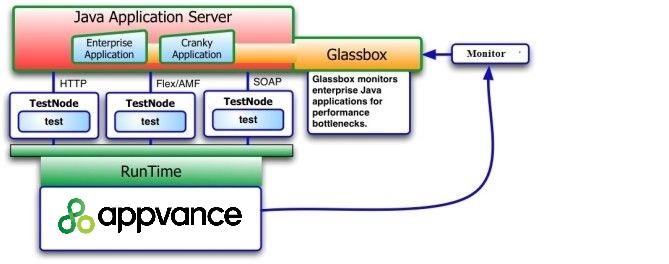
For example, Appvance operates a load and performance test on one or more TestNodes. A TestNode is a Web service that receives and operates a test. The TestNode is in your QA lab, data center, cloud computing environment, or both. Glassbox installs on a Java application server and uses Aspect-Oriented Technology to observe enterprise applications. The AIQ monitor system (Appvance Monitor) communicates over JMX protocols to Glassbox as the test operates. The Appvance Enterprise Results Analysis Engine correlates the Glassbox observations to the load test results for root cause analysis and mitigation.
Glassbox provides a Troubleshooter to view the live monitored data and performance alerts for your application. The following shows the Glassbox Troubleshooter interface.
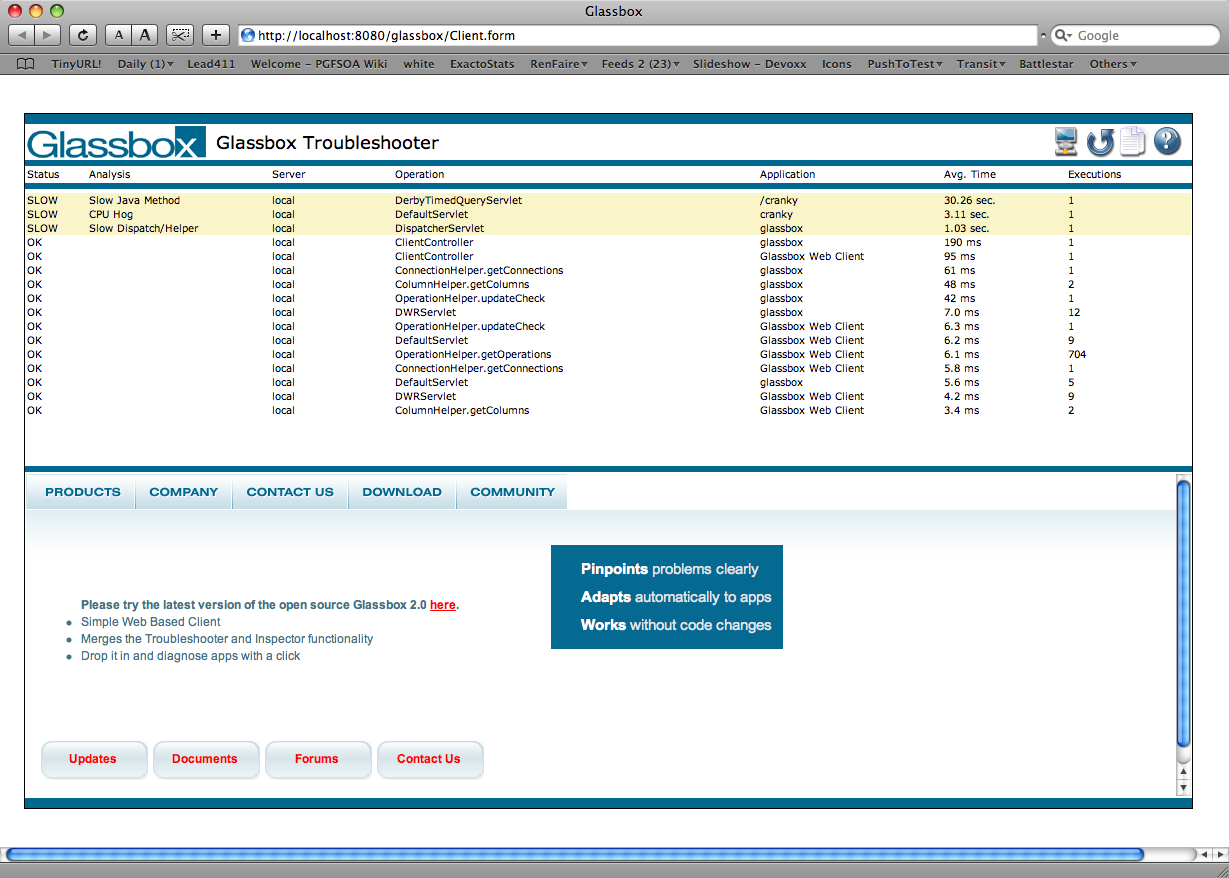
Glassbox Troubleshooter highlights problems with your application achieving your criteria for acceptable performance criteria. For example, Glassbox identifies slow object performance by setting a threshold in milliseconds. Use the Glassbox com (Hyperlink) figuration to set the criteria.
Appvance designed AIQ's Results Analysis Engine to provide drill-down functions on any of the Glassbox performance observations. [Contact Appvance Global Services](http://www.appvance.com/appvance-global-services/) to learn about additional charting and analysis functions.
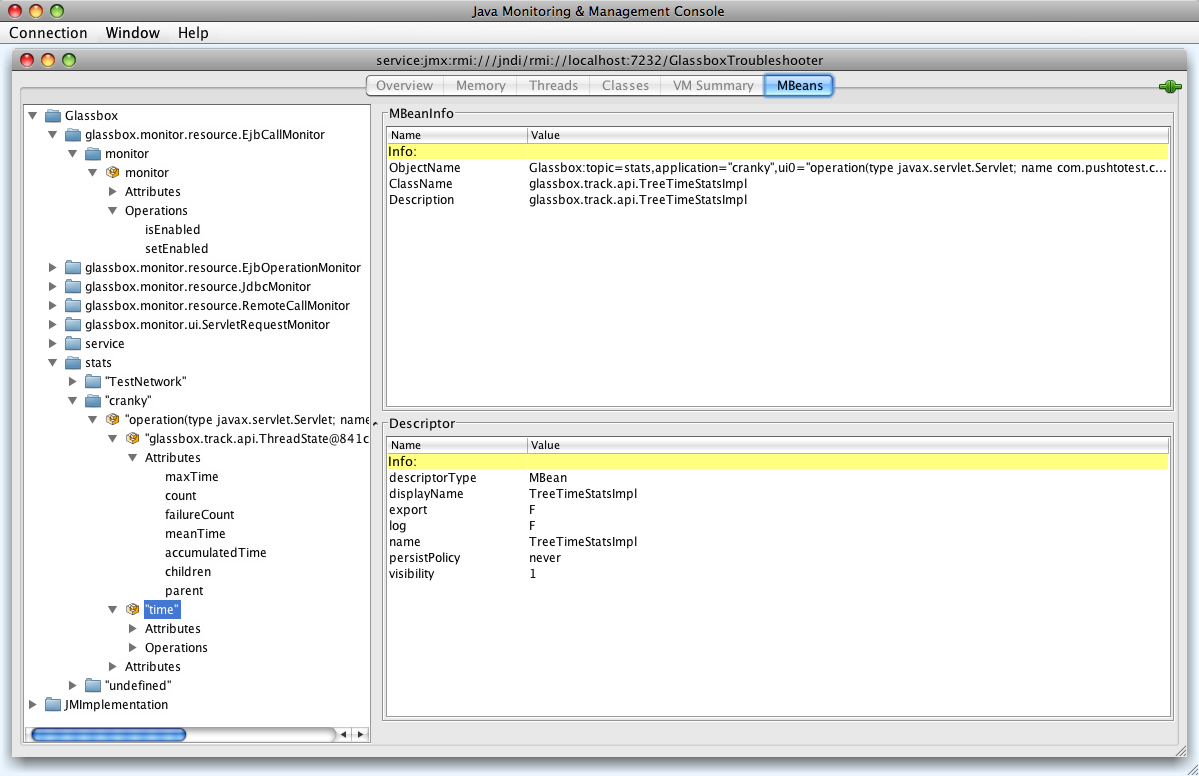
Glassbox provides a Java management (JMX) interface to the Troubleshooter's extended performance monitor data. Access this data through the [Java Management Console](http://challenge.openjdk.org/tools/svc/jconsole/index.html) (JConsole). JConsole comes with the [Java Development Kit](http://java.sun.com/javase/downloads/index.jsp) (JDK.) With the JDK installed run the JConsol in a shell or terminal window by typing the following:
jconsole service:jmx:rmi:///jndi/rmi://localhost:7232/GlassboxTroubleshooter
JConsole connects to the Glassbox Troubleshooter and displays a graphical interface shown in the following.
---
Last updated: June 02, 2023
If you have any feedback on this topic, please contact us at
# Glassbox Features and Benefits
- 100% FREE and Open Source.
- Glassbox is a web app, drop it in and point your browser to our UI
- Anyone can diagnose a problem with one click, without knowing the code
- Concise English output ends miscommunication and finger-pointing
- Measures SLA violations, so you know which problems matter
- Low overhead won't slow down production applications
- Plug and play. Up in minutes with no source or build changes needed.
- Adapts to your code automatically, no need to 'train the app'
- Monitor or Troubleshoot multiple agents simultaneously with the same client
- Release Candidate New and Improved:
- 9+ months of improvements from the Beta
- Improved installation, more platforms, improved automation
- More Monitors, Glassbox understands more frameworks and finds more issues
- Improved APIs for integration
- And last but not least... More tested and more bug fixes
- Pinpoints Faults Out of the Box:
- Slow database query
- Database connection failure
- Broken database query
- Failing Java
- Slow Java
- Bottleneck or thread contention
- Slow or Failing web service
- Inefficient Java code
- Slow or Failing remote procedure call
- Faulty HTTP
- Java Mail Issues
- Broken FTP
- Conclusive diagnoses, not piles of logs and reports
- Simple web-based list/detail UI paradigm
- Safe, only standards-based monitoring, no custom byte-code manipulation
- Technology Supported:
- Platforms: Windows/Linux/Solaris
- Java6 Versions: From Sun, BEA JRockit, and IBM
- Java5 Versions: Java 1.5 JVMs from Sun, BEA JRockit, and IBM
- Other Java Versions: 1.4.x JVMs from Sun, BEA JRockit, and IBM
- Databases: Oracle / MySQL / IBM DB2 / SQL Server
- Application Servers: Apache Tomcat, WebLogic, JBoss, Oracle OC4j, Websphere, Resin
- Please check back, or contact us on the forums about support for other platforms. We are actively adding support for other technology platforms.
- Robust, flexible, easily adaptable: uses standards-based AspectJ and JMX infrastructure
- No licensing and no rules about where you can or cannot run Glassbox 2.0
---
Last updated: April 14, 2023
If you have any feedback on this topic, please contact us at
# Legacy Glassbox Installation Reference
**Last reviewed:** September 25, 2026
This page is retained as a legacy reference for environments that still require Glassbox integration or installation notes.
## What changed in this article
- Marked Glassbox installation as legacy/environment-specific unless a current customer deployment still depends on it.
- Added validation steps around version compatibility, required access, and post-install evidence.
- Avoided presenting Glassbox installation as a default AIQ integration path.
## Validation workflow
1. Confirm the customer still uses Glassbox and identify the required version.
2. Validate prerequisites and access with the Glassbox owner before installation work.
3. After installation, run a small validation flow and capture evidence that AIQ and Glassbox data align.
**Review note:** Flagged the article as legacy to prevent it from being treated as standard integration guidance.
---
Last updated: September 25, 2026
If you have feedback on this topic, contact .
# Install Glassbox on an AIQ Test Node
## Recommended guidance
Install Glassbox on an AIQ Test Node only when the integration is approved for the target environment and the Test Node owner understands the performance, privacy, and monitoring impact. Coordinate installation with application, security, and observability teams.
## Before installation
- Confirm the Glassbox version, AIQ version, Test Node operating system, browser version, and application scope.
- Validate network access, certificates, proxy settings, and endpoint security policy.
- Confirm what data Glassbox captures and whether masking is required.
- Back up current Test Node configuration before making changes.
## Post-install validation
1. Restart only the required services or host components.
2. Run a small Scenario Editor smoke test.
3. Confirm Glassbox captures expected sessions without exposing sensitive data.
4. Monitor Test Node CPU, memory, browser stability, and execution time after installation.
*Last updated: October 6, 2026*
# Resources
Appvance and Glassbox make the following resources available:
[Glassbox Web Site](http://glassbox.sourceforge.net/glassbox/Home.html)
Glassbox User Guide (Adopt Acrobat PDF format)
---
Last updated: April 14, 2023
If you have any feedback on this topic, please contact us at