# How to stop the Sahi logging feature in Appvance IQ.
While I am running sahi/designer based vusers in Appvance IQ, sahi logs are taking up lot of disk space (sometimes 100 GB in 3 to 4 days).
How can we disable the traffic logs that are written to this folder?
/AIQ/sahi/userdata/logs/traffic
**Solution:**
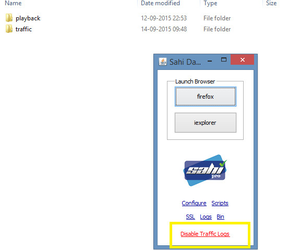
Kill all java process, Start sahi dashboard alone in the below given path.
Please try disabling the traffic logs by launching sahi dashboard(/AIQ/sahi/userdata/bin/start\_dashboard.bat).
Restart Appvance IQ.
---
Last updated: June 26, 2023
If you have any feedback on this topic, please contact us at