# Pagination - How to search items in a page with multiple paginations
If you want to search for a specificstring, "Testappvance15860" for example, and if is not found then it should click on the next page.
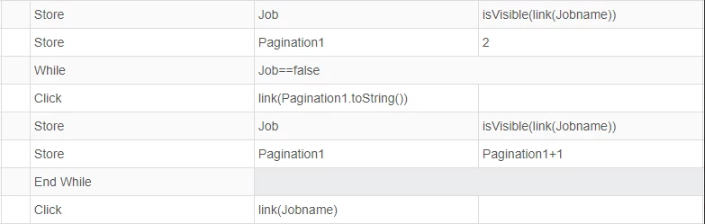
The code will search for the string in the page if the string is not found then it will click on the next pagination
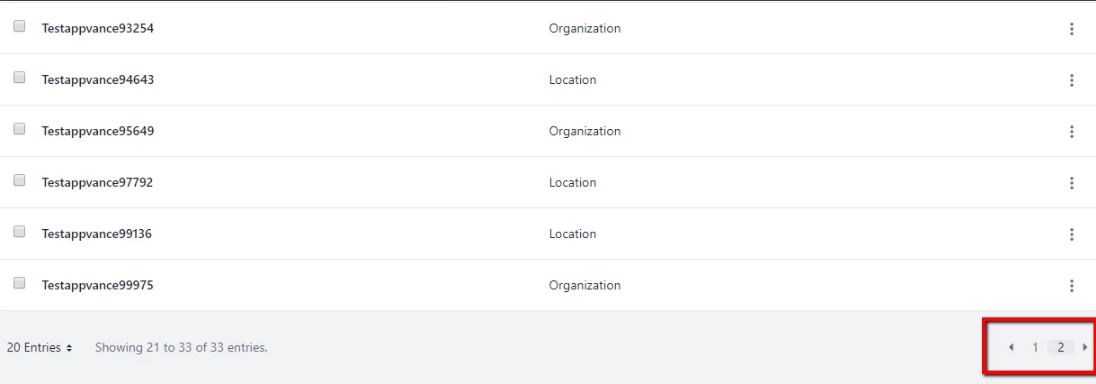
The Js Code is given below
```
var Job=isVisible(link(Jobname));var Pagination=2;log(Pagination.toString());while (Job==false){click(link(Pagination.toString()));var Job=isVisible(link(Jobname));var Pagination=Pagination+1;}click(link(Jobname));
```
---
## Pagination assumptions
Set `Jobname` to an accessor that is unique on the target page and initialize `Pagination` to the first page link used by the application. Add a termination condition when the site can exhaust its pages without finding the item; otherwise the loop can continue indefinitely. Validate the script against the application’s actual pagination labels and disabled-state behavior.
Last updated: October 15, 2026
If you have any feedback on this topic, please contact us at