
MySQL 8.x Database on AWS RDS (8.0 and 8.4)
Setting
This parameterguide groupcovers
Afterthe creatingdeployment aand MySQLtuning of the AIQ results database on Amazon RDS databasefor inMySQL. AmazonIt AWS,supports youboth needMySQL to8.4 (the current Long Term Support release) and MySQL 8.0, and it is the reference for parameters, instance sizing, schema installation and verification.
In short: create a newthe parameter group byfirst, navigatingthen tothe RDSinstance, >then Parameterload Groupsthe >schema. CreateMySQL 8.4 and 8.0 use identical AIQ parameter group
After group is created, select Edit Parameters. The following values should— be set:
Assignonly the new parameter group family name changes.
Supported versions
Which version to yourchoose:
- MySQL
database8.4.x — recommended for new installations. LTS, supported to April 2032. - MySQL 8.0.x — still supported by AIQ. Use it when you are migrating an existing 8.0 deployment.
- Do not use MySQL 8.1 — it contains changes AIQ does not support.
AfterCost creatingwarning on 8.0: from 1 August 2026, RDS instances still running MySQL 8.0 that AWS has moved past its standard support window transition into Amazon RDS Extended Support, which AWS bills as an additional charge. Plan the newmove to 8.4 instead of waiting.
Parameter group families are not interchangeable: mysql8.0 vs mysql8.4. A parameter group,group assigncreated itfor one family cannot be attached to an instance of the databaseother.
Quick andstart
- Provision the parameter group with family mysql8.4 (or mysql8.0).
- Instance: db.t3.large minimum, db.t3.xlarge or db.r6g.large recommended.
- Storage: gp3 SSD, 200 GB allocated, autoscaling enabled.
- Apply every parameter in this guide; reboot
it.onceThensoconnecttheytotakethe MySQL database using the admin credentials and executeeffect. - Run MySQLInitial.sql and then MySQLAppvance.sql.
- Verify the versions and parameters with the queries in Verify the installation.
Instance and storage sizing
Sizing is driven by three buffers that must fit in RAM at the same time: the MyISAM key buffer (2 GB), the temp-table allowance (2 GB) and the InnoDB buffer pool (30 % of instance memory). The working set of a production results database is roughly 1.3 GB, so the constraint is concurrency, not data volume.
| Tier | Instance | What it is configured for | Suitable for |
|---|---|---|---|
| Minimum | db.t3.large (2 vCPU, 8 GB) | 2 GB key buffer + 2 GB temp + 2 GB InnoDB ≈ 6 GB used | Development and small test environments |
| Recommended | db.t3.xlarge (4 vCPU, 16 GB) or db.r6g.large (2 vCPU, 16 GB, memory optimised) | 2 GB key buffer + 2 GB temp + 4 GB InnoDB + OS ≈ 10 GB used | Standard production deployments |
| Heavy load | db.r6g.xlarge (4 vCPU, 32 GB) | Allows several getSummary report generations at the same time | High-traffic production, many concurrent report users |
Storage. A populated results database is about 24 GB including the BLOBs that hold screenshots and attachments.
- gp3 SSD — recommended. 3,000 IOPS baseline, good balance of performance and cost for a mixed workload.
- io1 / io2 (provisioned IOPS) — use it only above roughly 50 concurrent report requests, where you need predictable latency.
- Minimum 100 GB allocated to leave room for growth; 200–500 GB is the practical range.
Create the parameter group
The parameter group must exist before the instance, so it can be selected during creation. Loading the schema before the parameters are in place fails with ERROR 1419 (see Troubleshooting).
- In the AWS console go to RDS → Parameter groups.
- Click Create parameter group.
- Set the family and name:
- MySQL 8.4: family mysql8.4, group name aiq-myisam-mysql84-optimized
- MySQL 8.0: family mysql8.0, group name aiq-myisam-mysql80-optimized
- Edit the parameters and apply every value in the tables below, then click Save changes.
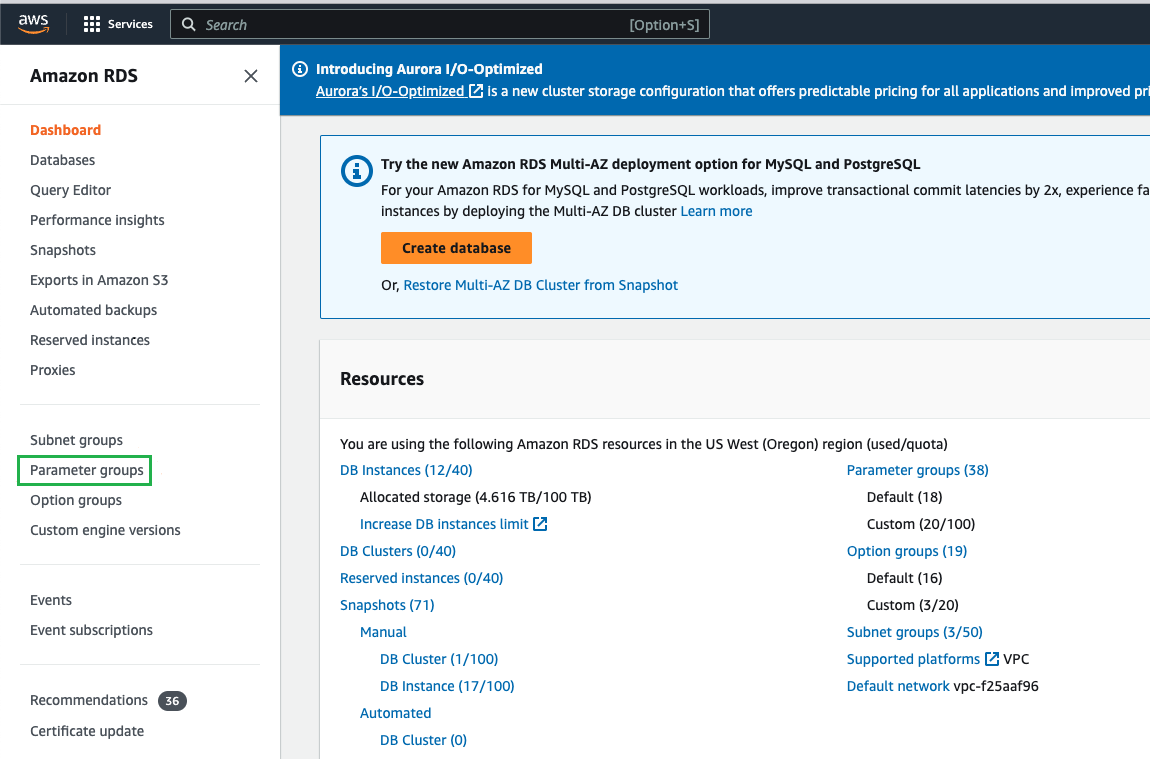
Parameter groups in the RDS console
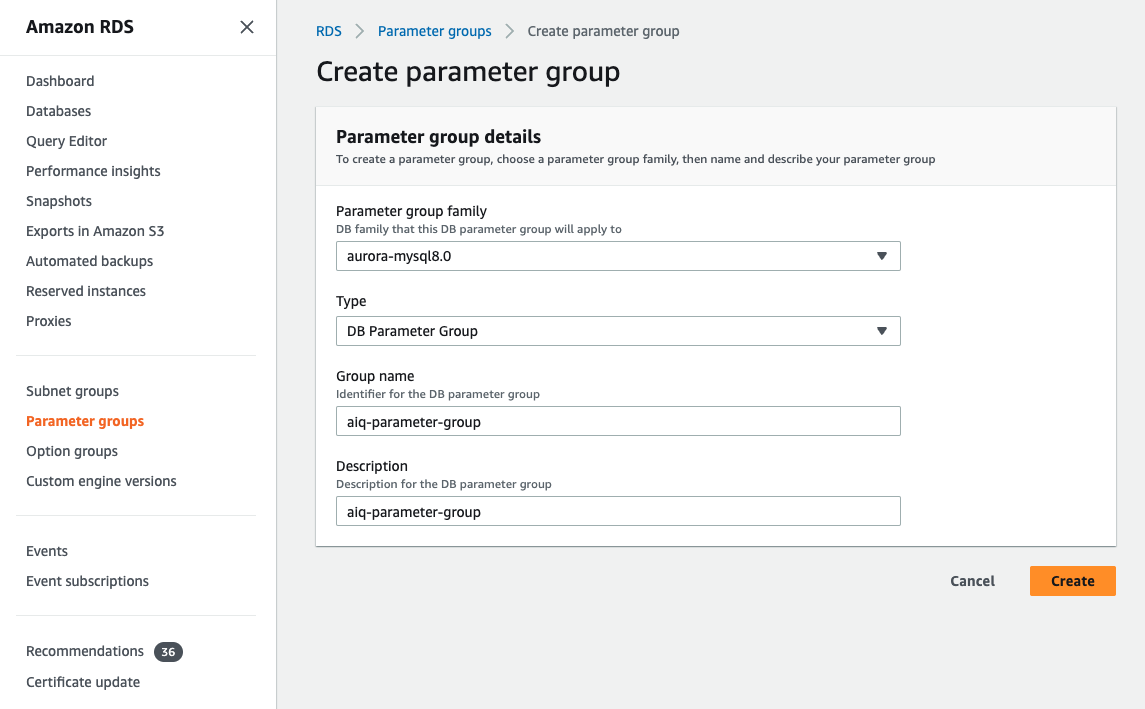
Creating the parameter group
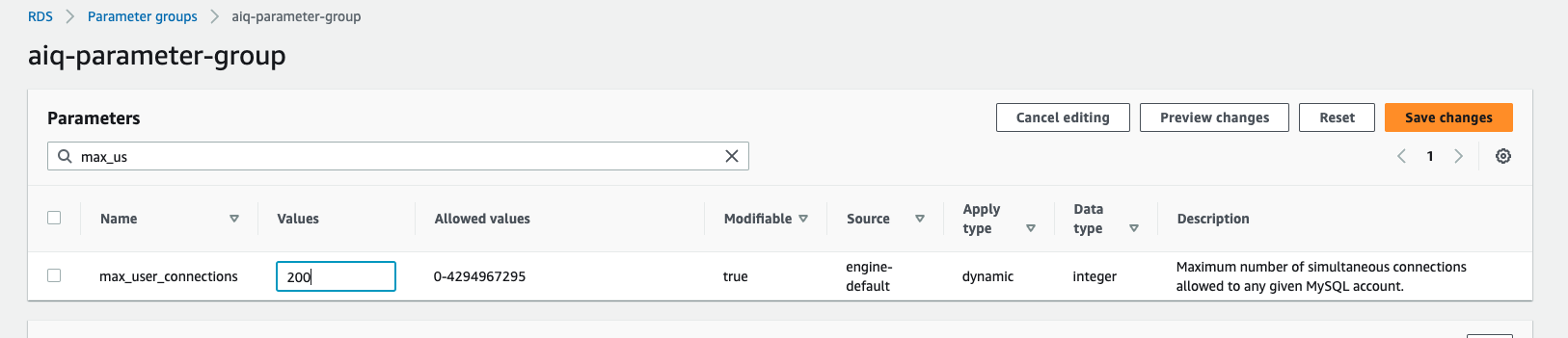
Editing the parameter values
Critical parameters
Reading these tables: values marked formula are RDS expressions that scale with the instance class — enter them exactly as written, AWS evaluates them.
MyISAM index and sort buffers. AIQ keeps its report tables on MyISAM, so the key buffer is what keeps report queries off the disk. Production indexes total roughly 757 MB, hence the 2 GB allowance.
| Parameter | Value | Purpose |
|---|---|---|
| key_buffer_size | 2147483648 | 2 GB — caches MyISAM indexes |
| myisam_use_mmap | 1 | Memory-maps the .MYD data files |
| myisam_sort_buffer_size | 268435456 | 256 MB for bulk inserts and table repairs |
| myisam_max_sort_file_size | 2147483648 | 2 GB maximum sort file |
Temp tables — the single biggest lever on getSummary. Report generation builds large temporary tables; if these two values are smaller than the queries need, MySQL writes them to disk and report time collapses.
| Parameter | Value | Purpose |
|---|---|---|
| tmp_table_size | 2147483648 | 2 GB — keeps temp tables in memory |
| max_heap_table_size | 2147483648 | 2 GB — must match tmp_table_size |
InnoDB. Sized as a share of instance memory so it scales with the class instead of being re-tuned per instance.
| Parameter | Value | Purpose |
|---|---|---|
| innodb_buffer_pool_size | {DBInstanceClassMemory*3/10} | 30 % of RAM |
| innodb_log_buffer_size | {DBInstanceClassMemory/100} | 1 % of RAM |
| innodb_flush_log_at_trx_commit | 2 | Faster commits — small durability trade-off |
| innodb_io_capacity | 2000 | Suited to SSD storage |
| innodb_io_capacity_max | 4000 | Burst I/O ceiling |
Connection and performance parameters
| Parameter | Value | Purpose |
|---|---|---|
| max_connections | {DBInstanceClassMemory/12582880} | Roughly 100 connections per GB of RAM |
| max_user_connections | 200 | Per-user ceiling |
| wait_timeout | 1080 | See the note below |
| interactive_timeout | 1080 | Must match wait_timeout |
| connect_timeout | 10 | Handshake timeout |
| max_allowed_packet | 1073741824 | 1 GB — large JSON results and BLOB writes |
| bulk_insert_buffer_size | 536870912 | 512 MB for massive transactional load |
| read_buffer_size | 2097152 | 2 MB per sequential MyISAM scan |
| read_rnd_buffer_size | 2097152 | 2 MB for sorted reads |
| sort_buffer_size | 8388608 | 8 MB per sorting thread |
| join_buffer_size | 4194304 | 4 MB per join without an index |
wait_timeout — do not leave the default. RDS defaults to 28800 seconds (8 hours). The MySQL 8 kernel lets idle sessions stay open for a long time, so with the default a busy controller piles up sleeping connections until the instance runs out of them (AIQ-6619). 1080 seconds is the AIQ value. Raise it only if you genuinely have sessions that must survive long idle gaps.
Caching
| Parameter | Value | Purpose |
|---|---|---|
| table_open_cache | 4000 | Number of table descriptors kept open |
| table_definition_cache | 2000 | Number of table definitions cached |
| thread_cache_size | 100 | Threads kept for reuse |
Stored procedures
| Parameter | Value | Purpose |
|---|---|---|
| log_bin_trust_function_creators | 1 | Required — without it the schema scripts cannot create the stored procedures. Reboot after changing it. |
Optional: password policy and slow query log
| Parameter | Value | Purpose |
|---|---|---|
| validate_password | OFF | Leave ON if your security policy requires it — then set every password to match the policy |
| slow_query_log | 1 | Enables slow query logging |
| long_query_time | 5 | Logs anything slower than 5 seconds |
Query cache does not exist in MySQL 8. query_cache_size and query_cache_type were removed in 8.0 and cannot be set in an RDS parameter group. If you are carrying values over from a 5.7 parameter group, drop them.
Create the RDS instance
- On the console home page, select the region where the AIQ controller runs. Instance and database must be in the same region.
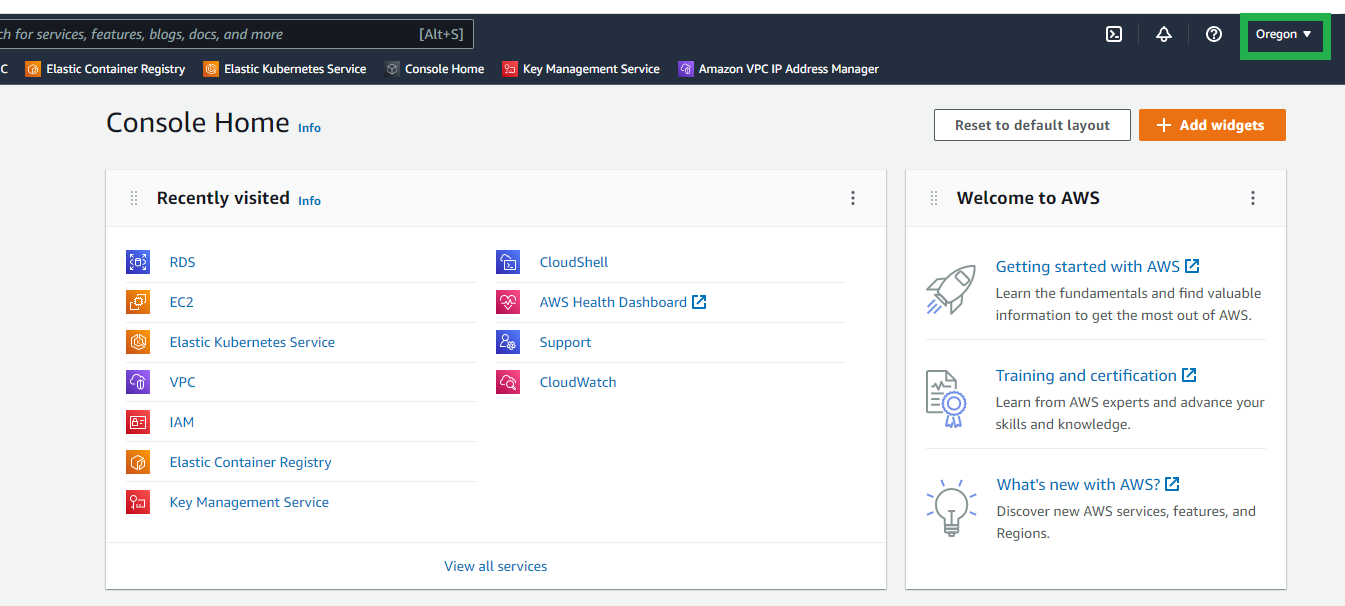
Select the AWS region
- Open RDS and click Create database.
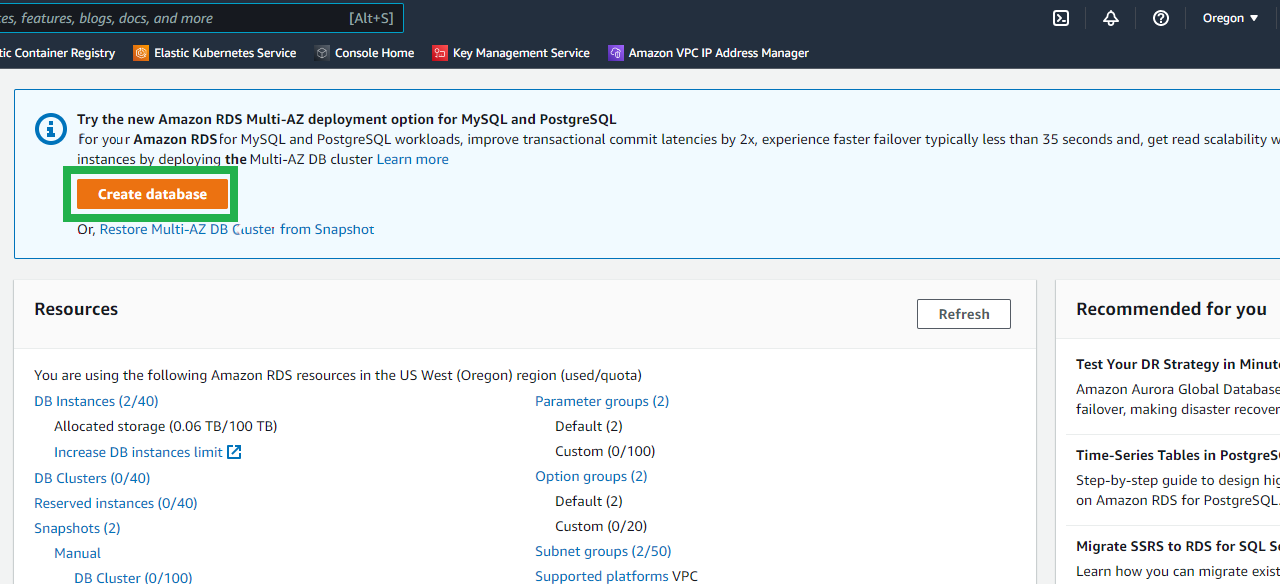
Creating a database
- Standard create → engine MySQL.
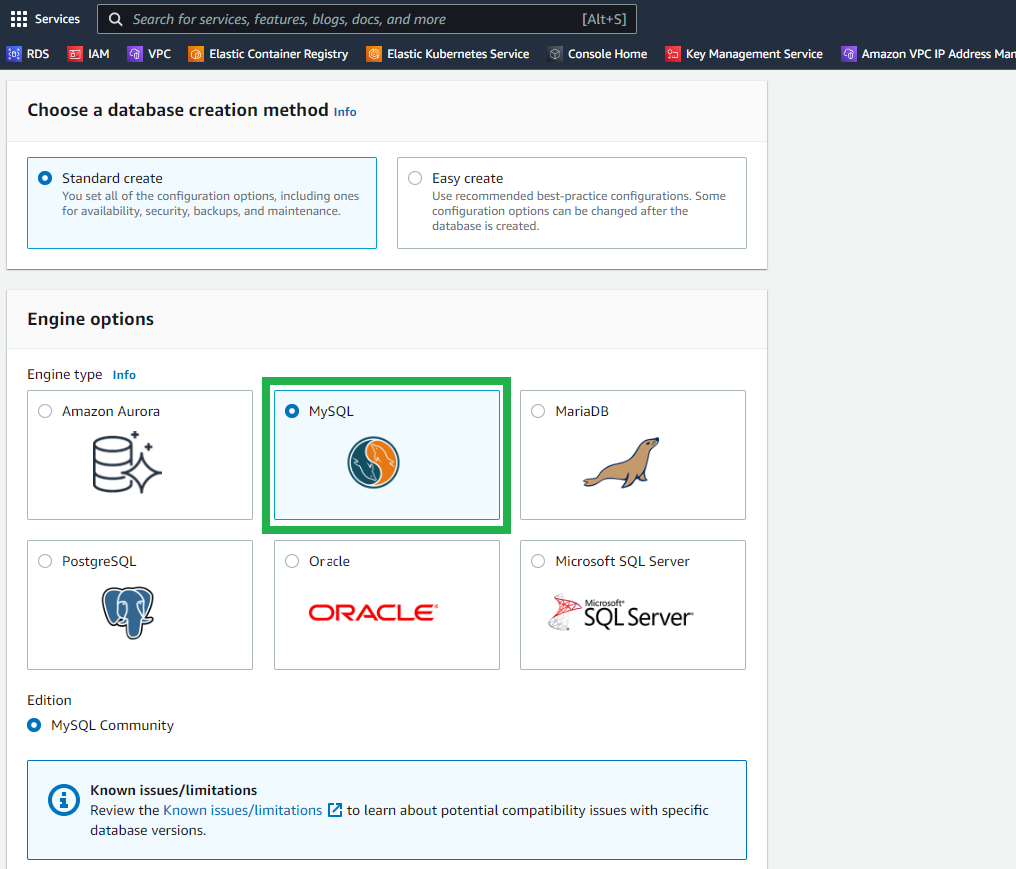
Standard create and engine selection
- Version: MySQL 8.4.x (recommended) or 8.0.x. Templates: Production. Deployment: Single DB instance.
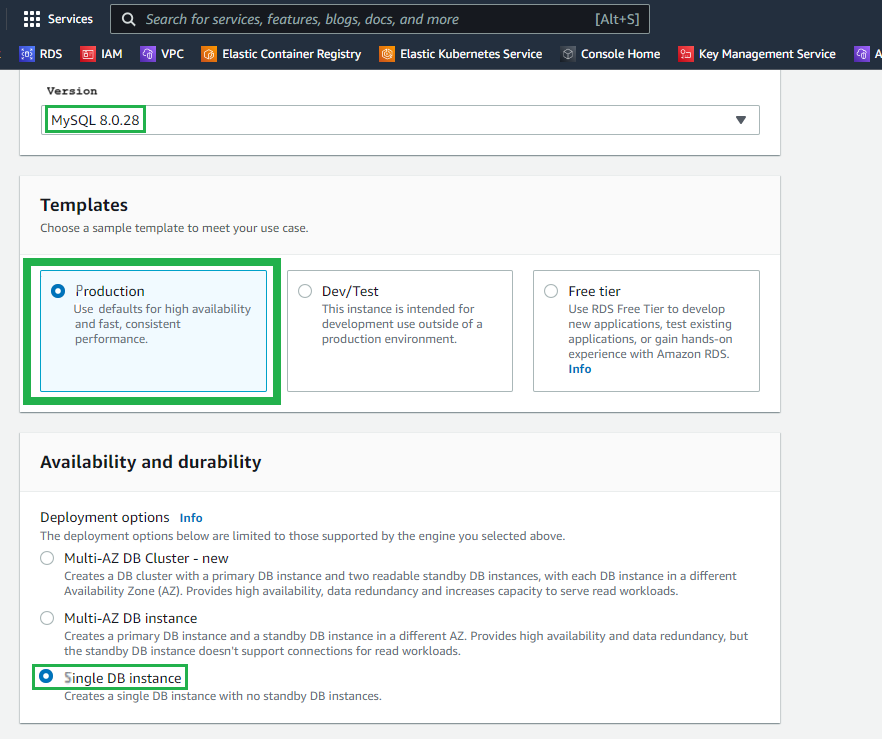
Version, template and deployment
- DB instance identifier (for example aiq-mysql-prod), master username and a strong master password.
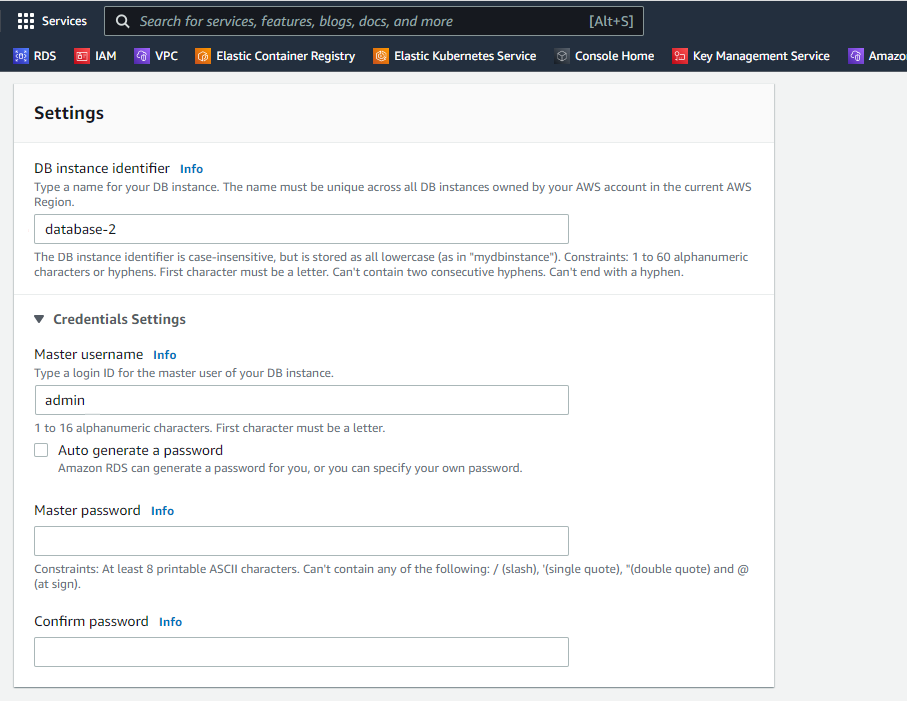
Instance identifier and credentials
- Instance class and storage: gp3, 200 GB, storage autoscaling enabled (maximum 500 GB).
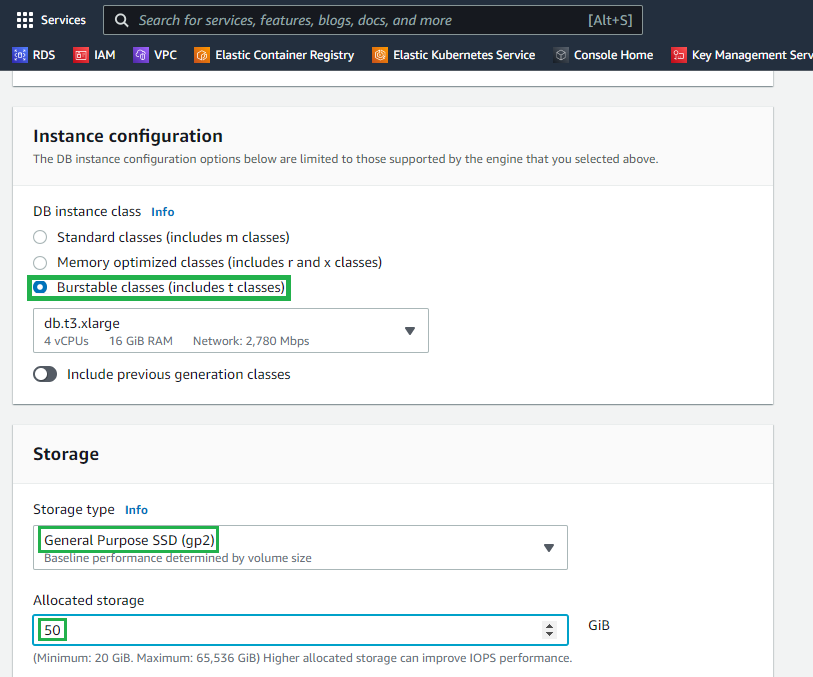
Instance class and storage
- Connectivity: your VPC, public access: No, database port 3306.
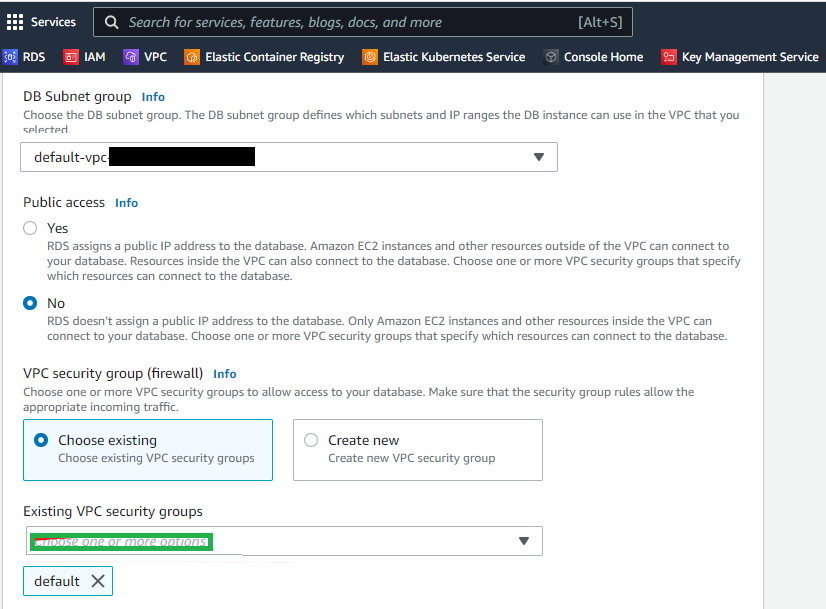
Subnet group, public access and security group
- Authentication: password authentication.
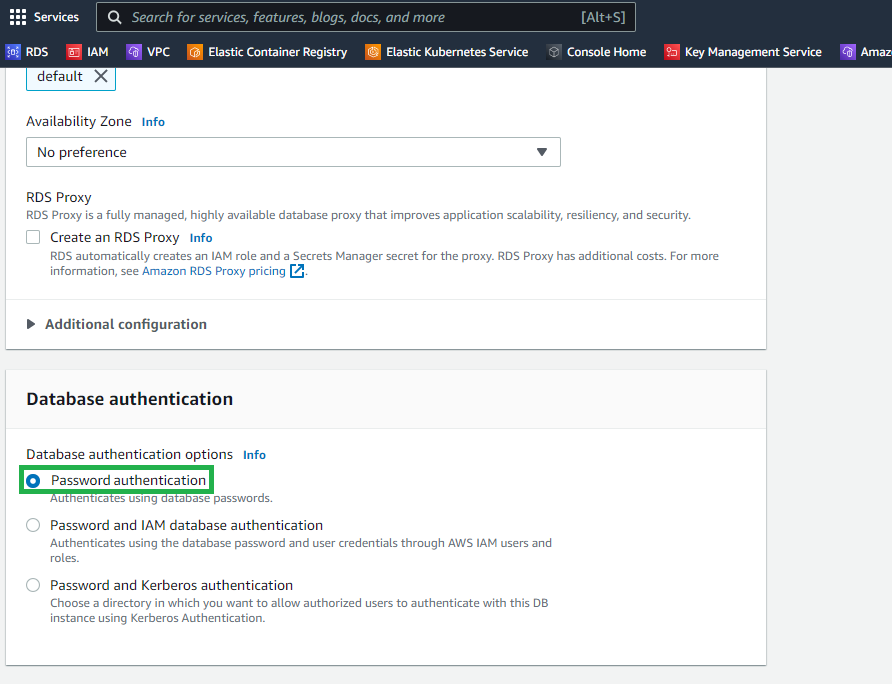
Database authentication
- Additional configuration: initial database name aiq, parameter group created above, backup retention 7 days (or per your compliance requirements), encryption enabled, enhanced monitoring at 60-second granularity.
- Review and click Create database. It takes 10–15 minutes to become available.
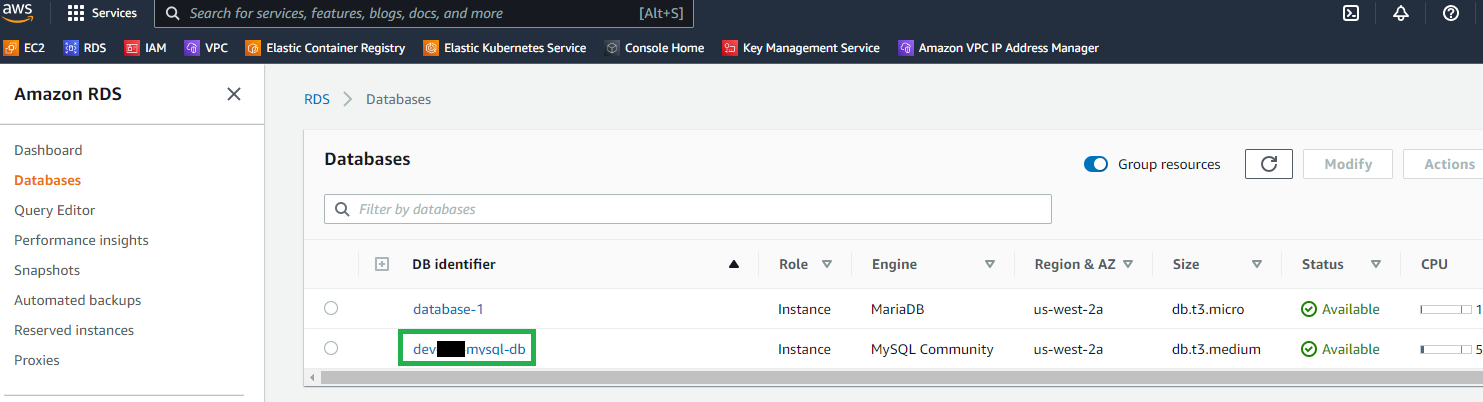
Databases list after creation
- Open the instance and copy the endpoint and port from the Connectivity & security tab — you need them for the schema step.
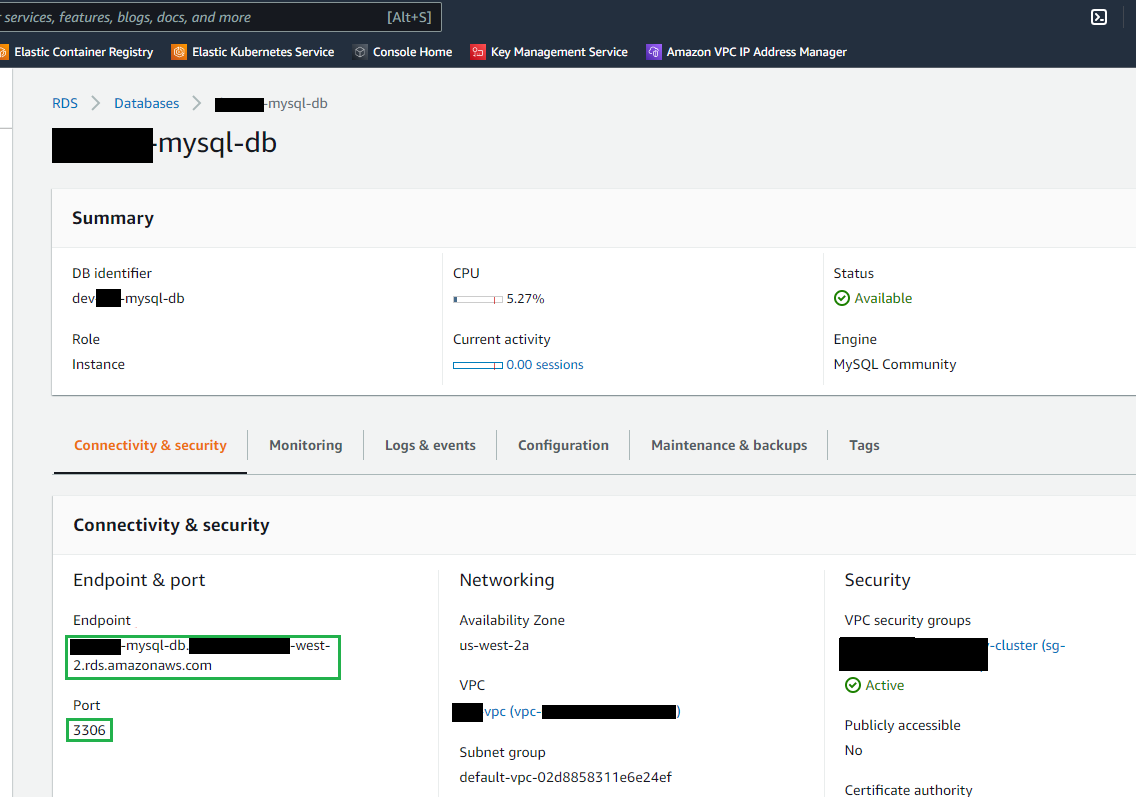
Endpoint and port
Open the security group
In EC2 → Security groups, select the RDS security group and add an inbound rule: type MySQL/Aurora, protocol TCP, port 3306, source = the AIQ controller security group (preferred) or its fixed IP address. Do not open 3306 to the internet.
Install the AIQ schema
Connect with the master user from a host that can reach the instance:
mysql -h <rds-endpoint> -P 3306 -u admin -p
Then run the two schema scripts in this order. The first creates the schema and the aiq database user; the second creates the AIQ tables and stored procedures.
SOURCE /path/to/MySQLInitial.sql;
SOURCE /path/to/MySQLAppvance.sql;
The scripts are compatible with both 8.0.x and 8.4.x — no modification is required. No error should beappear visibleduring execution; if one does, stop and read it before continuing. If you do not have the scripts, request them from your Appvance account team.
ERROR 1419 — SUPER privilege. If MySQLAppvance.sql fails with “You do not have the SUPER privilege and binary logging is enabled”, the parameter group is missing log_bin_trust_function_creators = 1. Set it and reboot the instance — parameter changes of this type do not take effect until the reboot completes.
Verify the installation
SELECT VERSION();
SHOW VARIABLES LIKE 'character_set%';
SHOW VARIABLES LIKE 'collation%';
SHOW TABLES;
SHOW PROCEDURE STATUS WHERE Db = 'aiq';
SHOW VARIABLES WHERE Variable_name IN (
'key_buffer_size', 'tmp_table_size', 'max_heap_table_size',
'innodb_buffer_pool_size', 'max_allowed_packet',
'log_bin_trust_function_creators');
The second query must come back with key_buffer_size = 2147483648, tmp_table_size and max_heap_table_size at 2147483648, max_allowed_packet = 1073741824 and log_bin_trust_function_creators = ON. innodb_buffer_pool_size should read approximately 30 % of the instance memory in the execution.bytes. If anany errorvalue happens, reviewdiffers, the errorparameter message.group is not the one attached to this instance, or the instance has not been rebooted since the change.
Monitoring and maintenance
Three ratios tell you whether the tuning is holding:
SHOW STATUS LIKE 'Key%'; -- Key_reads / Key_read_requests < 0.01
SHOW STATUS LIKE 'Created_tmp%'; -- disk / created < 0.05
SHOW STATUS LIKE 'Threads%';
SHOW STATUS LIKE 'Max_used_connections';
Set CloudWatch alarms on Error Code: 1419.CPUUtilization above 80 % for 5 minutes, FreeableMemory below 1 GB, DatabaseConnections above 400, and ReadLatency / WriteLatency above 100 ms.
Monthly, optimise the four MyISAM report tables so their index statistics and data files stay compact, and keep an eye on growth:
OPTIMIZE TABLE summaryattribute;
OPTIMIZE TABLE resultontime;
OPTIMIZE TABLE summarystatsontime;
OPTIMIZE TABLE defaultpercentil;
SELECT TABLE_NAME,
ROUND(data_length/1024/1024, 2) AS data_mb,
ROUND(index_length/1024/1024, 2) AS index_mb,
ROUND((data_length + index_length)/1024/1024, 2) AS total_mb
FROM information_schema.TABLES
WHERE TABLE_SCHEMA = 'aiq'
ORDER BY (data_length + index_length) DESC
LIMIT 20;
Troubleshooting
| Symptom | Cause | Fix |
|---|---|---|
Got a packet bigger than ‘max_allowed_packet’ bytes | max_allowed_packet left at a low default | Set it to 1073741824, reboot the instance, confirm with SHOW VARIABLES LIKE ‘max_allowed_packet’ |
| getSummary reports are slow; temp tables spill to disk | tmp_table_size / max_heap_table_size too small for the report set | Set both to 2147483648. Check Created_tmp_disk_tables / Created_tmp_tables — it should stay under 5 % |
| You do not have the SUPER privilege and binary logging is enabled | log_bin_trust_function_creators
| Set it to 1 and reboot |
| Key_reads / Key_read_requests above 1 % | The key buffer is smaller than the index set | Raise key_buffer_size until it covers the index total reported by SHOW TABLE STATUS |
| Connections pile up until the instance refuses new ones | wait_timeout left at the 8-hour default | Set wait_timeout and interactive_timeout to 1080 ( |
MySQL 8.0 compared with 8.4
| MySQL 8.0 | MySQL 8.4 | |
|---|---|---|
| Release type | Standard release | Long Term Support |
| Support lifecycle | Ends April 2026 | Ends April 2032 |
| Recommended for | Existing | All |
| Parameter group family | mysql8.0 | mysql8.4 |
| AIQ parameter values | Identical | Identical |
| MySQLInitial.sql / MySQLAppvance.sql | Compatible | Compatible |
| Production ready | Yes | Yes |
Where the performance comes from
| Setting | Impact | Priority |
|---|---|---|
| key_buffer_size = 2 GB | 50–100× faster MyISAM index lookups | Critical |
| tmp_table_size = 2 GB | 10–20× faster report temp operations | Critical |
| max_heap_table_size = 2 GB | Must match tmp_table_size or the larger value is ignored | Critical |
| innodb_buffer_pool_size = 30 % | General database | High |
| max_allowed_packet | Prevents | High |
Last updated November 2026. Versions covered: MySQL 8.0.x and 8.4.x on Amazon RDS. Maintained by AIQ DevOps. For deployment on a local Windows server instead, see Installing and Configuring MySQL 8 Database (Windows).