
Use getCssValue in Scenario Editor Scripts
Use getCssValue in Scenario Editor Scripts
IsUse usedgetCssValue toonly retrievewhen validating a CSS property is part of the csstest propertyobjective. valueFor most functional tests, validate visible behavior or business output instead of animplementation-level elementstyles.
Example:
Recommended getCssValue(link('Mac'),"color")use
In
- Confirm a required state is represented by a CSS property, such as disabled, highlighted, hidden, or color-coded status.
- Validate style behavior only after the
abovepageexample,has reached a stable state. - Keep expected values maintainable and avoid checking browser-specific formatting unless necessary.
Maintenance notes
- Prefer stable locators for the
LinkelementMacbeingelement,inspected. - Use conditional waits before reading style values.
- Document why the
colorCSS propertyshall be retrieved. Thisisusually stored in a variable to be used in further scripting.business-relevant.
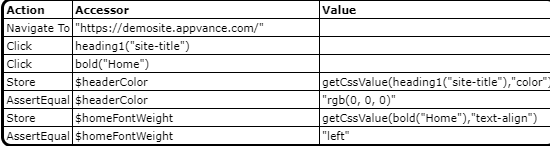
Javascript example
navigateTo("http://myplaceforparts.com/web/alliance/home ");click(heading1("site-title")); click(bold("Home")); var $headerColor=getCssValue(heading1("site-title"),"color"); assertEqual($headerColor,"rgb(0, 0, 0)"); var $homeFontWeight=getCssValue(bold("Home"),"text-align"); assertEqual($homeFontWeight,"left");Last updated: JuneSeptember 26,18, 20232026
If you have any feedback on this topic, please contact us at documentation@appvance.ai