
getCssValue
Is used to retrieve the css property value of an element
Example: getCssValue(link('Mac'),"color")
In the above example, for the Link Mac element, the color property shall be retrieved. This is usually stored in a variable to be used in further scripting.
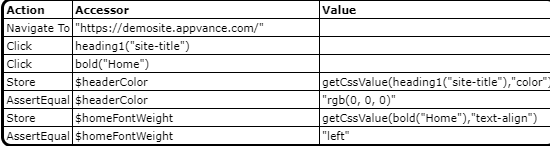
Javascript example
navigateTo("http://myplaceforparts.com/web/alliance/home ");click(heading1("site-title")); click(bold("Home")); var $headerColor=getCssValue(heading1("site-title"),"color"); assertEqual($headerColor,"rgb(0, 0, 0)"); var $homeFontWeight=getCssValue(bold("Home"),"text-align"); assertEqual($homeFontWeight,"left");Last updated: June 26, 2023
If you have any feedback on this topic, please contact us at documentation@appvance.ai