
Run JMeter Scripts as Performance Tests in AIQ
AppvanceLast IQreviewed: September 25, 2026
Use this article when a JMeter script is aexecuted systemin AIQ to generate load and measure performance behavior.
What changed in this article
- Clarified that
supportsperformancerunningrunsJMeterrequirescripts.workloadHeremodel,areramp-up,theduration,stepsandthatresultweinterpretation. - Added
needreminders tofollowvalidatetotestrundata,thetargetJMeterenvironmentscripts from Appvance IQ. Navigate to the Appvance IQ Home screencapacity, andclickmonitoringScenariobeforeEditorloadundergeneration.- Separated
Build.
Validation workflow
ClickConfirmTesttheManagementworkloadtab.
Review 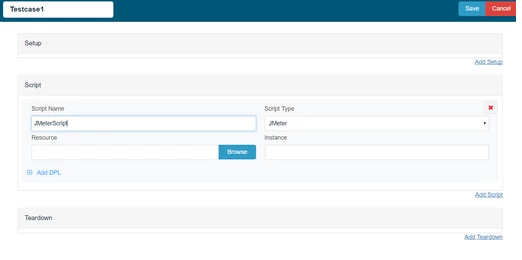
9.this Clickpage Browseon andload/performance Browseconcerns theinstead respectiveof generic JMeter Script and save the test case.playback.
10. Enter 100 in User box. Click Set (Run Time):
11. Ramp up 10 users every 10 second Maximum ramp up time 100 second and save Run Time option.
12. Click Locations tab.
13. Enter Name: localhost and URL: http://localhost:8080/TMServer/ws/TestNode
15. Also make sure the resources are added with Name, Type and the correct path of the jmx file.
17. Click check box Custom Database Credentials (Database Logging) and use the following settings:
Database Type: MySQLDriver: com.mysql.jdbc.DriverURL: jdbc:mysql://localhost:3306/utp?useSSL=falseDefault Schema: utpUsername: utpPassword: utp
18. Click File >Save to save new scenario.
19. Click Play Scenario from the top navigation bar.
20. Controller window will open in a new tab which displays the tests running and will display the pass/fail status of the tests upon the test completion.
21. Left part shows the steps and the duration in milliseconds and right side shows the test run status under Output tab.
22. On The transactions tab we can find the request/response and an error tab to drill down further.
23. Click Click here link to get to the list of Reports that Appvance IQ supports.
Last updated: JulySeptember 28,25, 20232026
If you have any feedback on this topic, please contact us at documentation@appvance.ai.