
Windows AIQ Driver Setup
Windows AppvanceAIQ Driver (WAD)Setup
Use asthis page when preparing a substituteWindows formachine to run AIQ browser, desktop, or device-related automation that depends on local drivers. Match driver versions to the target browser, operating system, and AIQ environment.
Preparation
- Install drivers with an account that has the required Windows
Apppermissions. - Confirm
Driverthe driver version matches the browser or application version used by the test. - Store drivers in
orderatocontrolledavoidpathwellandknowdocumentissuesthatreportedpath in theWinAppDriver.environmentThe WAD is in charge of processing all Desktop Designer actions & recording Windows sessions.Installation PrerequisitesOpen PortsMake sure to open any port you want to use with the Windows Appvance Driver so AIQ ca access it. By default the WAD uses port 4724.OpenWindows Firewall with Advanced Security.
You can also run the following command when run in an admin command prompt: netsh advfirewall firewall add rule name="WinAppDriver remote" dir=in action=allow protocol=TCP localport=4723
Install Chocolatey
Installing Chocolatey is required to install ffmpeg.
You can also install it by running PowerShell as Administrator and running the following command: Set-ExecutionPolicy Bypass -Scope Process -Force; [System.Net.ServicePointManager]::SecurityProtocol = [System.Net.ServicePointManager]::SecurityProtocol -bor 3072; iex ((New-Object System.Net.WebClient).DownloadString('https://community.chocolatey.org/install.ps1'))
Restart PowerShell. Be sure to run it as Administrator again.
Install ffmpeg
ffmpeg is a cross-platform solution that allows you to record, convert and stream audio and video.
Install ffmpeg plugin by running the following command: choco install ffmpeg
Installation Process
Download the installer. Note where the file is saved.
Download Link
Open a Command Prompt as Administrator.
Navigate to the folder where you downloaded the WindowsAppvanceDriver.
Run the executable by running the following command: WindowsAppvanceDriver.exe
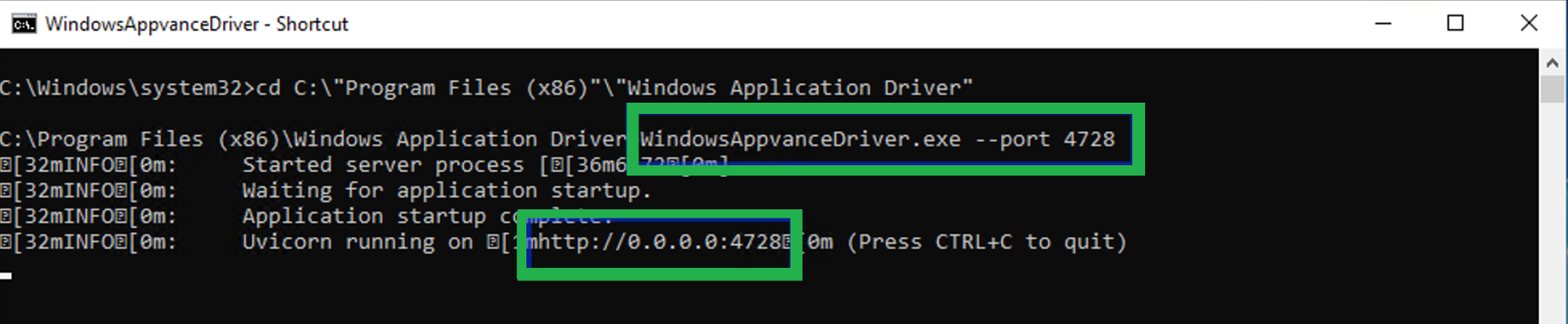
Wait until the driver isthrough started.endpoint Youprotection shouldonly seewhen something like this:

Important Considerations
WADapproved by default uses port 4724. You should use this port in the config file for videoPort and in the server URL fields.
You can change the port by adding the --port parameter when executing WAD. You should use the specified port in the config file for videoPort and in the server URL fields.
WindowsAppvanceDriver.exe --4728
Troubleshooting
If you get the following error:
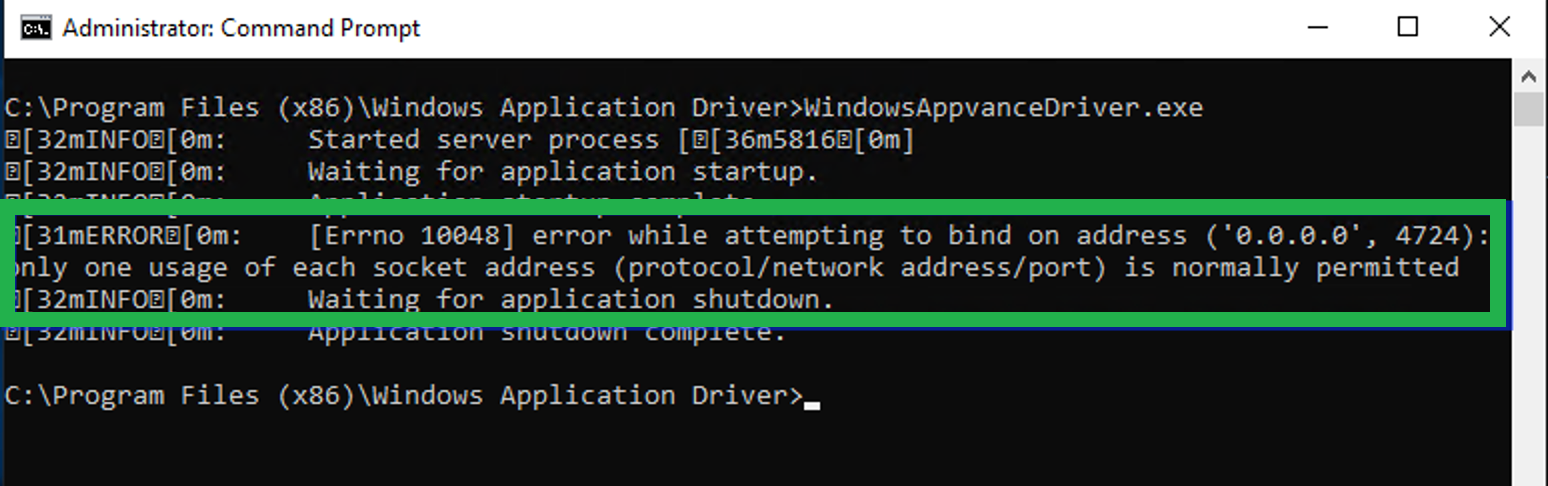
Make sure no other applications are using either the default port (4724)IT or the portcustomer yousecurity specifiedpolicy.
--portdriver installation requires it.
Validation workflow
- Run a basic AIQ smoke test that starts the target browser or desktop application.
- Confirm the driver process starts and stops cleanly.
- Review output logs for path, permission, or version mismatch errors.
- Record the driver version and installation path for future upgrades.
Last updated: SeptemberOctober 24,8, 20242026
If you have any feedback on this topic, please contact us at documentation@appvance.ai