Work with HAR Scripts in AIQ

InLast reviewed: September 29, 2026

Use this lessonarticle youwhen willHAR learnnetwork howcaptures toare useconverted, replayed, or validated as part of AIQ testing.

What changed in this article

  • Clarified that HAR scripts toare loadnetwork-capture testartifacts and not a web application.

    About HAR

    HAR, which standssubstitute for HTTPfunctional Archiveassertions.

  • Added Format,checks isfor anrequest archiveordering, filedynamic derivedtokens, throughcookies, interactionsheaders, withinpayload a web browser. The file contains protocol-level GETmasking, and POSTenvironment-specific requestURLs.
  • Connected logging,HAR asusage wellto asvalidation/storage performance informationworkflows and websecurity pagereview loadbefore times.sharing.

WhyValidation workflow

  1. Review the HAR for

    HARsensitive filesheaders, cookies, tokens, and customer data before reuse.

  2. Validate that dynamic values are quickparameterized and simple to produce. When used with Appvance IQ, HAR files provide detailed performance data and load testing capabilities.

    How to Generate HAR File

    1. Open Appvance IQ in your favourite Browser
    Click Global Options. Click HTTP Proxy. Enter the Mark Step Name. Enter the Port number 9095 in the Text Box.(HTTP Proxy Port) Click Mark Step. Click Start Proxy. Open the Firefox browser, click Options → Advanced → Network → Settings Click Radio Button Manual proxy Configuration, Provide HTTP Proxy as "localhost" (If you are using client installer you need to provide domain name EX: ec2.xxxx.aws.com) and provide the same HTTP Proxy port and Click Ok. Provide some website in Firefox browser which you are going to record as HAR file. Verify in chrome browser all the requests are getting captured of that application. Click Download HAR Log. Click Stop Proxy.

    HAR Exercise

      Open Appvance IQ. Click Build. Select File > New.

      The Scenario Test Type is Load Test in Info tab.

      Select Test Management.

        Iteration1's Completion Type is specified as Executions Per User, with a Max execution time of two minutes.

        Select Test Cases.

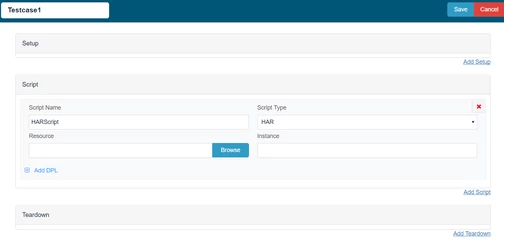
          From theTest Casestab, clickAdd a Test Case Execution
           
          Enter a name for the test case in theTest Case Namebox
           
          Enter a name for the script in theScript Namebox
           
          Click theScript Typebox and selectHAR

          5. ClickBrowse(to the right of the Resource box)
          The Open window appears

          Iteration1 contains one Test Case, Spree HAR, where the number of Users and Executions to run are specified.

            Click Edit Test Case (pencil icon).

            The Script Type is set to HAR, and the test case Resource points to the spreeHAR.har file located in the HAR_example directory.

              Click Cancel. Select Resources.

              All resources related to the Scenario are summarized, including the test case specified in Test Cases.

                Click Play Scenario to execute the scenario. The Scenario loads in a new browser tab. As the scenario executes, metrics pertaining to the execution display in Live Reports Once the execution completes, indicating a status of Execution Done, select Output and the Click here (within the Output details). Select Resource Correlation and/or Resourceregenerated Usage.during playback.

                Additional reports listed reveal more information about the scenario executed.

                How to convert DS file to HAR:

                  Open Appvance IQ. Navigate to DS record page. Open the DS file in Designer. Click Http History. Select Start Recording from Action Drop down. Navigate to Designer page. Run the DesignerHAR-based script. Once it is completed, navigate to DS3 HTTP Historyflow and clickcompare Exportnetwork responses with the expected application behavior.

                  Review note: The page now treats HAR as HARa fromnetwork-evidence Fileartifact dropwith down.

                  security Itand savesdynamic-data as ZIP file Unzip the file to get the HAR file.


                  constraints.


                  Last updated: AugustSeptember 03,29, 20232026

                  If you have any feedback on this topic, please contact us at documentation@appvance.ai.