
Working with TestNG scripts
UseIn this articlelesson, whenyou will learn how to use TestNG scripts to load test a web application.
About TestNG
TestNG is a testing framework used most often in Unit Testing. For more information about TestNG, visit >http://testng.org/.
TestNG Exercise
Select Test Management.
The scenario test cases are specified to repeat 1 time.
Select Test Cases.
Enter a name for the test case in theTest Case Namebox.
Enter a name for the script
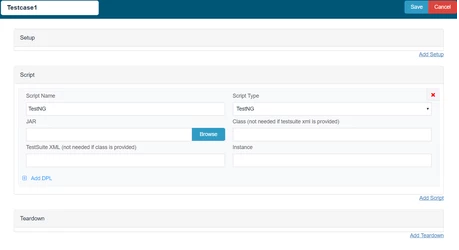
5. Click Browse(to the right of the Resource box)
The Open window appears
The Script Type is set to be prepared, packaged,TestNG, and executed from AIQ.
Validation workflow
BuildtheTestNGtestprojectcaseand confirm testng.xmlResource points to theintendedJARclassesfileandlocatedparameters.Package dependencies soin theAIQrespective TestNG directory.
A class from within the jar file (packagename.classname) is specified.
As the test is data enabled, a data connection, described later in this exercise in more detail, is specified, as well as how to use the data (Get Next Row of Data).- Click Cancel.
All resources related to the Scenario are summarized, including the test case specified in Test Cases. Most notably, the Data Sources contains a connection to data, used in the TestNG test case, using a query to a SQL database.
Last updated: SeptemberAugust 29,02, 20262023
If you have any feedback on this topic, please contact us at documentation@appvance.ai