
AI 3.0 (AIQ 5.x)
AISG
AI Script Generation 3.0 forin AIQ
AIQ release 5.0.0 contains a comprehensive update to the AIQ 5.xAI engine that results in enhanced performance, reporting, and bug-finding accuracy.
UseSome thishighlights of the improvements include:
Optimized performance means that your AISG will run faster.
Calculated page forstates are more accurate and reliable when executing custom actions on specific pages.
User interface has been re-factored to make it more intuitive and accessible to new users.
You can data drive your AISG 3.0by behavioradding data sets prior, during, and guidanceafter AISG execution. You do not have to reset or restart the AISG if you forgot to add a data set when you added an execution.
Existing AISG that were created in older versions of AIQ will automatically be upgraded to the new format when you open them for the first time in AIQ 5.x.0. UpdateSee referencesUpgrading fromBlueprint olderFiles to AI Script Generation orFiles for more information.
AISG Designer is the new AIQ 5.x AISG user interface. Unlike the updated Web Designer interface, there is no corresponding "classic" version of AISG Designer in AIQ 5.0.
In AIQ 5.0.0 AISG is only supported on Windows test node.
Autonomous Testing Options
This is the Autonomous Testing menu in AIQ release 5.0.0.
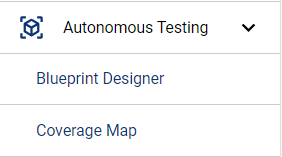
The following sections detail working with those options:
AISG Designer - Working with AI Script Generation
Coverage Map - Exploring the Coverage Map
Changes from Previous Releases
The Blueprint wordingTemplate toEditor has been removed as part of the AISG unlessenhancements.
The Compare AISG option is not enabled in AIQ release 5.0.0. This function is being enhanced and will be reintroduced in a future release of AIQ.
The Generate Scripts option is not enabled in AIQ release 5.0.0. This function is being enhanced and will be reintroduced in a future release of AIQ. However, you can now generate a DS script from the articleCoverage map, or download all actions in the AISG as a DS script.
A dedicated training course on AISG is preservingavailable aas historicalpart releaseof reference.Appvance's training offerings. See the Appvance Training page for more information.
Recommended
guidanceFor
Useyour convenience, the information about the new AISG3.0functionalitywithisclearincludedobjectives, scoped application context, and expected validation outcomes.Review generated tests before execution and remove irrelevant, unsafe, or duplicate steps.Prefer stable selectors, explicit validations, reusable data, and Scenario Editor-compatible flows.Keep prompts and examples free of credentials, personal data, and customer-sensitive records.Document any assumptions AISG made during generation or refinement.
Validation workflow
Generate or updatein thetestAIQasset5.0.0withReleaseaSummary.focusedThisAISGdocumentprompt.Reviewalso contains thegeneratedAIQsteps5.0.0andReleaseexpectedNotes,assertions.Runwhichaincludessmokeinformationexecution and verify evidence.Promoteabout theassetAIQonly5.0.0afterrelease.itisstable and maintainable.
Last updated:
OctoberApril9,01,20262025If you have any feedback on this topic, please contact us at documentation@appvance.ai