
Setting up the Environment
Now let’s see how to create the SQL script using these configuration settings. We have created a database named: “appvancetest”. This database has a table named: “worker” which has the columns: “idworker”, “name”, “lastname”. This database was installed using MySQL on a remote machine identified as “appvance00” on our local intranet, with MySQL Server running on port 3306.
-
The first step is to add the Hibernate settings we need in order to run the script. This configuration setting must be set like this in our case:
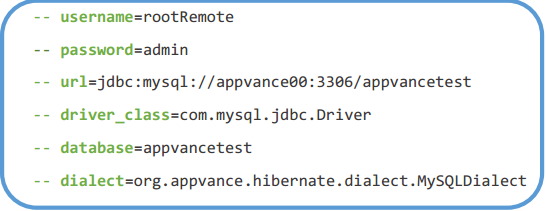
As you can notice, we have provided the respective values for each of the configuration settings needed to connect to our database. These values must come as the header of the script.
-
After providing proper values on the header, we can continue by adding the connect delimiter before the SQL actions, then you can embed your SQL actions, and finally add the disconnect delimiter. In our case, we want to insert a new record into the database only. Syntax:
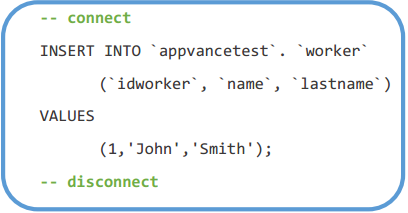
These are the two basic steps to create a valid SQL script for ASE and use it in a scenario to run a test on that database. In our case the whole file should look like this:
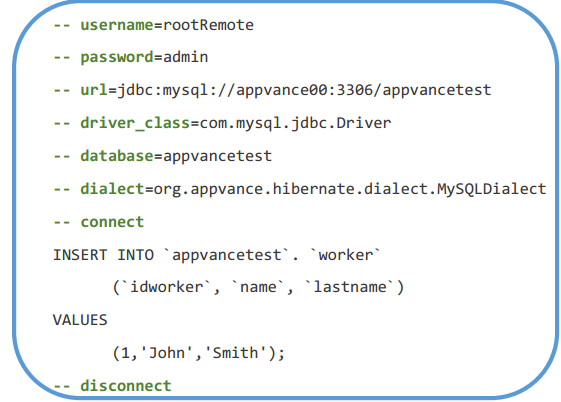
Note that you must type “--“before every setting in order to take effect and the file extension must be ‘.sql’.
Last updated: March 08, 2023
If you have any feedback on this topic, please contact us at documentation@appvance.ai