
Appvance DPL Types
Recommended
The guidancefollowing topic summarizes Appvance's basic and special data production libraries (DPLs).
Basic Data Production Libraries
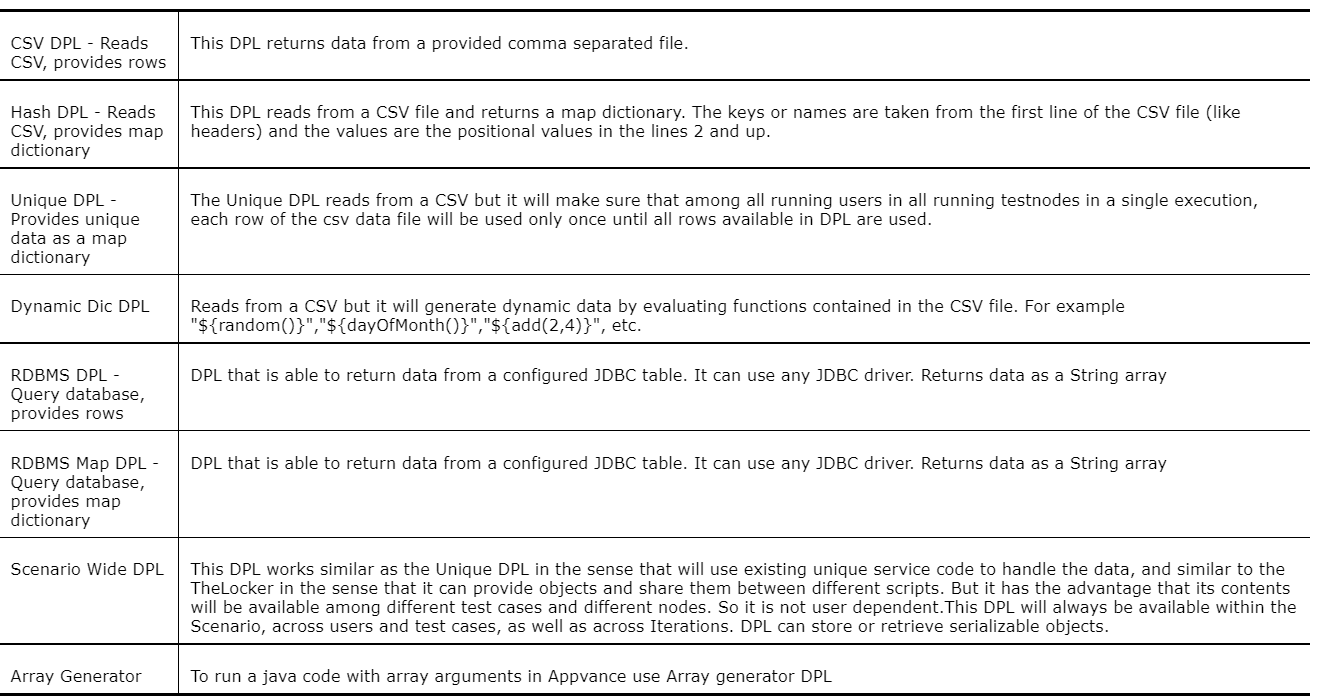
Special Data Production Libraries

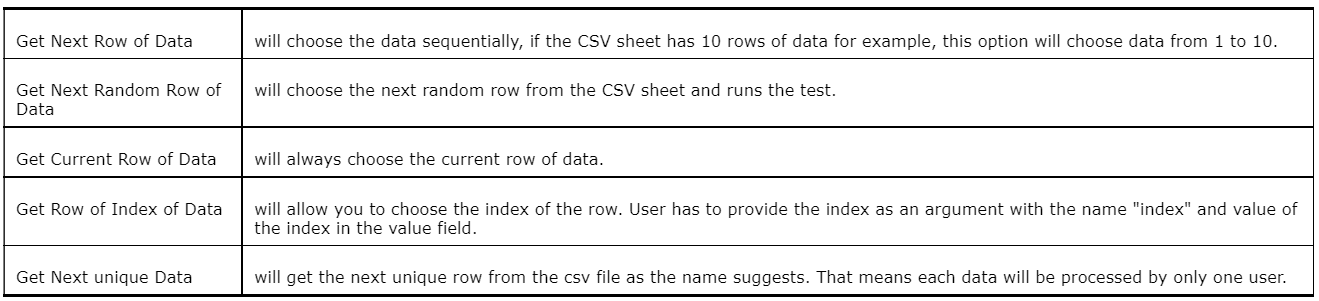
Different Actions Available
DPLsAIQ implements a Data Production Library (DPL) as an extensible framework to provide operational test data forto test script runners at test runtime. The DPL framework is general in the sense that it can get data from a variety of sources, including a relational database, comma-separated-value file, and data generating objects. A DPL also provides a safe way to store data between test steps. AIQ scenarioscomes with pre-built DPLs and services.makes Chooseit easy for software developers to add their own custom DPLs.
DPLs work in conjunction with script runners at test runtime. Test scenarios define the DPL typeand basedscript runner interaction. The AIQ Tutorials give instructions on using the pre-built DPLs.
AIQ users configure Test Use Cases in the Appvance Scenario Builder to use operational test data ownership,from repeatability,a volume,DPL. security,To see this in action follow these steps:
Start AIQ
Click Build from the Start Screen. The Scenario Builder opens with a blank page.
Click File, then New to create a new scenario. AIQ sets the default name of the new scenario to New-Scenario.
In the Info tab, which is opened by default, select Functional Test for this example.
Click the Resources tab.
Click Add Data Source.
Choose "HashDPL - Reads CSV" in the DPL Type drop-down menu.
Click Browse to select a CSV data file.
Provide a name for the DPL in the Name box.
Click Test Cases on the left-hand side.
Under Iteration Name: Iteration 1, click Add a Test Case Execution
Provide a Test Case Name at the top of the pop-up window.
Select Type Selenium, provide a Script Name and whetherthen click Browse to find your appropriate Selenese file.
Click Add DPL and under Select DPL choose the DPL you created earlier.
Choose Get Next Row of Data from the Actions menu.
Provide a name for the DPL action and then click Save at the top.
Click File at the top and then Save and choose a location to save the Test Scenario
This configuration tells the AIQ Selenium script runner to look into the Selenium test and replaces values are static, generated, or retrieved from an external system.
Common DPL considerations
Static data for repeatable regression tests.CSV or file-backed data for controlled row-based execution.Dynamic or generated data for unique values per run.Service-backed data whenin the testneedswith values fromantheAPIdata.csvorfile.systemThe DPL provides data from the data.csv file as AIQ runs the Selenium script, at test run time.
The DPL uses the first row in the CSV file to identify field mapping names. Insert these mapping names into the Selenium file where you want AIQ to inject the test data from the CSV file.
After the mapping name row comes the rows of
record.Securethehandlingdata file containing the actual data. The DPL Action determines the row of data AIQ provides to the test.In a load test, setting the DPL Action to Get Next Row of Data tells AIQ to advance to the next row of data.
When the DPL reaches the bottom of the table, the DPL starts at the top.
The Selenium, SoapUI, and Command-Line script runners provide support for
credentials,datapersonalmappingdata,fromorDPLs.customer-sensitiveScript
values.
Selectionfor checklist
Appvance DefineDesignerwhetherScript, Java, Jython, JRuby, VB, .NET, Groovy, and thescenariootherneedssupportunique,scriptingreusable,languagesrandom, or environment-specific data.Confirm how data is reset or cleaned up after execution.Document which scenario steps consume eachreceive DPLvalue.Do not store secrets or production customerdata inunsecureda dictionary structure (map).For TestNG engine to work with DPLs, it is necessary to define the @DataProvider annotation inside the TestNG, an AIQ will override that method providing the DPL
sources.
public class TestNG {

@DataProvider(name = "DPLDataProvider")

public Object[][] ValidDataProvider3() throws Exception {

return new Object[][] {

{'C', 65}, {'c', 97},

{'D', 66}, {'d', 98}

};

}


@Test(dataProvider = "DPLDataProvider")

public void basicTest(final char character, final int ascii) throws Exception {

System.out.println("character " + character + " ascii " + ascii);

}
In this case, you need to use CSV DPL in your Scenario. AIQ will do the casting of the arguments to the ones expected in the @Test method.
If you want to use HashMap instead (sending arguments as map dictionaries) then you need to add an AIQ provided annotation @TestNGParams (tools.jar):
DPLs have the ability to share data from one test to the next. For example, TheLocker DPL takes the results from a test step authored in soapUI as input to a second test step authored in Appvance Designer Script.
The above example shows how to use data from a CSV file. DPLs work in the same way with data from a Relational Database (RDBMS DPL, RDBMS Map DPL) and other data-generating objects.
Test Type Map DPL Support Array DPL Support Arguments Support
DPL By Engine:
Test Type
Map DPL Support
Array DPL Support
Arguments Support
Java
YES
YES
YES
TestNG
YES
NO
NO
SoapUI
YES
NO
NO
Jmeter
YES
NO
NO
DS
YES
NO
NO
Sahi
YES
NO
NO
.Net
NO
NO
YES
AJT
YES
NO
NO
Command Line
NO
NO
YES
Groovy
YES
YES
YES
Jython
YES
YES
YES
Selenium
YES
NO
NO
Selenium RC
YES
NO
NO
SQL
YES
NO
NO
Last updated: OctoberApril 6,11, 20262024
If you have any feedback on this topic, please contact us at documentation@appvance.ai