
Configuring Appvance DPLs
Recommended
AIQ guidanceimplements
Configurea Data Production Library (DPL) as an extensible framework to provide operational test data to test script runners at test runtime. The DPL framework is general in the sense that it can get data from a variety of sources, including a relational database, comma-separated-value file, and data generating objects. A DPL also provides a safe way to store data between test steps. AIQ comes with pre-built DPLs soand makes it easy for software developers to add their own custom DPLs.
DPLs work in conjunction with script runners at test runtime. Test scenarios and services receivedefine the rightDPL and script runner interaction. The AIQ Tutorials give instructions on using the pre-built DPLs.
AIQ users configure Test Use Cases in the Appvance Scenario Builder to use operational test data from a DPL. To see this in action follow these steps:
Start AIQ
Click Build from the Start Screen. The Scenario Builder opens with a blank page.
Click File, then New to create a new empty scenario. AIQ sets the default name of the new scenario to New-Scenario.
In the Info tab, which is opened by default, select Functional Test for this example.
Click the Resources tab.
Click Add Data Source.
Choose "HashDPL - Reads CSV" in the DPL Type drop-down menu.
Click Browse to select a CSV data file.
Provide a name for the DPL in the Name box.
Click Test Cases on the left-hand side.
Under Iteration Name: Iteration 1, click Add a Test Case Execution
Provide a Test Case Name at the righttop time.of the pop-up window.
Select Type Selenium, provide a Script Name and then click Browse to find your appropriate Selenese file.
Click Add DPL configurationand shouldunder defineSelect source,DPL format,choose ownership,the lifecycle,DPL resetyou behavior,created earlier.
Choose Get Next Row of Data from the Actions menu.
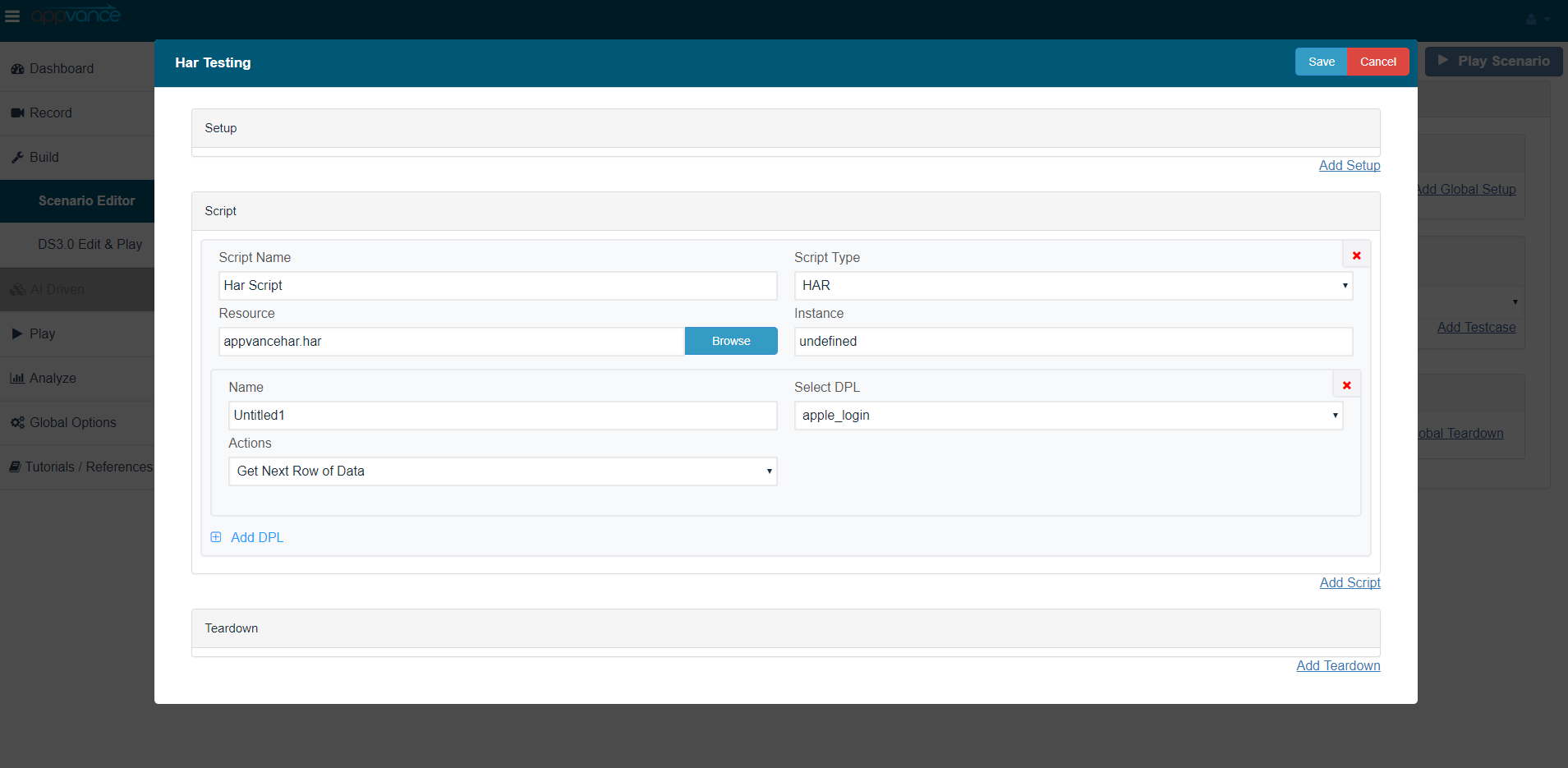
Provide a name for the DPL action and securitythen boundaries.
ConfigurationSave checklist
Chooseat thecorrecttop.DPL
Click static,File file-backed,at generated,the dynamic, or service-backed data.
This configuration tells the AIQ Selenium script runner to look into the Selenium test and replaces values in the test consumeswith values from the data.csv file.
The DPL provides data from the data.csv file as A IQ runs the Selenium script, at test run time.
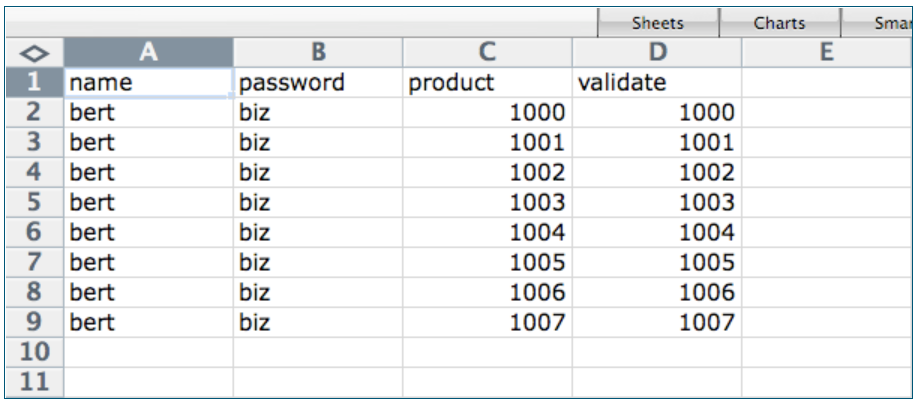
The DPL uses the first row in the CSV file to identify field mapping names. Insert these mapping names into the Selenium file where you want AIQ to inject the test data from the CSV file.
After the mapping name row comes the rows andof what happens whenthe data isfile exhausted.containing the actual data. The DPL Action determines the row of data AIQ provides to the test.
In a load test, setting the DPL Action to Get Next Row of Data tells AIQ to advance to the next row of data.
When the DPL reaches the bottom of the table, the DPL starts at the top.
The Selenium, SoapUI, and environment-specificCommand-Line overrides.
Script runners for Appvance Designer Script, Java, Jython, JRuby, VB, .NET, Groovy, and the other support scripting languages receive DPL data in unsecureda dictionary structure (map).
For TestNG engine to work with DPLs, it is necessary to need to define the @DataProvider annotation inside the TestNG, an AIQ will override that method providing the DPL sources.
Validationas workflow
arguments Runfor the @Test method:public class TestNG { @DataProvider(name = "DPLDataProvider") public Object[][] ValidDataProvider3() throws Exception { return new Object[][] { {'C', 65}, {'c', 97}, {'D', 66}, {'d', 98} }; } @Test(dataProvider = "DPLDataProvider") public void basicTest(final char character, final int ascii) throws Exception { System.out.println("character " + character + " ascii " + ascii); } }In this case, you need to use CSV DPL in your Scenario. AIQ will do the casting of the arguments to the ones expected in the @Test method.
If you want to use HashMap instead (sending arguments as map dictionaries) then you need to add an AIQ provided annotation @TestNGParams (tools.jar):
public class TestNG {
@DataProvider(name = "DPLDataProvider")
public Object[][] ValidDataProvider3() throws Exception {
return new Object[][] {
{'C', 65}, {'c', 97},
{'D', 66}, {'d', 98}
};
}
@Test(dataProvider = "DPLDataProvider")
@TestNGParams(params = {"character","ascii"})
public void basicTest(final char character, final int ascii) throws Exception {
System.out.println("character " + character + " ascii " + ascii);
}
}
DPLs have the ability to share data from one test to the next. For example, TheLocker DPL takes the results from a
smalltestscenariostep authored in SoapUI as input to a second test step authored in Appvance Designer Script.SoapUI support was removed in release 5.2.0 of AIQ.
The above example shows how to use data from a CSV file. DPLs work in the same way with
known data.Check Output Logs for missing or malformed values.Verify assertions confirm thedatawasfromusedacorrectly.ReviewRelationalDPLDatabasechanges(RDBMSbeforeDPL,largeRDBMSregressionMaporDPL)performanceandruns.
Last updated: OctoberJuly 6,25, 20262024
If you have any feedback on this topic, please contact us at documentation@appvance.ai