
Use DPL Data Sources in AIQ
Use DPL Data Sources in AIQ
TheDPLs useprovide reusable data to AIQ tests. They keep test data and data-generation rules separate from Scenario Editor steps so scenarios remain easier to maintain.
Basic workflow
- Create or select the DPL that represents the required data source or generated data rule.
- Map the needed DPL fields to the Scenario Editor inputs.
- Choose the execution behavior, such as using the next available row or reusing a value.
- Run a short validation execution and review the output before using the DPL in a larger run.
Good practices
- Use clear field names that match the business meaning of
athe data. - Keep credentials and environment-specific values out of the DPL
is an easy task, but it is still a very powerful tool. There are some concepts that may need to be clear to understand the full power of DPLs.Data Production Libraries Concepts
scenarioThe following table summarizes key Appvance DPL termsarticle andconcepts.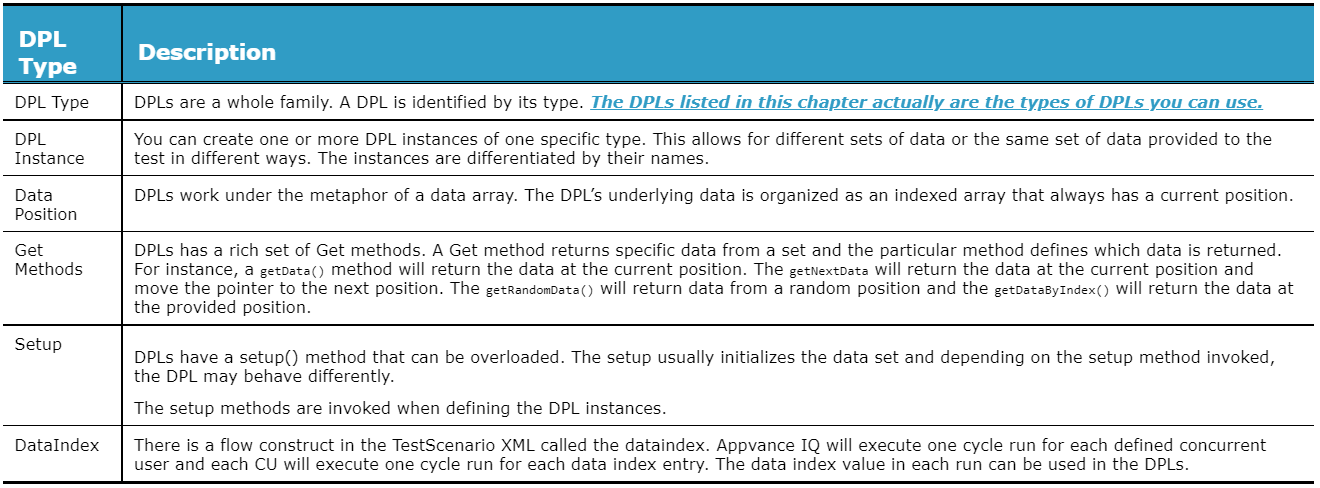
- Document data
assumptions, such as required formats, uniqueness, and reset behavior.Last updated:
JuneSeptember26,18,20232026If you have any feedback on this topic, please contact us atdocumentation@appvance.ai