
Self-Healing for Mobile Testing
UseSelf-healing mobilecreates a repository of accessors for each step in the test script. If an accessor changes permanently, AIQ will recommend substitutes based on what it has learned from previous executions of the test script and replace the accessor in the script automatically.
While the script is being self-healed, the IDE will highlight the steps that have been changed as part of the self-healing process.
The ability to improveself-heal locatora resiliencescript whenfor supportedMobile mobileTesting elementswas changeadded in predictablethe ways.4.9.5 release of AIQ. Previously, this option was only available for Web Testing.
ValidationEnabling workflowSelf-Healing
RunYou can invoke the
mobile scenario and identify locator failures that are candidates for healing.Enable or reviewself-healingbehaviorfunctionforby right clicking inside a step in theaffectedteststeps.script, selecting SelfHeal Script and then choose the browser.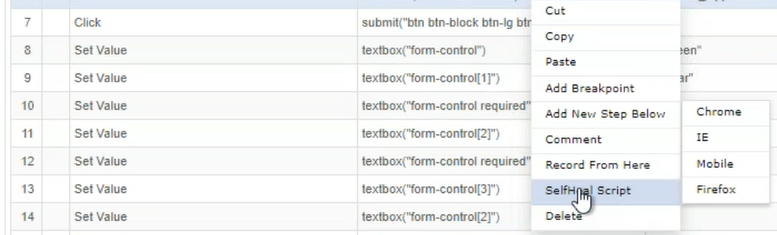
About Self-Healing
-
Self-healing can be run without fallback, however it is not recommended.
Self-healing plays the script back once.
If the target deviceis matrixvalid, it is maintained as the target.
If the target is invalid, it is moved to fallback accessors with its fallback attribute enabled and confirmthe first fallback accessor found is moved to target.
If an accessor fallback attribute is enabled but invalid during the healedself-heal steprun, stillits validatesfallback attribute will be disabled.
If an accessor is fallback is disabled and invalid during the intendedself-heal UIrun, element.it will be deleted.
If an accessor is fallback disabled but valid during the self- heal run, its fallback attribute will be enabled.
A newly found accessor will be added using the standard approach. Fallback is enabled for all except:
index and byXY, due to the brittleness,
images as they are resource intensive targets.
Last updated: SeptemberJuly 24, 20262023
If you have any feedback on this topic, please contact us at documentation@appvance.ai