
Mobile Testing Configurations in AIQ
Recommended
These are the three supported configurations for testing mobile apps with AIQ.
AIQ and Mobile Devices in the Cloud
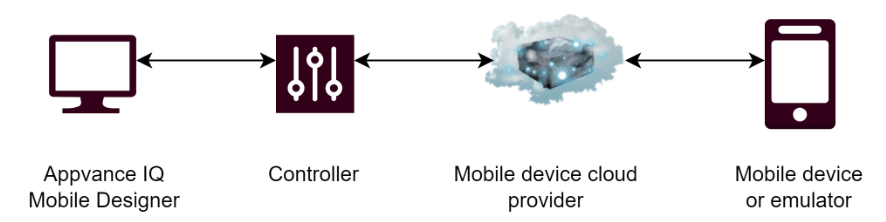
User connects their local session to the AIQ instance in the cloud.
AIQ cloud instance is connected to a mobile cloud provider.
Mobile cloudtesting providerconfiguration facilitatesshould define the device, platform, application build, automation framework, network access, permissions, and evidence requirements before execution. Keep configurations explicit so failures can be reproduced.
Configuration areas
- Device type, OS version, orientation, screen size, and locale.
- Application package, build version, installation method, and reset behavior.
- Network, proxy, certificates, VPN, and back-end environment.
- Permissions such as camera, location, notifications, files, or microphone.
- Test data, DPLs, accounts, screenshots, logs, and video evidence.
Maintenance workflow
- Start with a
connectionsmoke test on one known-good device. - Expand to
eitherdeviceanpoolsemulatoronly after configuration is stable. - Review configuration after app, OS, browser, driver, or
real device.
User is only required to connect to their AIQ EC2upgrades.
AIQ infrom the Cloud with Local Mobile Devices
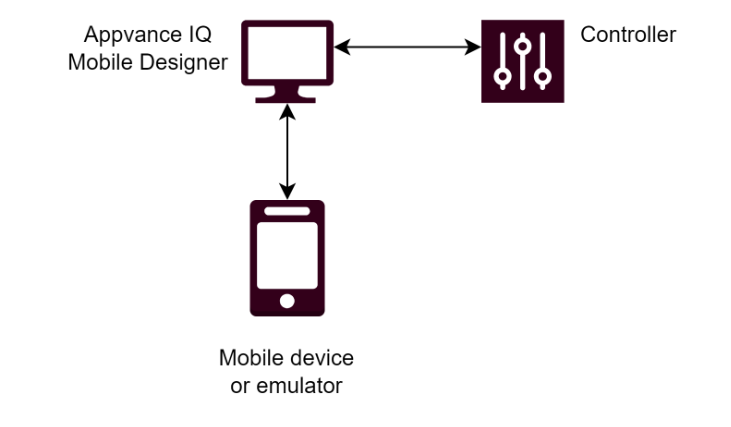
User connects to AIQ in the cloud.
User has localstandard mobile devices and emulators.
Local computer acts as a relay for the mobile data between the local session and the cloud.
Everything on the Local Machine
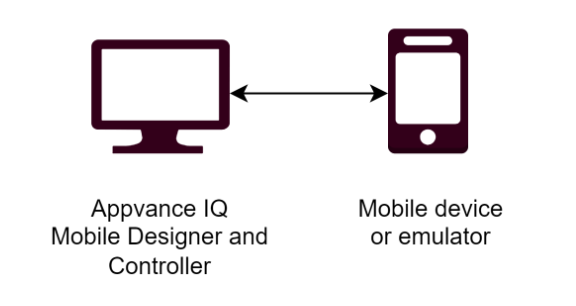
User installs and configures AIQ on their local machine.
Local machine has mobile devices connected or running as emulators.
Everything runs on the local computer.
Last updated: AprilOctober 11,6, 20242026
If you have any feedback on this topic, please contact us at documentation@appvance.ai