
Mobile Testing Configurations
Recommended
guidance
These are the three supported configurations for testing mobile apps with AIQ.
AIQ and Mobile Devices in the Cloud
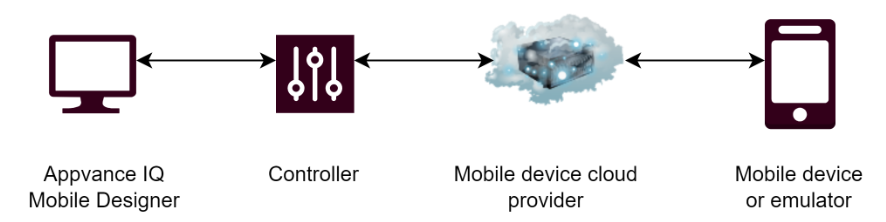
User connects their local session to the AIQ instance in the cloud.
AIQ cloud instance is connected to a mobile cloud provider.
Mobile testingcloud configurationprovider shouldfacilitates definea connection to either an emulator or real device.
User is only required to connect to their AIQ EC2 instance using a web browser.
AIQ in the device,Cloud platform,with applicationLocal build,Mobile automationDevices
network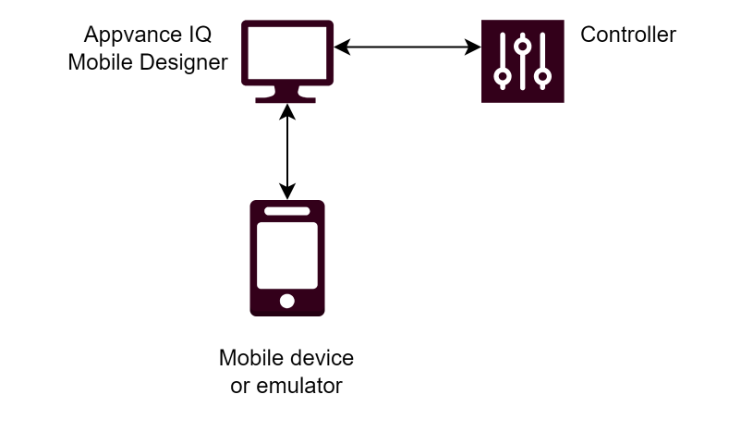
access,
User connects to AIQ in the cloud.
User has local mobile devices and evidence requirements before execution. Keep configurations explicit so failures can be reproduced.emulators.
Configuration
DeviceLocal
type,computerOSactsversion,asorientation,ascreenrelaysize,for the mobile data between the local session andlocale.the cloud.
Everything on the Local Machine
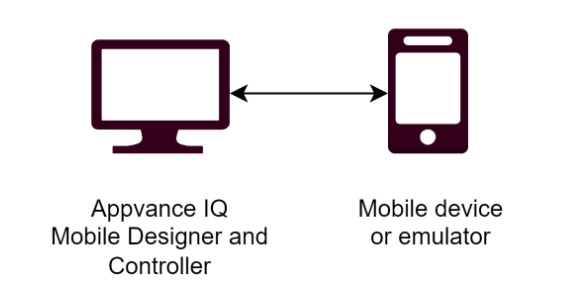
User build version, installation method,installs and resetconfigures behavior.AIQ on their local machine.
Local certificates,machine VPN,has andmobile back-enddevices environment.
Everything or microphone.
Maintenance workflow
Start with a smoke testruns onone known-good device.Expand to device pools only after configuration is stable.Review configuration after app, OS, browser, driver, or AIQ upgrades.Document deviations fromthestandardlocalmobilecomputer.environment.
Last updated: OctoberApril 6,11, 20262024
If you have any feedback on this topic, please contact us at documentation@appvance.ai