
Use Image Injection in AIQ Mobile Testing
The Set Camera
Use Image
Image injection lets a mobile test provide a controlled image to bethe usedapplication under test when triggeringthe scenario needs repeatable camera, upload, or visual-input behavior. Use controlled test images and avoid customer-sensitive content.
When to use image injection
- Testing flows that ask the
camera during a test. For example, you could use thisuser toinjectuploada QR code into your test script.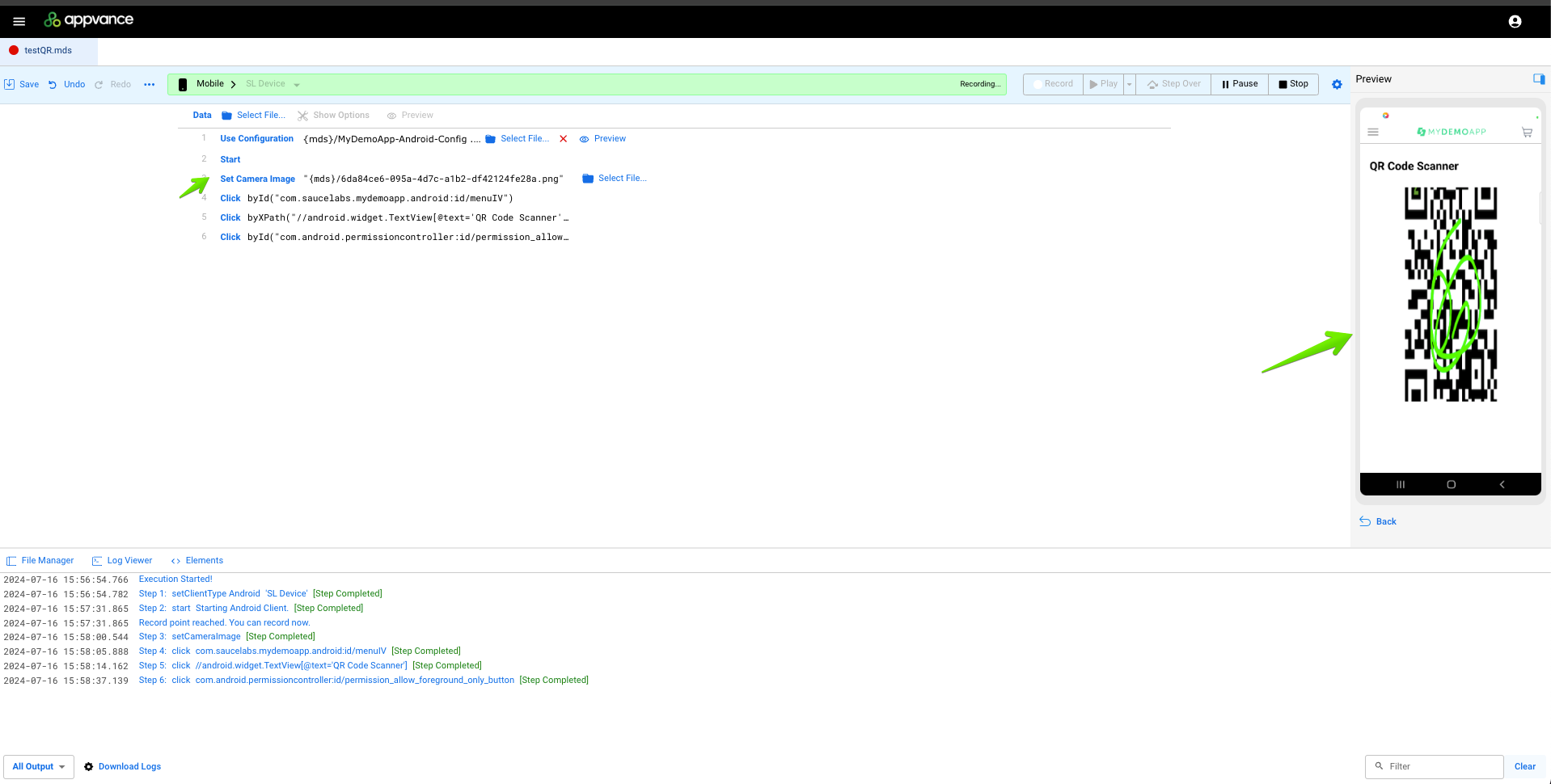
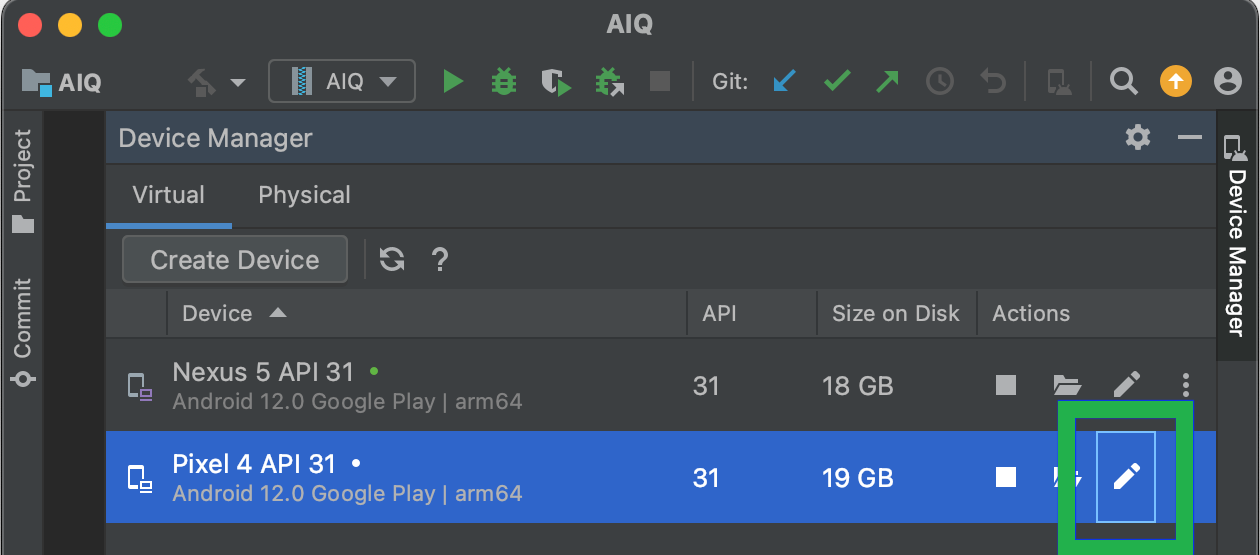
Compatibility SummaryServiceiOSAndroidRequirementsDeviceSimulatorDeviceSimulatorOn PremisesNot supportedNot supportedNot supportedSupportedUpdate emulator settings.Sauce LabsSupportedNot supportedSupportedNot supportedAdd capability: sauceLabsImageInjectionEnabled: trueBrowserStackSupportedNot supportedSupportedNot supportedAdd capability: enableCameraImageInjection: trueLambdaTestSupportedNot supportedSupportedNot supportedAdd capability: enableImageInjection: trueOn-PremisesAvailable for Android emulators only when running AIQ locally.When running AIQ on an EC2 we don’t have access toJAVA_HOMEenvironmental variable nor the local file system, hence we can’t override the emulator settings.Android Emulator Setup From Android Studio open the Device Manager.
Click the Edit button for the emulator that you want to use.
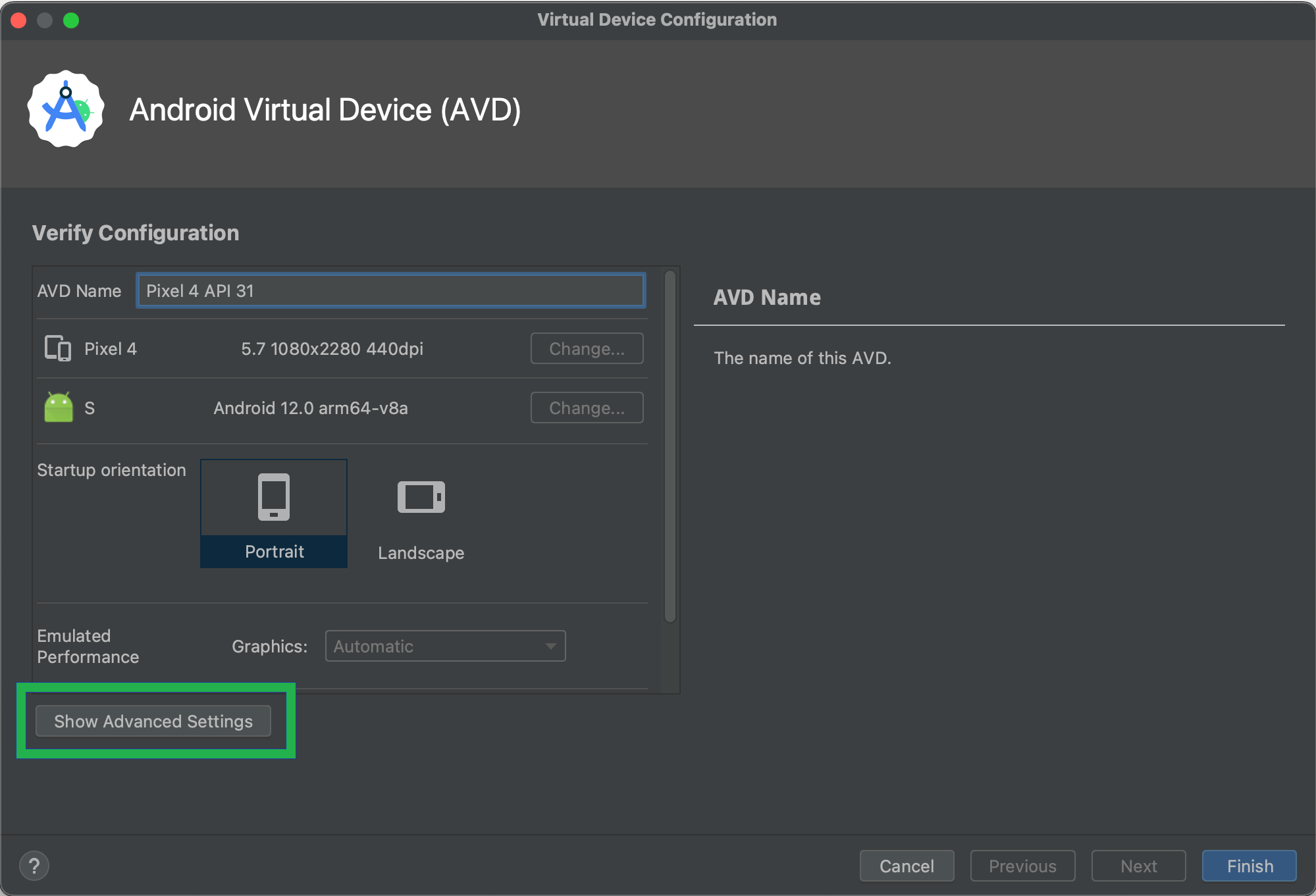
In the Virtual Device Configuration window, click Show Advanced Settings.
In the Camera section select VirtualScene from the drop down.
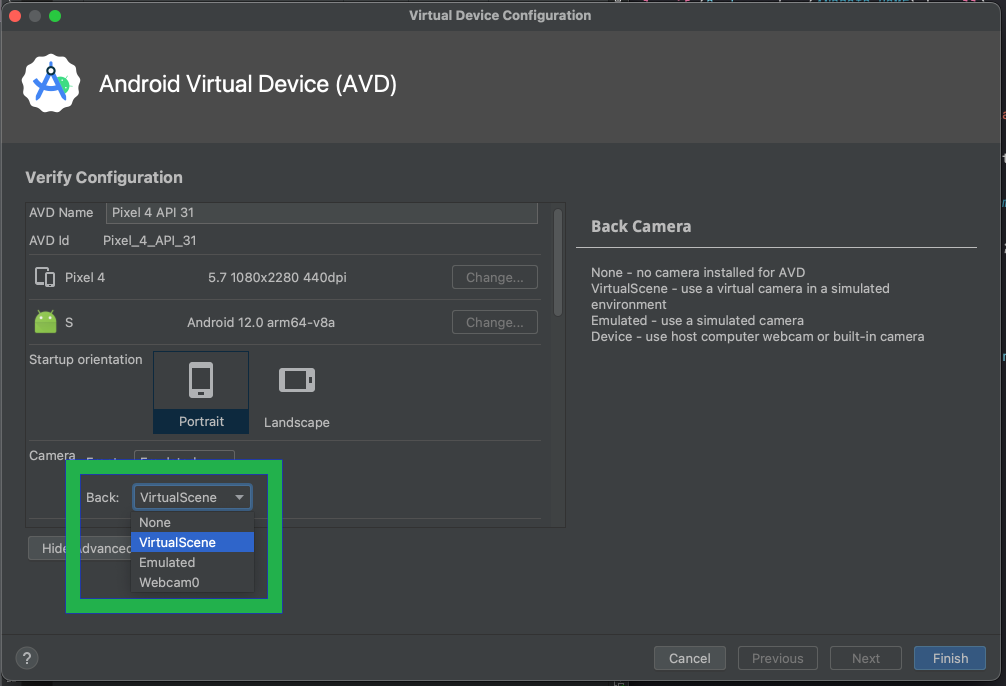
Click Finish.
Sauce Labs
Available for Android and iOS physical devices only. There’s support for native apps only.
The config file’s capabilities need to include the following field:
"sauceLabsImageInjectionEnabled": "true"
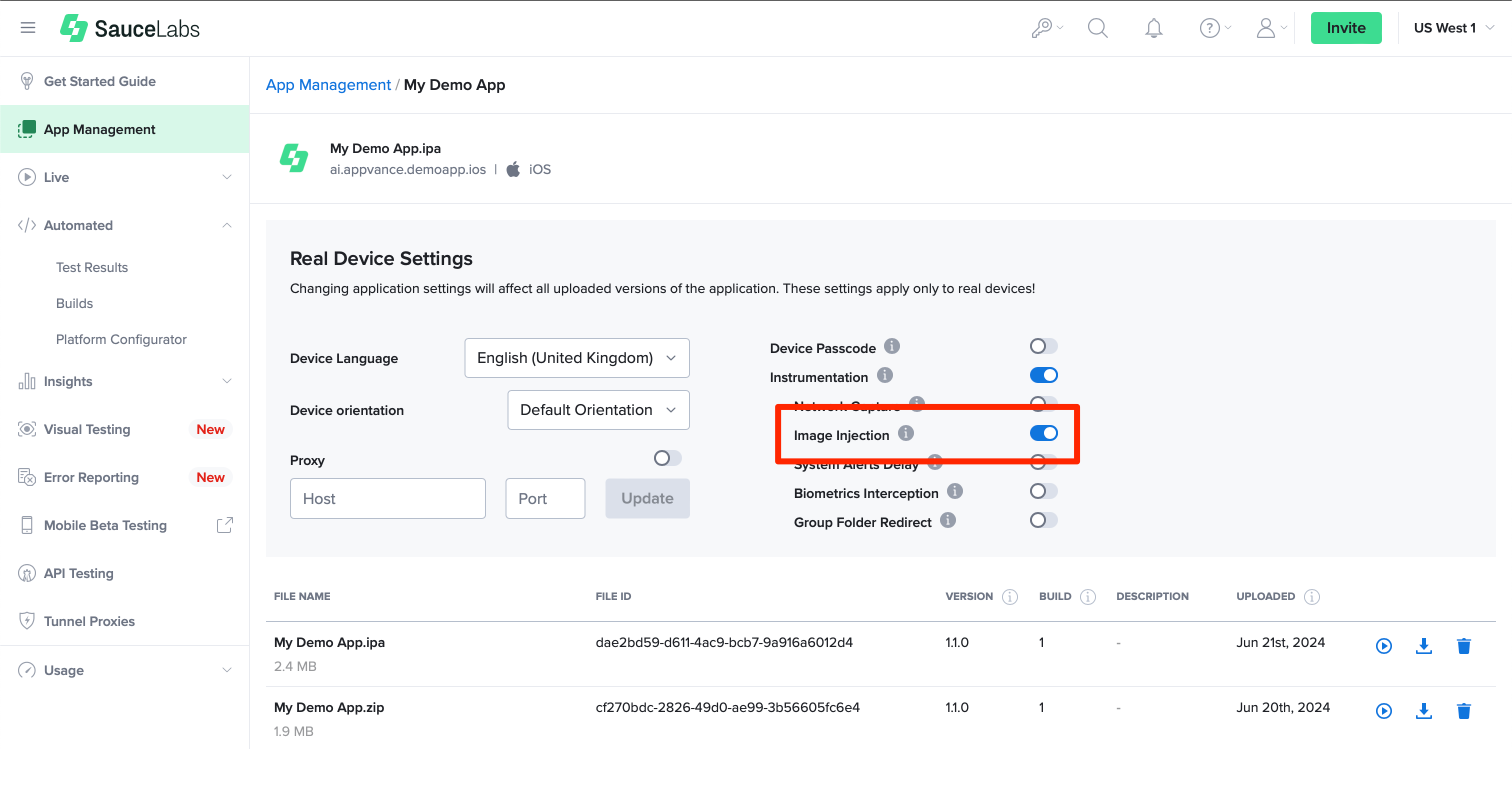
Sauce Labs' App Config
Login into your Sauce Labs account.
Go to App Management.
Click the Settings button for the app you want to use.
Turn the Image Injection switch on.
Supported APIs
Android System Camera
For Android devices, there are multiple ways toor capture an image,image.
Validation workflow
- Select a small set of approved test images with known expected results.
- Configure the
following:mobile ACTION_IMAGE_CAPTUREOpensso thesystemapplicationcamera and notifies the calling app when the image is taken.
camera2 API: Everything is configured and handled from within the app.
cameraX: Leverages the capabilities of camera2, but uses a simpler, use case-based approach that is lifecycle-aware.
Camera API (deprecated): partially supported. As with camera2, everything is handled in the app itself. QR Code readers often use Camera#setPreviewCallback. We pass the injected image to this method, but the rest of this deprecated API is not supported. UI Elements will not likely displayreceives the injected image.
iOS System Camera
For iOS devices, the camera can be configured with different outputs. AIQ supports the following:
AVCapturePhotoOutput: for capturing still images. The results are received via the AVCapturePhotoCaptureDelegateand the method captureOutput:didFinishProcessingPhoto:error: The other methods in this delegate are either deprecated or handle live photos, which we don't support.
AVCaptureVideoDataOutput: for capturing video frames and processing them. The frames are received via AVCaptureVideoDataOutputSampleBufferDelegate and the method captureOutput:didOutputSampleBuffer:fromConnection:.
AVCaptureMetadataOutputfor reading QR-Codes. The QR Codes are passed to the app via captureOutput:didOutputMetadataObjects:fromConnection:. We are detecting the AVMetadataMachineReadableCodeObject and QR Codes are part of that.
Sauce Labs documentation is available here.
BrowserStack
The config file’s capabilities need to include the following field:
"browserstack.enableCameraImageInjection": "true"
Supported APIs
Camera image injection is supportedassertions for the followingscreen, Camerauploaded APIs.file, Checkextracted withtext, youror appdownstream development team to get more details aboutrecord.
OS
OS version
Supported APIs
iOS
iOS 13profile and above
didFinishPickingMediaWithInfoData-safety APInote: ofDo UIImagePickerControllernot iOSinject SDKreal classcustomer fordocuments, capturingIDs, anor image.private Forimages moreunless details,the pleasecustomer checkhas Appleexplicitly documentation.approved that test data.
AVCapturePhoto iOS SDK class for receiving captured photos from AVCapturePhotoOutput API. For more details, please check Apple Documentation.
jpegStillImageNSDataRepresentation of AVCaptureStillImageOutput iOS SDK class. For more details, please check Apple documentation.
Android
Android 6 and above
android.hardware.camera.PreviewCallback API for API level 1-20
android.hardware.camera2.CameraManager, android.hardware.camera2.CameraDevice, android.hardware.camera2.CameraCharacteristics, android.hardware.camera2.CameraCaptureSession, android.hardware.camera2.CaptureRequest, android.media.ImageReader APIs for API level >=21
Camera Intent API
Browser Stack full documentation here.
LambdaTest
The config file’s capabilities need to include the following field:
"enableImageInjection": "true"
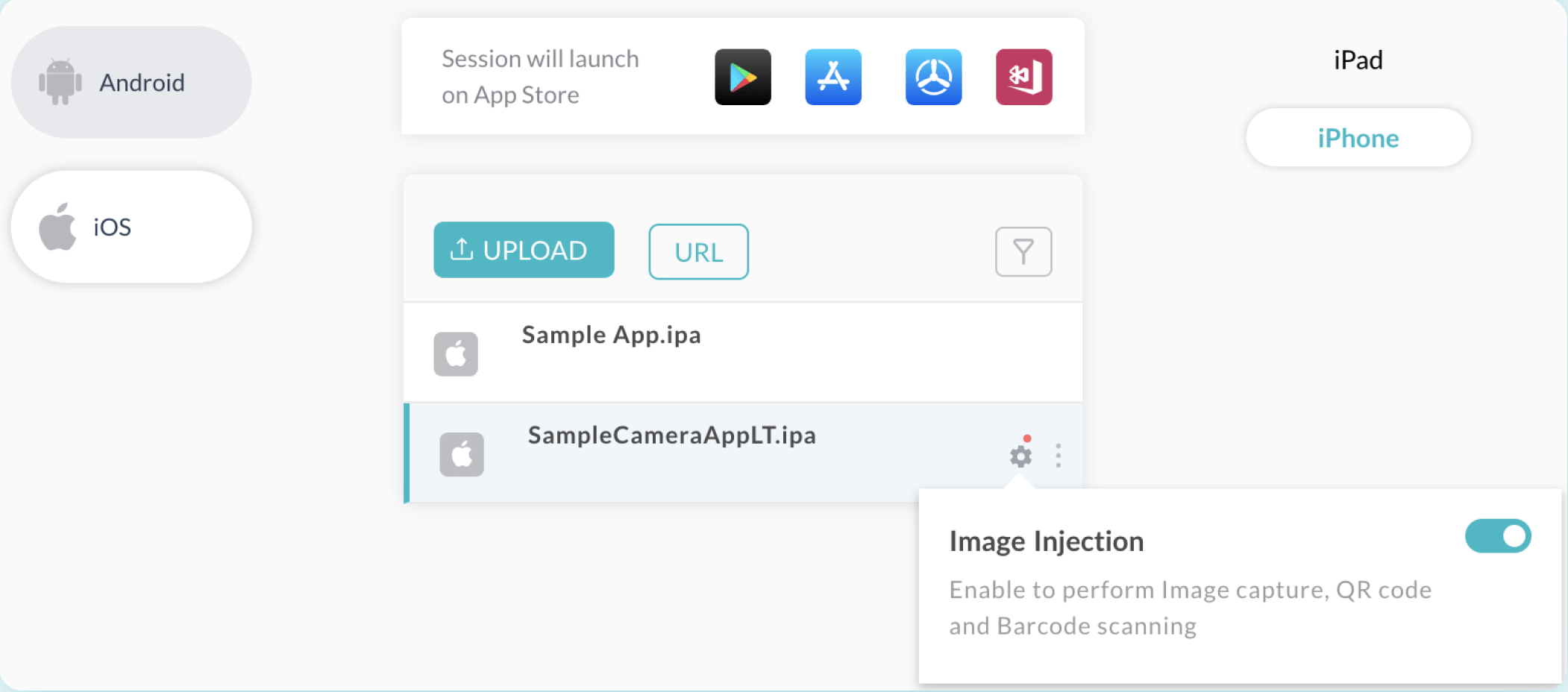
LambdaTest App Setup
1. Login to your LambdaTest account.
2. Go to App Testing under Real Devices.
3. Hover the Settings icon and toggle the Image Injection switch on.
Supported APIs
Below given is the list of Camera APIs which are supported by LambdaTest Image Injection tool. Please ensure that your app uses these APIs only to enable Image Injection.
OS
Devices
Supported APIs
iOS
iOS 13 and higher
didFinishPickingMediaWithInfo API of UIImagePickerController iOS SDK class for capturing an image. For details, please check Apple documentation.
AVCapturePhoto iOS SDK class for receiving captured photos from AVCapturePhotoOutput API. For details, please check Apple Documentation.
Android
Android 9 and higher
CameraX API is used. For details, please check CameraX Documentation
Camera API is used. For details, please check this link.
Camera2 API is used. For details, please check this link.
ACTION_IMAGE_CAPTURE is standard Intent action that can be sent to have the camera application capture an image and return it. For details please check this link.
LambdaTest full documentation here.
Last updated: October 01,8, 20242026
If you have any feedback on this topic, please contact us at documentation@appvance.ai