
Desktop Testing with AIQ - Legacy Desktop Designer Reference
Contents
Desktop
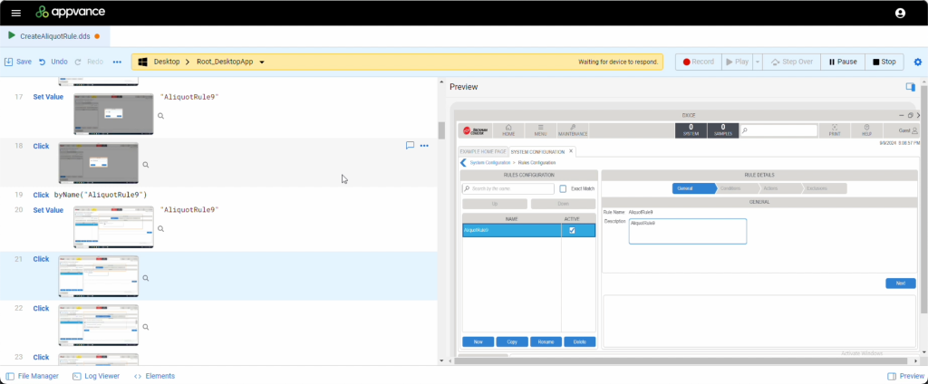
DesktopThis Designerpage is a new testing interface available in AIQ release 5.2.0 that takes advantage of AIQ’s Mobile Designer technology so that you can test desktop applications across diverse environments, including Citrix. You can use Visual Accessors to create new test scripts using simple as point-and-click. Fallback accessors and self-healing script capabilities are built-in to help make creating robust and resilient test scripts effortless.
Here is a brief introductory video on the features and benefit of Desktop Designer.
Benefits and Highlights
You can your test scriptsretained as a Scenarioslegacy reference for teams that still maintain Desktop Designer assets. For current AIQ authoring, prefer Scenario Editor and viewthe supported desktop testing workflow for the resultstarget onenvironment.
When to use this reference
- Use it only when maintaining an existing Desktop Designer test or troubleshooting an older desktop automation flow.
- For new work, create or migrate tests through the
Dashboard.current
Record a videoinstead of starting new Desktop Designer-only content.
Maintenance guidance
- Review whether the legacy script is still required.
- Update selectors, waits, and environment assumptions before execution.
- Run the test
scriptinexecution.a
Easy access to all Windows keysenvironment and actions.
Pointcandidates andso shootduplicate tolegacy record your script or add the logic you need with the use of Javascript commands
Detachable preview mode allows you to work on two monitors. Youcontent can viewbe yourretired test script on one monitor and the application on another monitor.
Obsolete-content note: The old Desktop Designer currentlyterminology supportsis Windowslegacy. applicationsKeep andreferences mainframeonly systems.where Supportthey forexplain Desktopexisting Testingassets onthat otherhave operatingnot systemsyet willmoved beto addedthe incurrent futureAIQ releases of AIQ.workflow.
Last updated: SeptemberOctober 20,8, 20242026
If you have any feedback on this topic, please contact us at documentation@appvance.ai