
Desktop Designer
Desktop
Contents
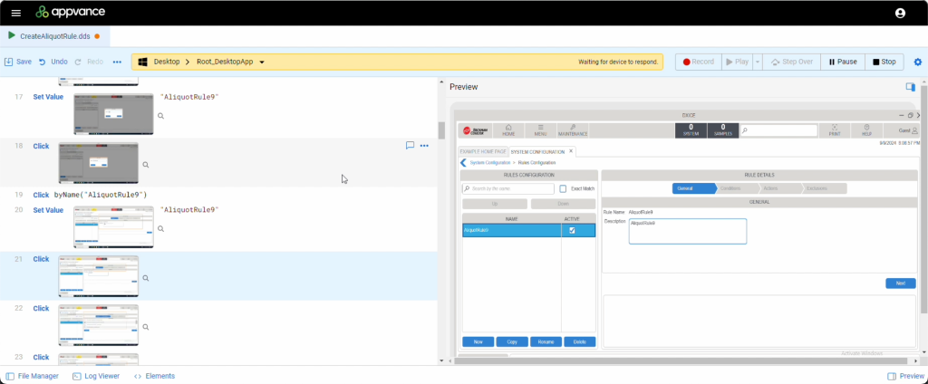
ThisDesktop pageDesigner is retaineda new testing interface available in AIQ release 5.2.0 that takes advantage of AIQ’s Mobile Designer technology so that you can test desktop applications across diverse environments, including Citrix. You can use Visual Accessors to create new test scripts using simple as point-and-click. Fallback accessors and self-healing script capabilities are built-in to help make creating robust and resilient test scripts effortless.
Here is a brief introductory video on the features and benefit of Desktop Designer.
Benefits and Highlights
You can your test scripts as a legacyScenarios referenceand forview teamsthe thatresults stillon maintainthe DesktopDashboard.
Record currenta AIQvideo authoring,of preferthe Scenariotest Editorscript execution.
Easy access to all Windows keys and actions.
Point and shoot to record your script or add the logic you need with the use of Javascript commands
Detachable preview mode allows you to work on two monitors. You can view your test script on one monitor and the supportedapplication desktopon testinganother workflow for the target environment.monitor.
When
Use it only when maintaining an existingDesktop Designer
testcurrentlyorsupportstroubleshootingWindowsanapplicationsolderanddesktopmainframeautomationsystems.flow.ForSupportnewforwork,DesktopcreateTestingoronmigrateothertestsoperatingthroughsystemsthewillcurrentbeAIQaddedworkflowininsteadfuture releases ofstartingAIQ.newDesktop Designer-only content.Confirm operating system, driver, browser, and desktop application versions before rerunning older scripts.
Maintenance guidance
Review whether the legacy script is still required.Update selectors, waits, and environment assumptions before execution.Run the test in a controlled environment and capture evidence for any failing step.Document migration candidates so duplicate legacy content can be retired later.
Obsolete-content note: The old Desktop Designer terminology is legacy. Keep references only where they explain existing assets that have not yet moved to the current AIQ workflow.
Last updated: OctoberSeptember 8,20, 20262024
If you have any feedback on this topic, please contact us at documentation@appvance.ai