
Identify Test Environment (Hardware and Software)
The last part of the test definition concerns the test environment itself. The goal is to follow commonly used, well-known, and published best practices. Here are the choices for the test environment:
-
Server Hardware - the fastest, least expensive server hardware with the best performance. For example, in 2007, this would be a rack-mounted IBM 4-CPU Intel Xeon 2.8 GHz model 873 server with 4 Gbytes of memory, dual Gigabit Ethernet adaptors, and running Windows 2003 Server - Service Pack 2
-
Server Load-Generating Consumers - a white-box no-name rack-mounted 2-CPU Intel Xeon 2.1 GHz with 2 Gbytes of memory, dual Gigabit Ethernet adaptors, and running Windows 2003 Server - Service Pack 2. These systems are referred to as TestNodes
-
Client-Side Load-Generating Test-Automation Framework - Appvance IQ comes with a commercial software package supported by a large user community. The kit comes as a set of Appvance IQ files, but it should be possible to implement the test scenario using any commercial or commercial performance tools
-
JAVA Virtual Machine - the BEA JRockit JVM 1.5 to operate the server-side test software, where past performance testing on JRockit showed speed and stability. Additionally, countless data centers show many JAVA application servers being run on JRockit
-
JAVA Specific Optimizations - the consumer and server systems' memory was expanded to 4 Gigabytes (the PC's full capacity). Setting the –Xms and –Xmx memory settings to the same large number
-
Execution Setup - logging, debugging, and monitoring components are disabled to reduce overhead and after each scenario, all servers are restarted to clean up resource allocations
At this point, the test is well defined to begin coding the necessary use cases. The definition phase has been completed, so building the test environment and installing the test are the next steps. Once this has been done, the server’s maximum capacity can be tested.
Using the XSTest-Pattern for Performance Tests
When testing Internet applications for scalability and performance, the sheer number of test cases in the test scenario makes it necessary to use test automation. An approach to test automation is a pattern, called XSTest and it is a feature of Appvance IQ. XSTest takes a test sequence – such as the scenario in The Test Scenario – as input, stages each test case in sequence, and records the transaction results in an XML-based log file. The XSTest implementation in Appvance IQ then tallies the results from the log file into a TPS report. XSTest Sequence Diagram Showing How a Test Scenario is Run illustrates the XSTest pattern as a UML sequence diagram:
XSTest Sequence Diagram Showing How a Test Scenario is Run

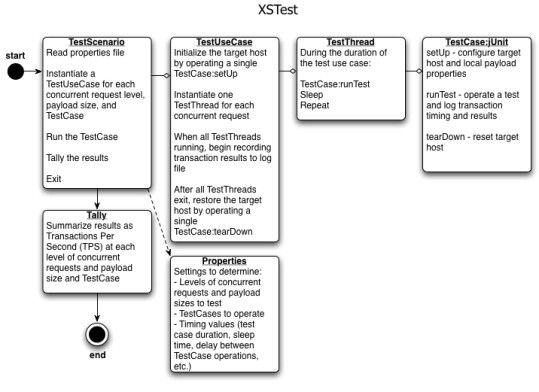
One of the key advantages of the XSTest pattern is its use of jUnit TestCase objects. These are familiar to most developers and also easily learned. The kit implements the tests as TestCase objects for use in the load test and reuses them as functional tests.
Last updated: March 18, 2024
If you have any feedback on this topic, please contact us at documentation@appvance.ai