
Assert Suite
This section provides the current execution results so you can add custom assertions to your scenario. Several assertion types are available from the Assert Type drop-down menu, and some are exclusively for requests. For most assertions, the AIQ UI provides current result information, so you don't have to look up the current results to validate against. These are some of the available assertions:
- Assert Exists: Validates whether the target element exists in the results tree.
- Assert Size: Validates the actual size of the desired target against the given custom value. Comparison criteria can be set to: equals, not equals, less than, greater than, less than or equal, greater than or equal.
- Assert Duration: Validates the actual duration of the desired target against the given custom value. Comparison criteria can be set to: equals, not equals, less than, greater than, less than or equal, greater than or equal.
- Assert Matches (Request only): Compares the request-response content to validate whether the given baseline string is contained in the request-response, delimited by the given target accessor. You must know and specify the request-response content format. The target accessor field changes according to the response format:
- If the response format is plain text, use regular expressions to limit the response range to what is valid (using ".*" validates against the whole response).
- If the response format is JSON, provide the JSON path to the desired element to assert.
- If the response format is XML, provide the XPath to the desired tag.
- Assert Checksum (Request only): Validates the actual request-response checksum against the given custom checksum.
- Assert Response Code (Request only): Validates the actual request-response code against the given custom response code.
- Store Content: The very first thing to know about this is that it is NOT an assertion; it is an auxiliary function of AIQ that provides the user with the ability to store request-response content into an internal custom-named variable in The Locker, which can be used in a later request if required. For example, imagine you have a shopping cart web application. One of your requests generates a unique ID number associated with each cart. Let's assume that this number is required to process transactions. In this context, you could store the first request response (the ID) and then instruct AIQ to use it at the expected request, taking the value from the stored content.
(NEW!!!) AI Assert
AI Assert is a no-code validation feature that lets QA teams validate anything they can describe using natural language, without writing code or defining locators. It can verify images, text, layouts, tables, animations, motion graphics, and more, and it is available in the Web Designer.
See AI ASSERT in the AIQ 5.3.0 Release Notes for details.
Or visit our LMS for a video:
https://academy.appvance.ai/mod/resource/view.php?id=364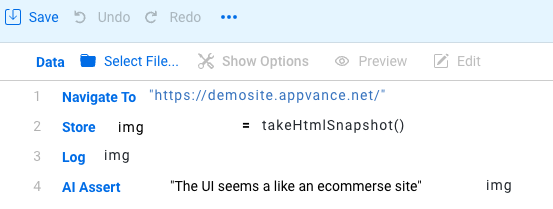
If you have any feedback on this topic, please contact us at documentation@appvance.ai