
Output
This tab provides the user with the live scenario execution output. This tab is a very important part of the Live Controller section, here’s where you’ll find out what is happening in the back-end and what actions are being executed, if there’s a critical error setting up the scenario or during the execution, you will see the error getting displayed here as well as the ramping process messages.
You will also notice the Execution ID which can be used to get data of the execution from the database.
It will have details about all the nodes that are loaded, in case of connecting to Amazon cloud services, it will display all the details about the instances launched and their statuses, all the execution, and iteration details shall be displayed in this tab.
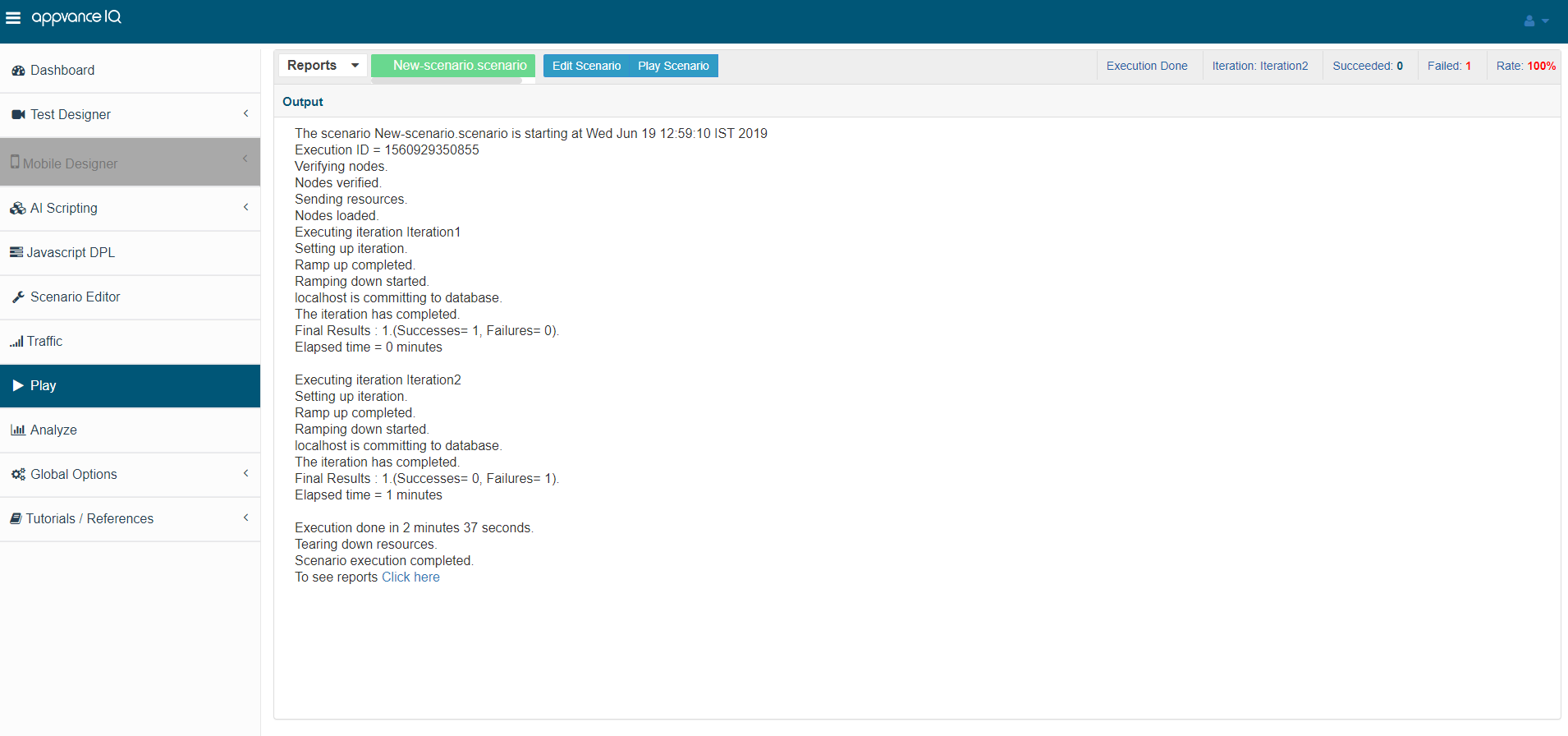
You will also notice the Succeeded, Failed transactions along with Failure Rates in Red on the top right corner of the output page.
The output will also show error and warning messages like
-
When there is a problem connecting to a Test Node machine
-
The status of cloud instances, starting, stopping, terminating, etc.
-
When a scenario is configured to use JIRA, the output will show the link to JIRA with the ticket number
-
When a scenario is configured to use a so and so browser and if that browser is not available, the output will show the message of the missing browser
Last updated: June 26, 2023
If you have any feedback on this topic, please contact us at documentation@appvance.ai