
Viewing Results from a Previous Test Run
UseAIQ stores the results of every test, every step, and every failure to a Results Repository (normally MySQL or Oracle RDBMS) as it operates the test. View results from the previous test run using the Analyze buttons from the Start Screen. Results Analysis Reports display the results in a browser-based Web page by making live requests to comparethe baselines,Results investigateRepository.
AIQ failures,keeps the results by execution. Each time you click the Play button in a Controller, or a Continuous Integration environment like Hudson, Jenkins, or Bamboo, execute a test AIQ stores a new execution.
Choose an execution, click the Analyze button, and tracka performancenew trendsbrowser overwindow time.appears Confirm thatdisplaying the comparedlist runsof usedReports for the samechosen environment,execution.
Printing version, data assumptions,Reports and loadCharts
AIQ beforepresents drawingthe conclusions.results in a set of Web pages. Use your browser's Print command to print reports.
Recommended workflowConfiguration
LocateAIQ uses a relational database (RDBMS) for its Repository. AIQ logs every test operation, test step, and monitored resource to the
runRepository.byAIQproject,MySQLsuite,andexecutionOracle.date,ContactorIQexecutionGlobalID.OpenServices for support of IBM DB2 and Microsoft SQL Server. For information, see Repository configuration in Appvance IQ.AIQ builds its own database schema to store the
completedlogs.resultThe DB contains a catalog of scenarios (scenario, use-cases, andreviewsteps)summaryandstatustablesfirst.Comparetokeystoremetricstheorresultsfailedof executions (executions, transactions results, stepsagainsttimes). Use thecurrentGlobalrun.RecordOptionsrelevantlinklinksfromortheexecutionStartIDsScreen, Navigate to the Preferences tab, Click Results under Preferences - Download SQL - to receive a copy of the schema.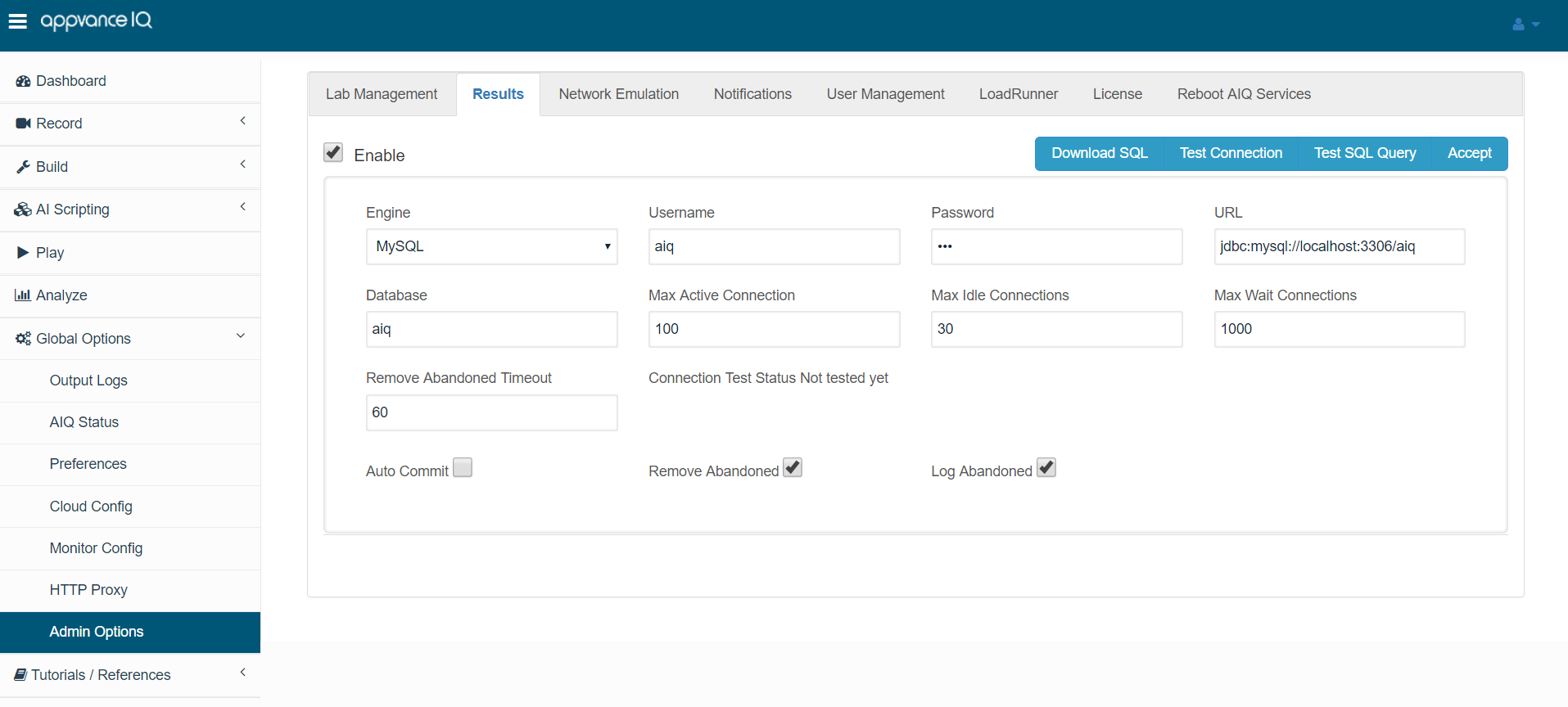
Database administrators use the Download SQL button to populate a database with the AIQ tables. For example, for MySQL users, after creating a user account and granting ALL privileges to the user, enter the Username, Password, URL (in the format of jdbc:mysql://localhost:3306/aiq,) and choose the database type. Make sure the URL does not include the AIQ database path. Click Result Schema. View the Output panel for any error messages. Then add the utp name to the URL (jdbc:mysql://localhost:3306/aiq) and click Accept.
MySQL database administrators who run MySQL in Unix and Macintosh operating environments must start the database with the --lower_case_table_names=1 option. Without this option, the Results Analysis Engine encounters SQL syntax errors when MySQL processes AIQ's reports-related queries.
You must also change your Test-scenario to log to the correct repository. Use the Options tab in the
relatedScenariodefect,Builderreport,toor maintenance note.
Comparison notes
Avoid comparing runs that used different environments or data sets unless that difference ischange thepointrepositoryoflocation.the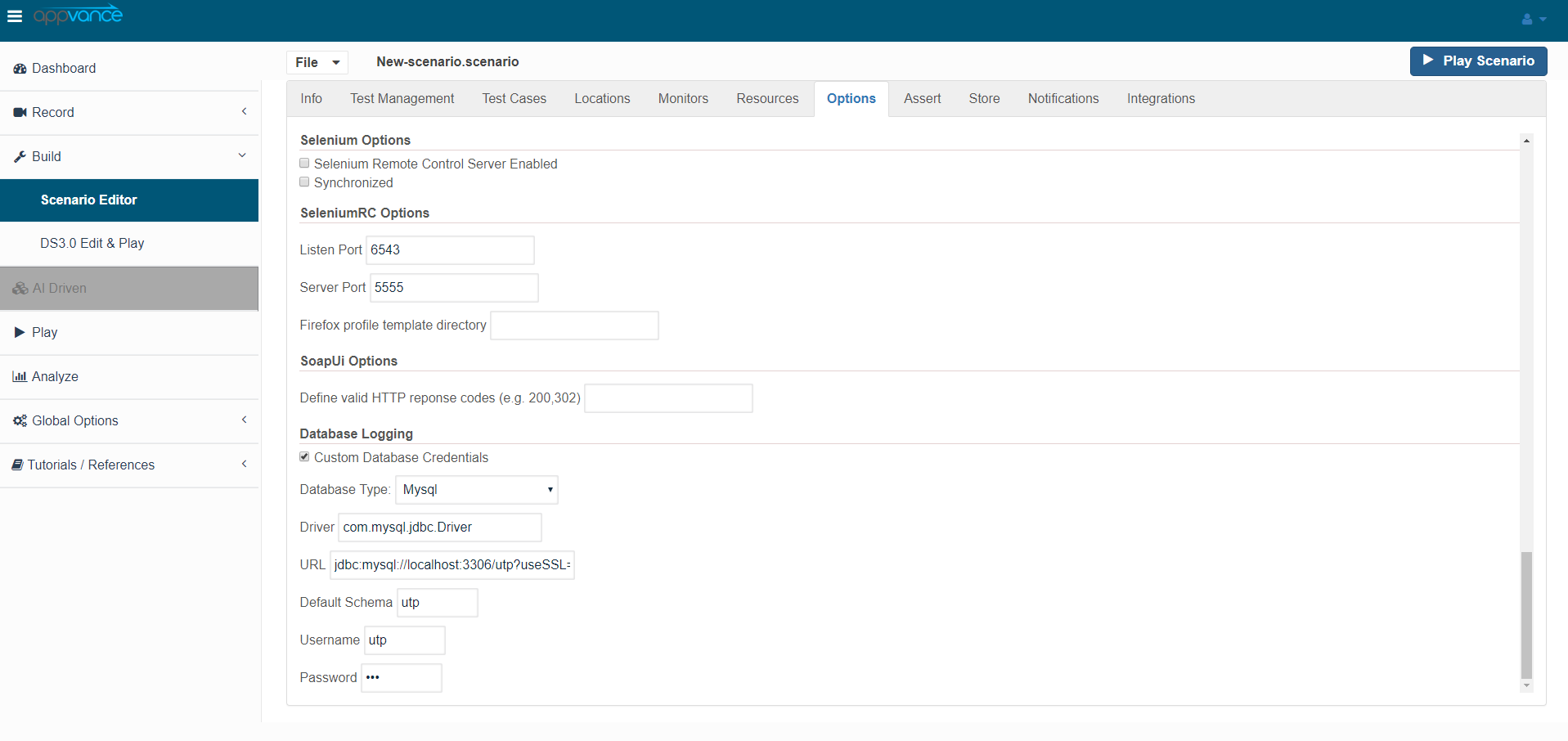
analysis.Usesteady-state
periodsLast
forupdated:performanceJunecomparisons.Document26, 2023
If you have any scenariofeedback oron applicationthis changestopic, betweenplease runs.contact
Lastus updated:at September 18, 2026documentation@appvance.ai