
iOS Proxy Settings and PAC Files for AIQ Traffic Recording
ThereLast arereviewed: 2September ways25, of2026
Use thethis Appvancearticle IQwhen configuring iOS devices to route traffic through AIQ recording or proxy on an iPhone:infrastructure.
What
Manual -changed in this way,article
you
- Standardized “IOS” to “iOS” and tied proxy/PAC guidance to AIQ traffic recording.
- Added checks for Wi-Fi network, proxy host/port, PAC file URL, certificate trust, and app traffic behavior.
- Added a warning that VPN, MDM, or corporate network policy can
telloverride manual proxy settings.
Validation workflow
- Connect the
proxyiOSto bypass some domains or only include a certain list of domains, but it is easier to set.
Automatic - using this way will require you to have accessdevice to the serverintended toWi-Fi editnetwork.
MoreReview detailsnote: on each ofMade the abovemobile methodsproxy follow:
Usingmore Manual Mode:
On your iOS device
Go to Settings
Click Wi-Fi
Connect to the same network as AIQ is running
Select the info (i) button
Scroll down to the HTTP Proxy sectionactionable and selectcalled MANUALout common iOS/network-policy blockers.
Set the Appvance IQ server IP and proxy port
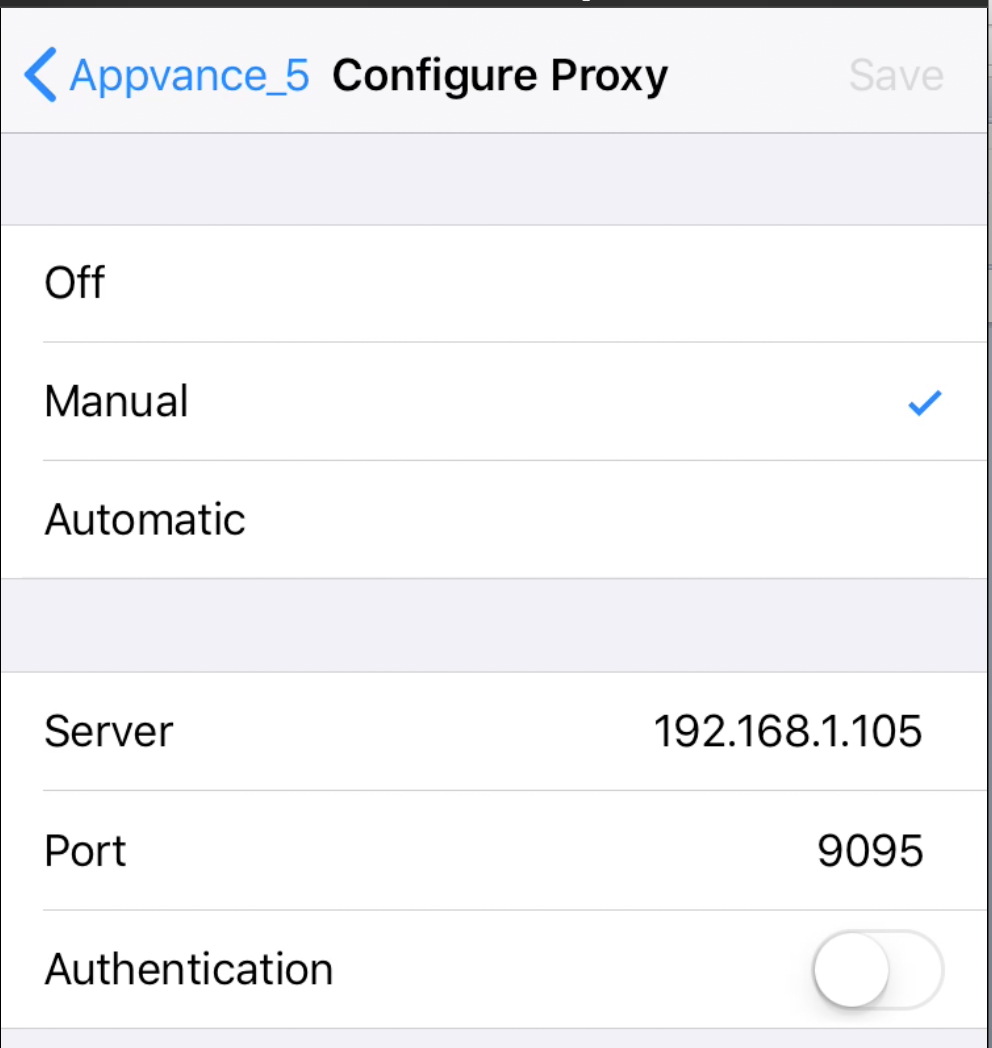
Using .Pac File/Automatic mode:
WARNING: This option requires editing a .pac file present in the Appvance IQ server. Do not use this if you do not have access or cannot have someone edit this file for you. As an option, you can download the .pac file, modify and then upload it to some server where you do have access, for this you can continue reading to find the URL of the .pac files.
On your iOS device,
Go to Settings
Click Wi-Fi
Connect to the same network as AIQ is running
Select the info (i) button
Scroll down to the HTTP Proxy section and select Auto
Edit the URL and add the URL of the .pac file. There are two options to choose:
http://<appvance-proxy-server-ip>:8080/iphone-exclude.pac
http://<appvance-proxy-server-ip>:8080/iphone-include.pac
The difference is that on the exclude one, you can (optionally) modify the file to add domains that you do not want to be seen by proxy. An initial list is provided in the default file but you can modify to add more if you want
On the iphone-include.pac, you must edit to add the list of domains that you want to be seen by the proxy (captured). This file only adds http://example.com as a template, so if you plan to use this you need to have access to the server to modify this and add the domains of your interest
In both cases above the default, the file should be edited to set the Appvace IQ server DNS or IP.
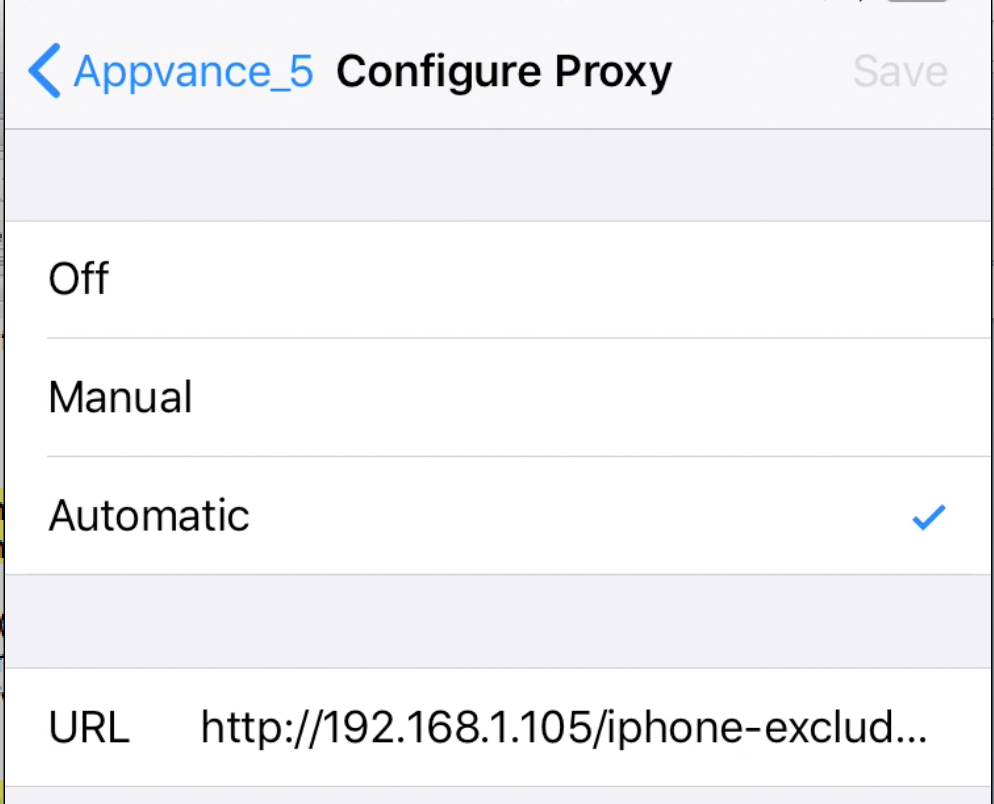
NOTE: In the above .pac URL it is important to notice that the protocol http:// is mandatory, if it is missing the Appvance IQ proxy will not receive any traffic.
It might be necessary to hit the link “Renew Lease” if you see that it takes a while for the Wi-Fi connection to apply the iphone-exclude.pac file.
Last updated: JulySeptember 28,25, 20232026
If you have any feedback on this topic, please contact us at documentation@appvance.ai.