
Manage Certificates for AIQ Integrations
AppvanceLast IQreviewed: supportsSeptember HTTPS22, 2026
Use this page when AIQ integrations or monitored systems require certificates for TLS trust, mutual authentication, or secure connections.
Recommended guidance
- Track certificate owner, expiration date, environment, and
Secureusage. - Protect
SocketprivateLayerkeys(SSL)andprotocols.avoidThesepostingprotocolsthemuseinthedocumentationJavaorCryptographytickets. - Coordinate
Architecturecertificateto workchanges withSSLservicecertificates.restartsTheand validation windows.
Validation workflow
- Identify whether AIQ
protocol handler will throw an SSLHandshakeException when connecting toneeds a serverovercertificate,SSLtrustedprotocolsCA,whenortheclientserver-side SSL certificate is unknown. AIQ, when accessing as a SAAS model, is required to updatecertificate. - Obtain the certificate
onand key material through theserverapprovedmachines.securityConfiguring a Certificate
Login to AIQ as an Admin user.
Navigate to Global Options > Admin Options > Certificate.
Provide the valid domainInstall or IP address of the controller instance and click Update Certificate and Reboot.
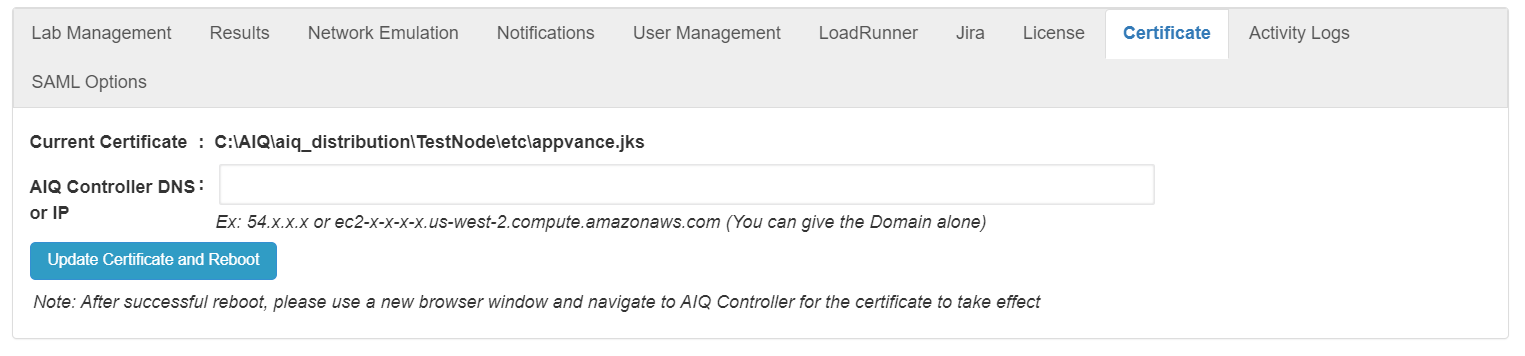
A new 'appvance.jks' certificate for the domain provided will be generated, and the controller instance will reboot.
After a successful reboot, please use a new browser window to navigate to the AIQ Controller forconfigure the certificate toin takethe effect.supported
Note: Certificate changes can break integrations if trust chains or private keys are mishandled.
Last updated: JulySeptember 07,22, 20232026
If you have any feedback on this topic, please contact us at documentation@appvance.ai.