
Certificate
LastAppvance reviewed:IQ Septembersupports 22,HTTPS 2026and Secure Socket Layer (SSL) protocols. These protocols use the Java Cryptography Architecture to work with SSL certificates.
UseThe thisAIQ pageprotocol handler will throw an SSLHandshakeException when AIQconnecting integrations or monitored systems require certificates for TLS trust, mutual authentication, or secure connections.
Recommended guidance
Track certificate owner, expiration date, environment, and usage.Protect private keys and avoid posting them in documentation or tickets.Coordinate certificate changes with service restarts and validation windows.
Validation workflow
Identify whether AIQ needsto a servercertificate,overtrustedSSLCA,protocolsorwhenclientthecertificate.Obtainserver-side SSL certificate is unknown. AIQ, when accessing as a SAAS model, is required to update the certificateand key material throughon theapprovedserversecuritymachines.process.Configuring a Certificate
-
Login to AIQ as an Admin user.
Navigate to Global Options > Admin Options > Certificate.
Provide the valid domain or configureIP address of the controller instance and click Update Certificate and Reboot.
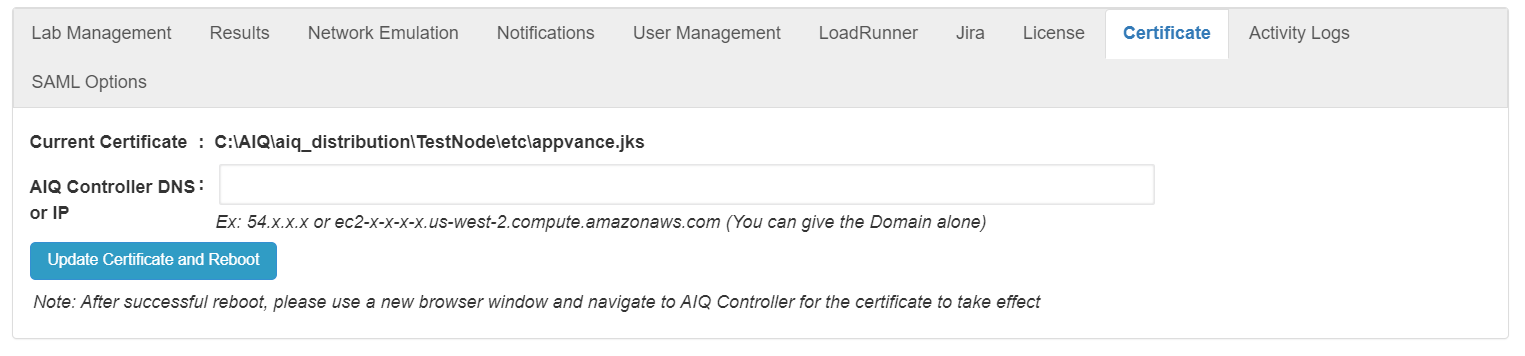
A new 'appvance.jks' certificate for the domain provided will be generated, and the controller instance will reboot.
After a successful reboot, please use a new browser window to navigate to the AIQ Controller for the certificate into thetake supportedeffect. AIQ/global
Note: Certificate changes can break integrations if trust chains or private keys are mishandled.
Last updated: SeptemberJuly 22,07, 20262023
If you have any feedback on this topic, please contact us at documentation@appvance.ai.