
Configuring an S3 Repositiory
Using an S3 repository is preferable to using a Git repository in some situations. The size limitation for Git is around 100MB. Once you exceed 100MB, you should consider using an S3 repository. Git is not designed to efficiently handle large amounts of binary files. Images are resource-consuming elements at the disk, memory, and CPU level, so using an S3 repository will yield the best performance. Images will be saved with the script in your S3 repository which further simplifies image management.
See Considerations for more information on specific reasons for choosing to use an S3 repository instead of a Git repository.
The S3 repository option was added in the 4.10.0 release of AIQ.
Creating an Amazon S3 Repository
For information on creating and setting up an Amazon S3, see the following Amazon documentation:
Considerations
As noted above, there are specific considerations for S3 repositories when you are using certain features and options within AIQ.
Running AIQ from an S3 Instance
If you are running AIQ from an S3 instance, in order for AIQ to connect to repository and function as expected, the S3 repository must be in the same region as the AWSinstance.
Visual Accessors
If you are going to use Visual Accessors, you must use S3 repository. Appvance does not recommend using Git to store your images if your are using the Visual Accessor functionality. Again, this is due to Git not being designed to handle large amounts of binary files efficiently.
AI Script Generation
If you are going to use AISG, you must use an S3 repository. Git is not recommended for use with AISG. If your AISG executions are extremely large and contains a large amount of images, you may eventually see performance issues if you are using Git.
Configuring AIQ to Connect to an Amazon S3 Repository
Once you have configured the repository on the Amazon S3 site, you can configure AIQ to connect to the S3 repository.
-
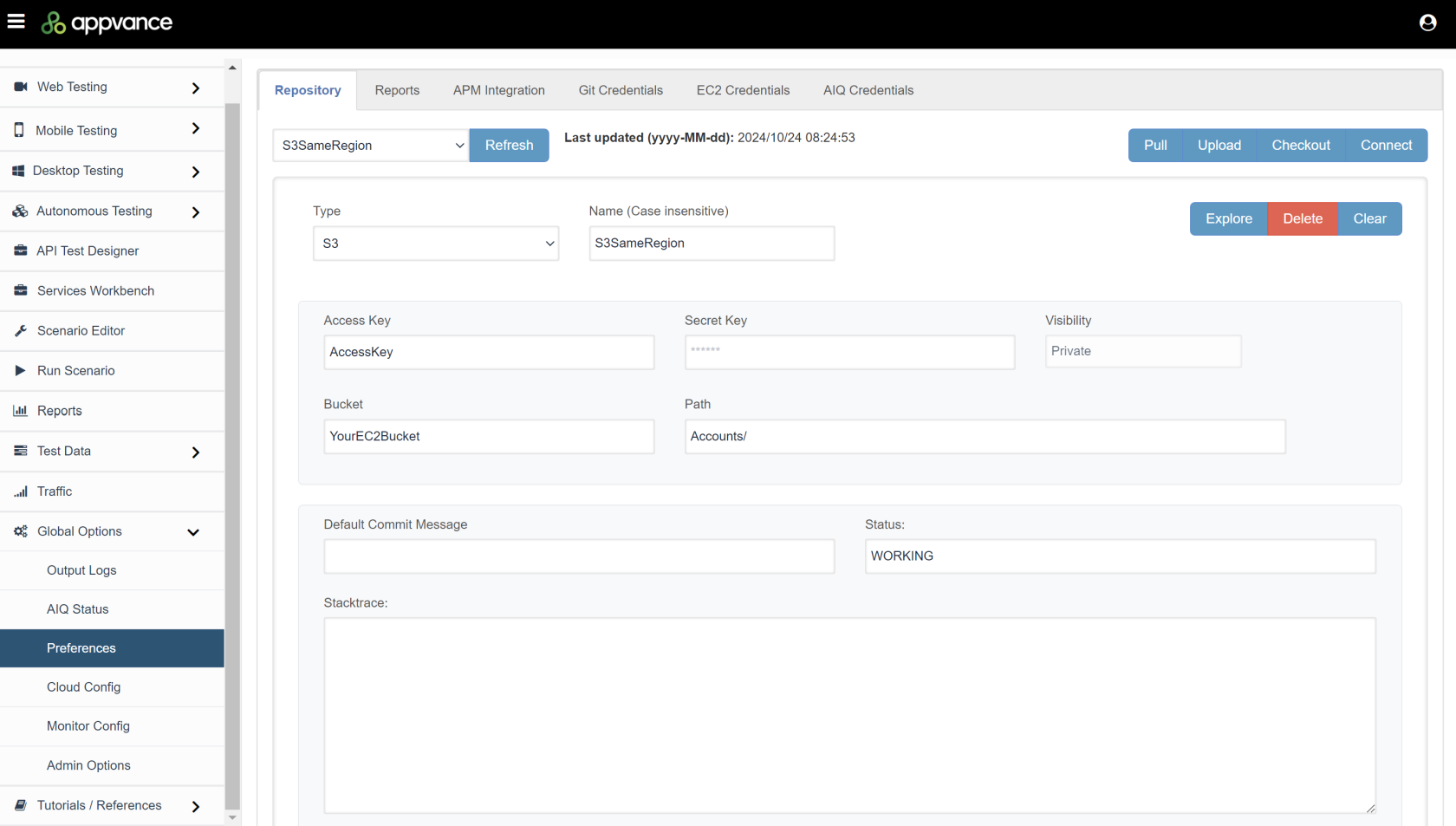
Navigate to Global Options > Preferences > Repository.
-
Select S3 in the Type drop down.
-
Configure the following fields as necessary. The minimum required fields are noted in the list.
-
Type - Select S3.
-
Name - Name of your S3 repository. Must be a unique name from the list of already created configurations.
-
Access Key - Amazon S3 credentials. Required field. Check with your DevOps team to get the AWS Access key.
-
Secret Key - Amazon S3 credentials. Required field. Check with your DevOps team to get the AWS Secret key.
-
Bucket - Required field.
-
Path - Required field.
Default Commit Message - You can specify a default commit Message. If left blank it defaults to "Appvance Commit".
-
Status - Define a status message for the connection.
-
See Repository Troubleshooting for solutions to common issues.
Last updated: March 12, 2025
If you have any feedback on this topic, please contact us at documentation@appvance.ai