
Configure an S3 Repository in AIQ
Using
Configure an S3 repository is preferable to using a Git repositoryRepository in some situations. The size limitation for Git is around 100MB. Once you exceed 100MB, you should consider using an S3 repository. Git is not designed to efficiently handle large amounts of binary files. Images are resource-consuming elements at the disk, memory, and CPU level, so using an S3 repository will yield the best performance. Images will be saved with the script in your S3 repository which further simplifies image management.AIQ
See Considerations for more information on specific reasons for choosing to use an S3 repository instead of a Git repository.
The S3 repository option was added in the 4.10.0 release of AIQ.
CreatingUse an Amazon S3 Repository
repository Forwhen informationAIQ onneeds creatingto read or write test assets, files, evidence, or integration payloads in AWS object storage. Corrected the title spelling and setting up an Amazon S3, seeupdated the followingpage Amazonaround documentation:
Considerations
As noted above, there are specific considerations for S3 repositories when you are using certain features and options within AIQ.
Running AIQ from an S3 Instance
If you are running AIQ from an S3 instance, in order for AIQ to connect tocurrent repository and functionAWS assecurity expected,practices.
Configuration checklist
- Confirm AWS account, region, bucket name, prefix/path, encryption, and lifecycle policy.
- Prefer IAM roles, instance profiles, or temporary credentials over static access keys.
- Grant only the required S3
repositoryactionsmust be infor thesamespecificregionbucketasand prefix. - Use server-side encryption and customer-approved retention settings.
- Document ownership, cost tags, cleanup policy, and access-review cadence.
Validation workflow
- Validate read/write access with a small non-sensitive test file.
- Run the
AWSinstance.Visual AccessorsIf you are going to use Visual Accessors, you must use S3 repository. Appvance does not recommend using Git to store your images if your are using the Visual Accessor functionality. Again, this is due to Git not being designed to handle large amounts of binary files efficiently.AI Script GenerationIf you are going to use AISG, you must use an S3 repository. Git is not recommended for use with AISG. If your AISG executions are extremely large and contains a large amount of images, you may eventually see performance issues if you are using Git.ConfiguringAIQtoworkflowConnectthatto an Amazon S3 RepositoryOnce you have configured the repository on the Amazon S3 site, you can configure AIQ to connect touses the S3 repository. - Review AWS and AIQ logs for permission, region, bucket, path, or encryption errors.
Navigatelifecycle toor Globalcleanup Optionsrules >do Preferencesnot > Repository.
Select S3 in the Type drop down.
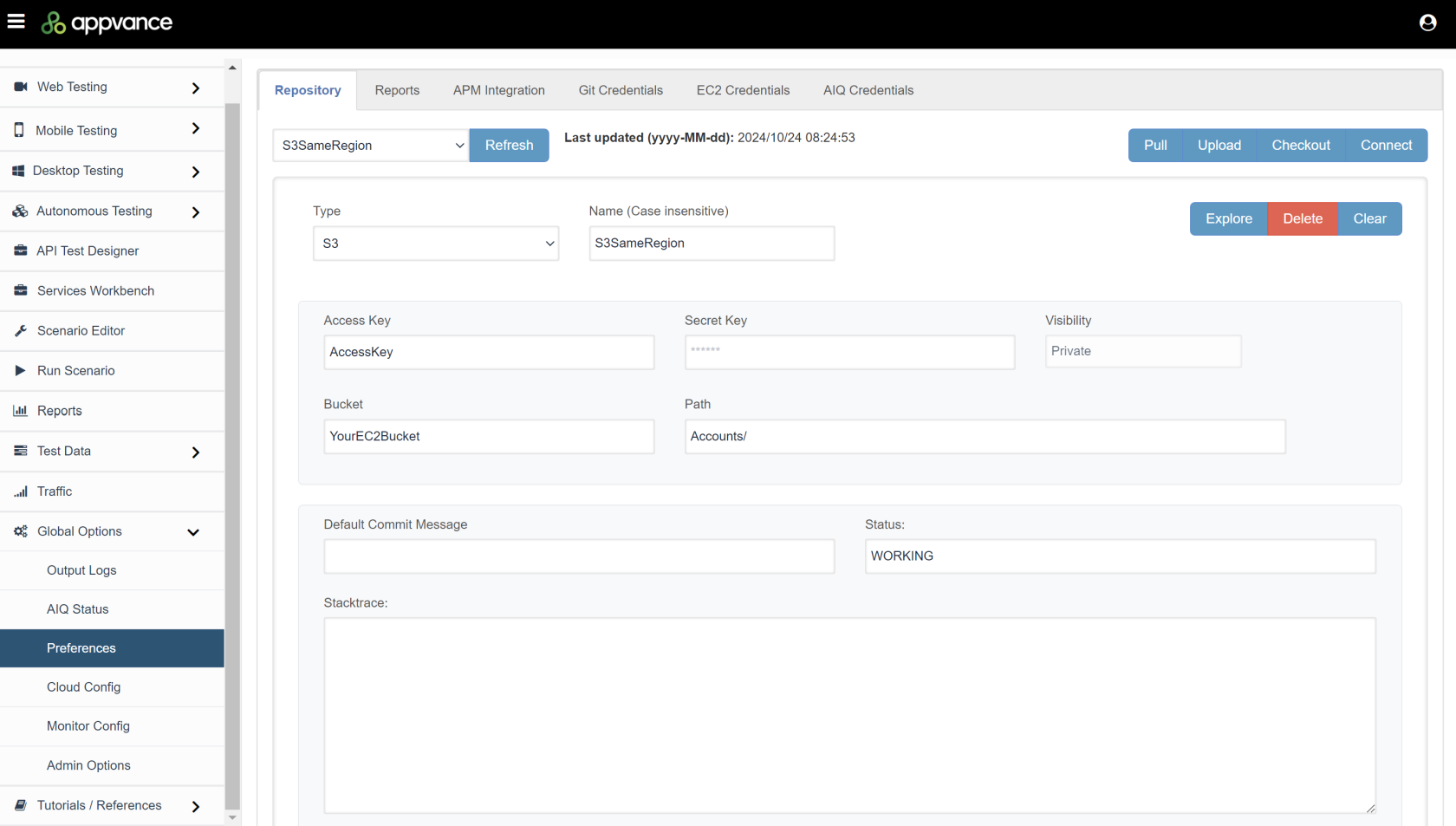
Configure the following fields as necessary. The minimumremove required fieldsevidence aretoo noted in the list.
Type - Select S3.
Name - Name of your S3 repository. Must be a unique name from the list of already created configurations.
Access Key - Amazon S3 credentials. Required field. Check with your DevOps team to get the AWS Access key.
Secret Key - Amazon S3 credentials. Required field. Check with your DevOps team to get the AWS Secret key.
Bucket - Required field.
Path - Required field.
Default Commit Message - You can specify a default commit Message. If left blank it defaults to "Appvance Commit".
Status - Define a status message for the connection.
See Repository Troubleshooting for solutions to common issues.
Last updated: MarchOctober 12,9, 20252026
If you have any feedback on this topic, please contact us at documentation@appvance.ai