
Repository Configuration in Appvance IQ
Appvance IQ allows seamless use of Git and SVN repositories. You can use them for storing your test scenarios and resource files.
Currently, the only authentication method is using user credentials for SVN and password, token, or SSH keys for GIT.
Manage Repository from File Explorer:
Manage Repository from File Explorer:
You can also configure Repositories from File Explorer
Go to any file explorer from IDE or Scenario Editor or anywhere from Appvance IQ
Click My Computer
Click Repository
Click Add New Repository link
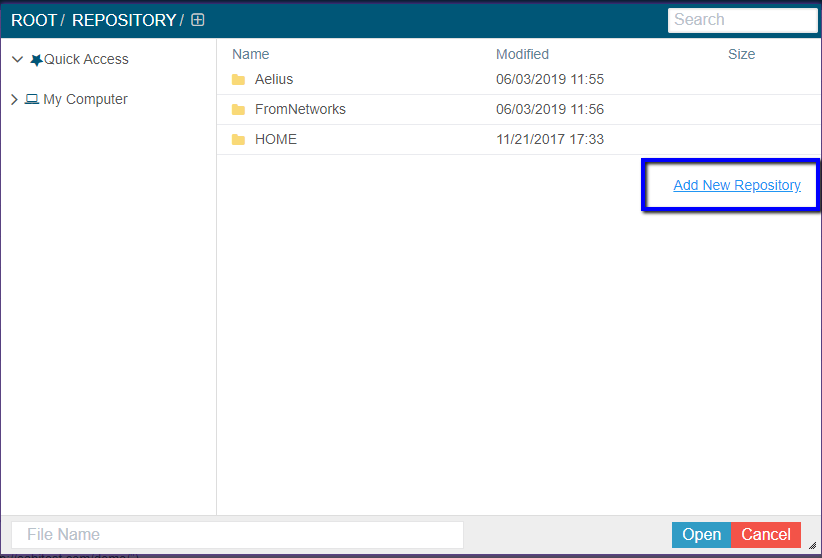
Provide all the required details of Name, Type, URL, Credentials, and Click Add Repository to add the repository from the file explorer
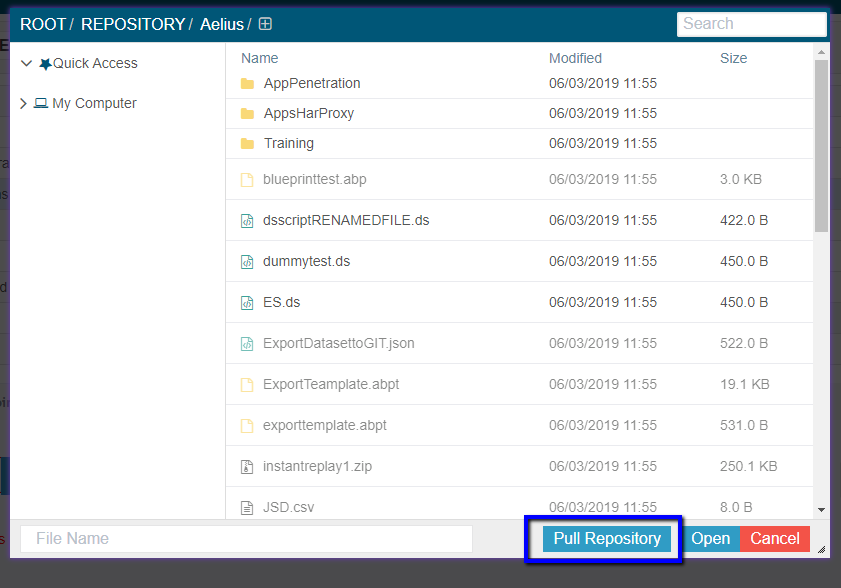
Pull Repository:
When you are inside any configured repository, you would see a Pull Repository button that would pull all the changes that happened to the Repository much like a GIT Pull command.
Note: Pull Repository button shall not be available when you are outside of any configured Repositories.
Best Practices
See the git Best Practices flowchart for more information.
Last updated: December 12, 2023
If you have any feedback on this topic, please contact us at documentation@appvance.ai