
Configure Repositories in AIQ
AppvanceUse IQthis allowsarticle seamlesswhen useconnecting ofAIQ Gitto Git, SVN, or other approved repositories for scenario, resource, and test asset storage.
What changed in this article
- Renamed the page to current AIQ terminology and shortened the title.
- Updated repository guidance around Git/SVN
repositories.configuration,Youcredentials,cantokens,useSSHthemkeys, pull behavior, and File Explorer usage. - Added security checks for
storingcredentialyourhandling,testrepositoryscenariosownership, branch strategy, permissions, andresourceavoiding secrets in committed files.
Currently,
Validation workflow
- Confirm the
onlyrepository type, URL, branch/path strategy, owner, and authentication methodisbeforeusingaddinguseritcredentialstofor SVN and password, token,AIQ. - Add or
SSH keys for GIT. Manage Repository from File Explorer:
Manage Repository from File Explorer:
You can also configure Repositories from File Explorer
Go to any file explorer from IDE or Scenario Editor or anywhere from Appvance IQ
Click My Computer
Click Repository
Click Add New Repository link
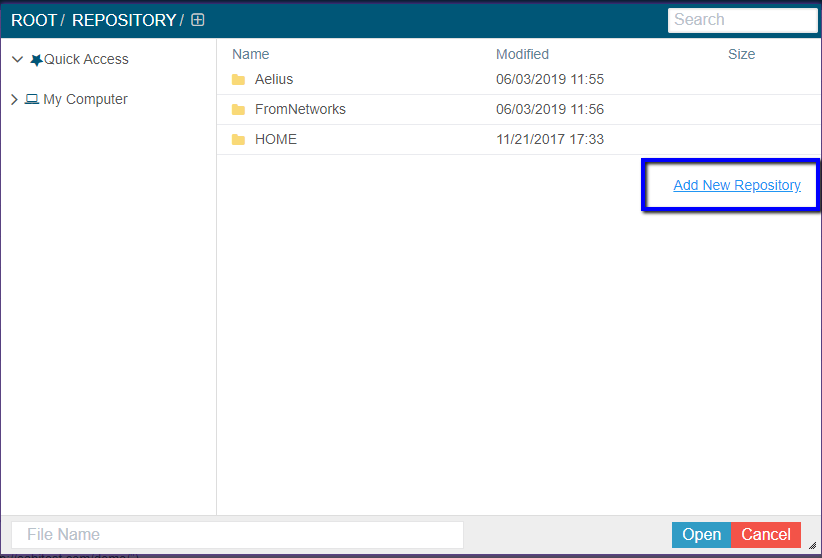
Provide all the required details of Name, Type, URL, Credentials, and Click Add Repository to addupdate the repository from the fileapproved explorer
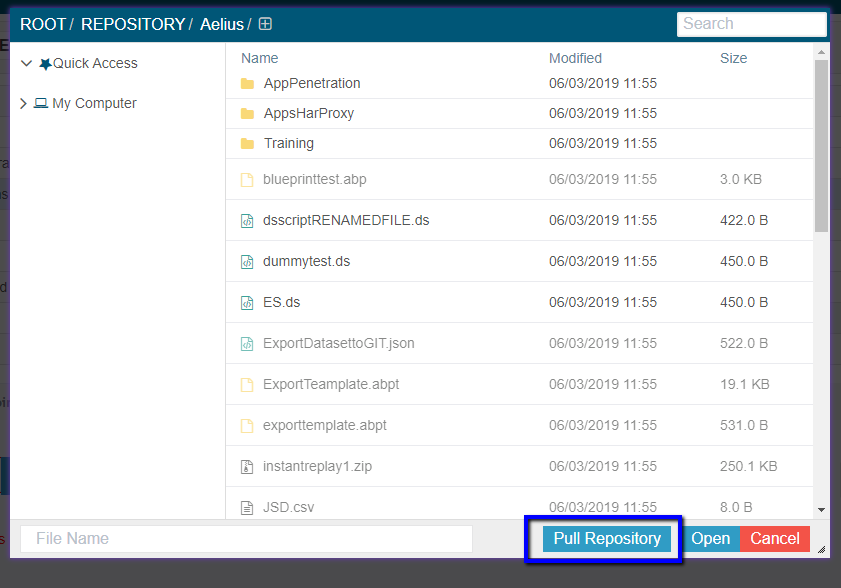
Pulland Repository:
test Whenthat youscenario/resource files are insidevisible anywithout configuredexposing repository,credentials youor wouldunrelated seerepository acontent.
PullReview Repositorynote: buttonThis thatpage wouldnow pullfocuses allon thesecure changesrepository thatsetup happenedand tooperational the Repository much like a GIT Pull command.validation.
Note: Pull Repository button shall not be available when you are outside of any configured Repositories.
Best Practices
See the git Best Practices flowchart for more information.
Last updated: DecemberOctober 12,5, 20232026
If you have any feedback on this topic, please contact us at documentation@appvance.ai.