
Creating a SVN Repository
Last
ThisFill articlein isAll retainedthe asfields, Name of the Repository, can be any name that should be unique, a legacynew referenceconfiguration forwith teamsthe thatsame stillname maintainwill SVN-backedoverride AIQany assets.previous configuration
Recommended
UseSelect
Git-based repository workflows where available for current AIQ projects.Keep SVN access limitedType toenvironmentsbethatSVN.stillProvidedependaonvalidhistorical repositories.Store repository credentials securelyUser-name androtatePassword.them according to your organization policy.
Validation workflow
Verify thatProvide theprojectentrystillpointrequiresURLSVNandbeforeclickconfiguringAcceptit.Createbuttonor validatefor the repositorypathto be configured successfully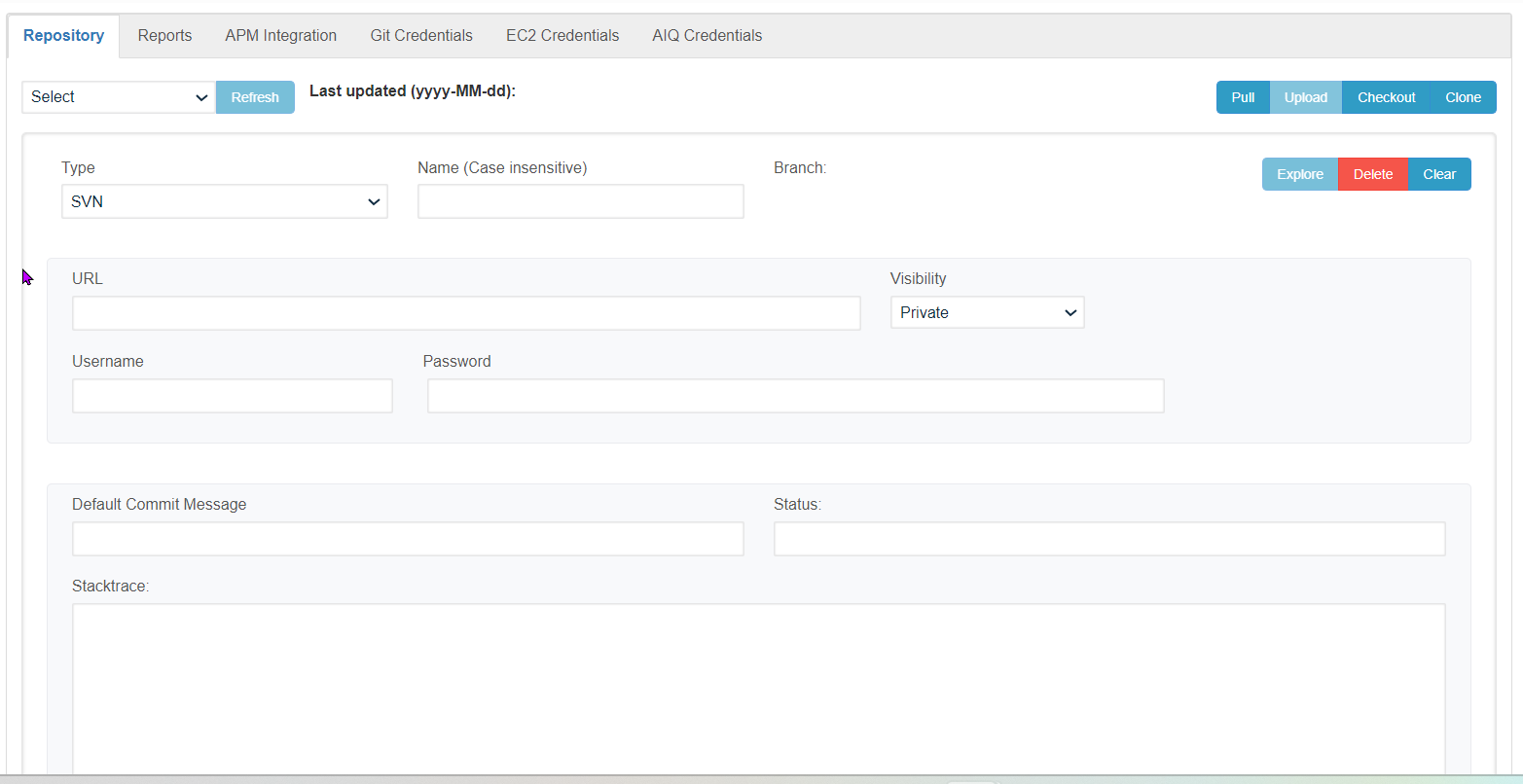
Similarly, any number of Repositories can be created, all the created repositories shall be displayed under the 'Select Repository' drop-down
Clicking on the Clear button will clear the current repository information that was made in the UI and to delete any repository user permissionshas outsideto AIQ.
Note: SVN is legacy guidance. Do not use it asclick the default'Delete' repositorybutton
Last updated: SeptemberJuly 24,17, 20262023
If you have any feedback on this topic, please contact us at documentation@appvance.ai.