
EC2 Credentials for AIQ Integrations
EC2 Credentials for AIQ canIntegrations
Use this article when AIQ needs to anaccess AWS EC2 resources. Prefer IAM roles or instance profiles whenever possible, and use static credentials only when the customer security model explicitly requires them.
Security guidance
- Prefer EC2 instance
toprofiles,runIAMtests in a Cloud Testing environment.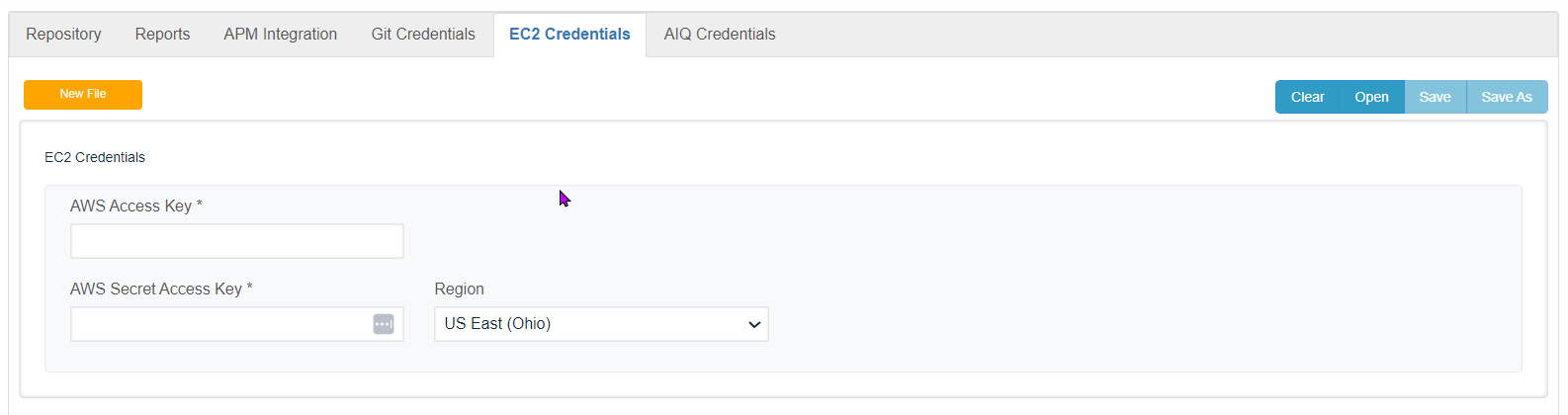
SeeonnEC2 Configuration for information on test deployment in the Amazon Cloud.The following configuration parameters must be defined: Account Nameis the account name by which AIQ securely communicates with the Amazon EC2 service.
AWS Access Key is a special security key to access the EC2 service. Managing Access Keys for Your AWS Account. You can create, rotate, disable,roles, or deletetemporary accesscredentials keysover (access key IDs and secret access keys) for your AWS account root user. Anyone who has an access key for your AWS account has unrestricted access to all the resources in your account, including billing information
AWS Secret Key Secret access keys are—as the name implies—secrets, like your password. For your security, AWS doesn’t reveal your password to you if you forgot it (you’d have to set a new password). Similarly, AWS does not allow the retrieval of a secret access key after its initial creation. This applies to both root secret access keys and AWS Identity and Access Management (IAM) user secretlong-lived access keys.
Regionnot -print Listsaccess allkeys, secret keys, or session tokens in output logs.
Validation workflow
- Confirm the
availableAWSregionsaccount,thatregion, and resources AIQ must access. - Run a small read-only validation first.
- Review AWS
supports.logsThosesuchinclude:as - Document
USowner,Eastpurpose,(N.permissions,Virginia)rotation date, and support contact.
Last updated: JanuaryOctober 29,9, 20252026
If you have any feedback on this topic, please contact us at documentation@appvance.ai