
Manage the AIQ License
AppvanceLast deliversreviewed: September 22, 2026
Use this page when reviewing, applying, or troubleshooting the freeAIQ triallicense versionfor ofan Appvanceenvironment.
Recommended withguidance
- Track license expiration, licensed capacity, and environment ownership.
- Coordinate renewals before expiration to avoid execution disruption.
- Share license files or keys only through approved channels.
Validation workflow
- Open the License area in Global Options or the supported admin location.
- Review expiration, capacity, and status messages.
- Apply a
simple commercialnew licensewith:only from - Validate
100 virtual user minutes for 15 days with 5 virtual users 5 virtual userssign-inthe cloud
5 virtual users in the grid
5 users per node
100 security requests
50 production monitors with no access to run any Appvance AI
Access to Appvance support
Access to resources such as:
Appvance User Guide
Training videos
Confluence wiki and andtest Knowledgeexecution Bases
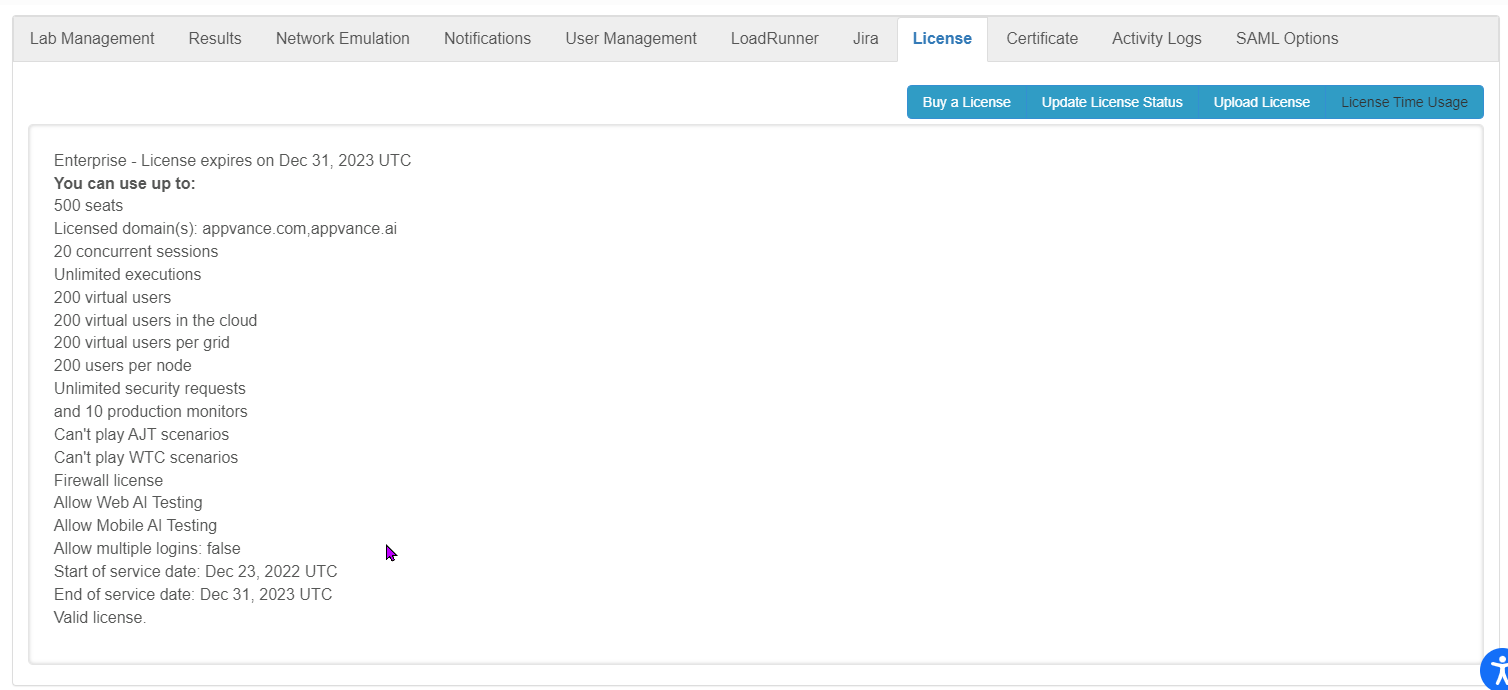
Accessing the Licenses page requires Administrator level access.
The following options are available from this page:
Buy a License opens the Appvance website. From there you can contact Appvance Support to investigate licensing details.
Update License Status can be used to refresh aafter license andchanges.
Upload License is used to upload the license file (.lic) provided by Appvance. Clicking Upload License will open up the File Manager to browse for the license file that needs to be uploaded.
License Time Usage downloads a report (in csv format) with information on all the scenarios that have been run, including therenewal date and theowner.
Note: userDo minutesnot spentpaste onlicense eachkeys ofinto thepublic scenariostickets, andscreenshots, theor scenario file used. documentation.
Last updated: JulySeptember 10,22, 20232026
If you have any feedback on this topic, please contact us at documentation@appvance.ai.