
Results
Appvance IQ uses a relational database (RDBMS) for its Repository. AIQ logs every test operation, test step, and monitored resource to the Repository. AIQ supports MYSQL and Oracle databases. It is required to configure the databases to store the results. The results page has the option to configure these databases in Appvance IQ.
Configuring Database as Results Repository
Start Appvance IQ and login to Appvance IQ as an Administrator
Select the Admin Options tab from the Global Options
Select the Results tab
Click Enable check-box for all the options to show
Select MySQL or Oracle under Engine depending on what database needs to be configured
Provide valid user names and passwords for the database
URL of MYSQL or Oracle by default would be 'jdbc:mysql://localhost:3306/aiq?useSSL=false' or 'jdbc:oracle:thin:@localhost:1521:aiq' respectively. When the database is installed and configured in the same instance as the controller machine, then localhost could be used but has to be changed to a different DNS depending on the database URL.
An AWS RDS instance Endpoint URL would look like this: sqlserver.c7nn5t4czzya.us-west-2.rds.amazonaws.com
Provide the valid name of the database
Click Accept to see the changes being saved successfully
All other fields can be left as default
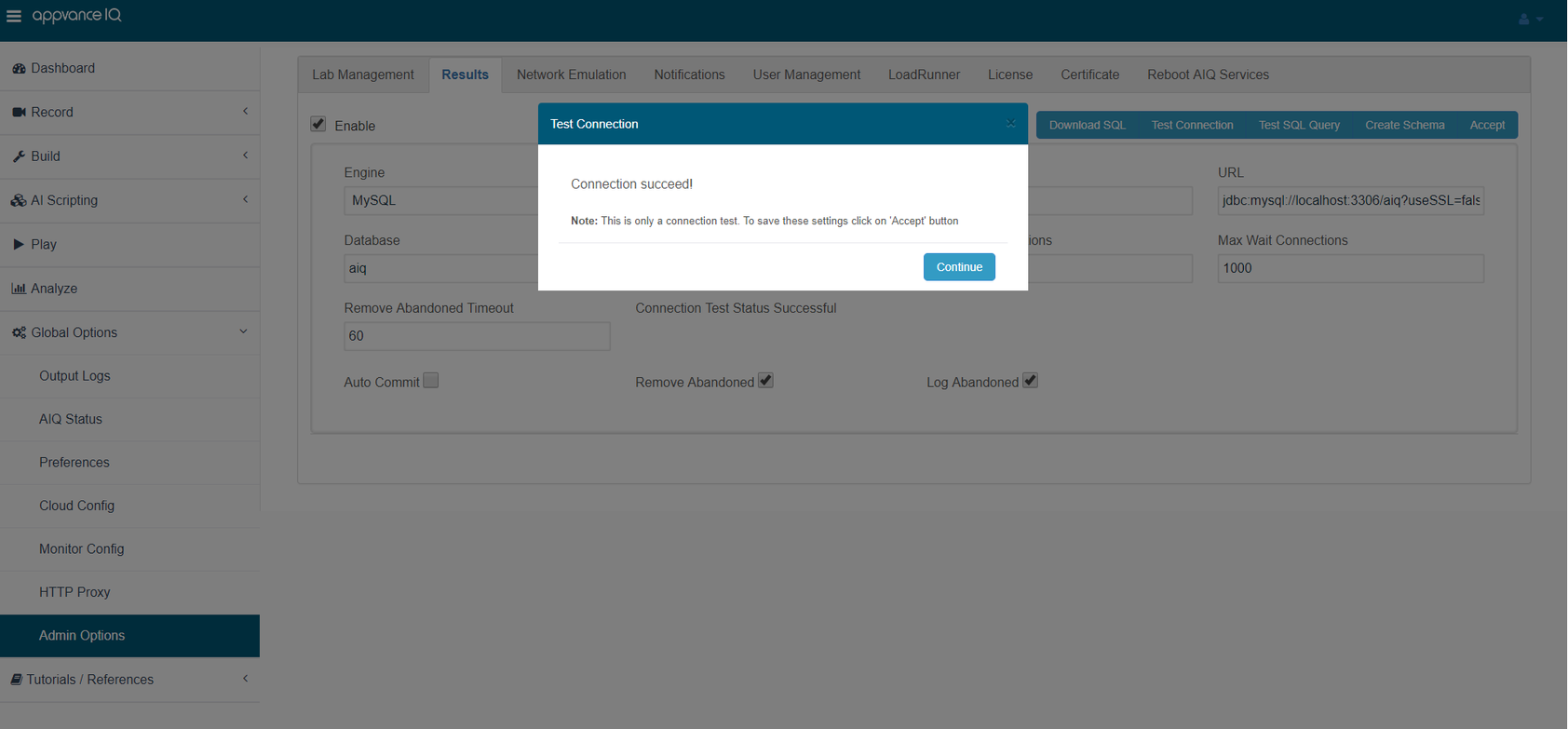
Click 'Test Connection' to see the message Connection Succeed!
Last updated: July 17, 2023
If you have any feedback on this topic, please contact us at documentation@appvance.ai