
SAML Options
LastSAML reviewed:(Security SeptemberAssertion 24,Markup 2026Language) enables you to access multiple web applications using one set of login credentials. This is also known as SSO (Single Sign-On).
SAML options connectAppvance AIQ authenticationsupports SAML 2.0 protocol SSO. Appvance behaves as an application or service provider in a SAML SSO architecture.
It has been tested against SAML identity providers, including Okta (>http://okta.com ) and Auth0 (>https://auth0.com/ ) and Akamai (>https://www.akamai.com/).
Full SAMLv2 specs can be found here >http://saml.xml.org/saml-specifications
Security overview of SAMLv2: >http://docs.oasis-open.org/security/saml/Post2.0/sstc-saml-tech-overview-2.0.html
Configuring SSO
When using SSO the standard login still applies. Only the appvance owner user can enable SSO.
Login to AIQ as an administrator user.
Navigate to Global Options > Admin Options > SAML Options.
There you can define the SAML configuration
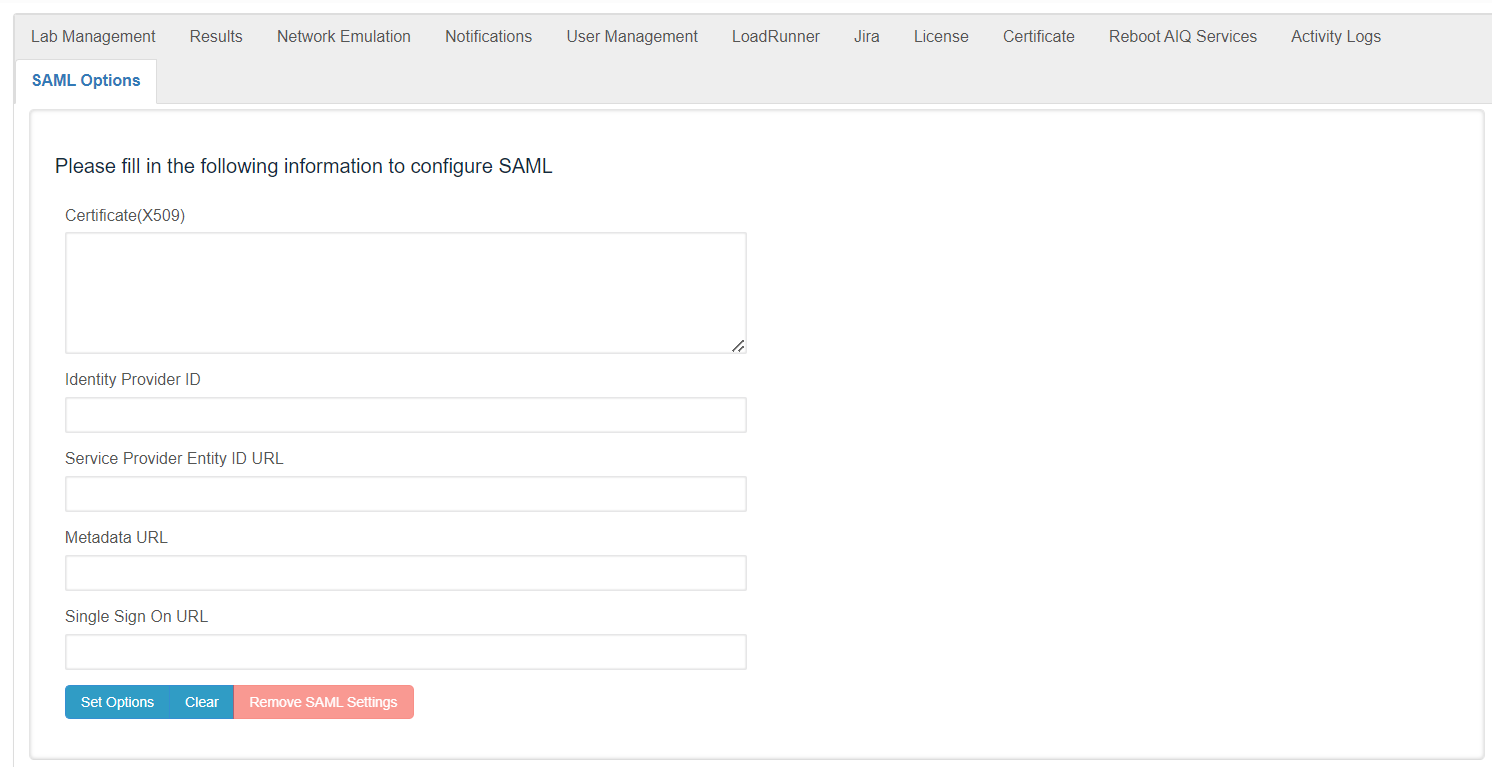
Every field is required. Following are the specs for each field. Configure the following fields:
Certificate (X.509) - This is the certificate of SAML usually they have the next format
-----BEGIN CERTIFICATE----- ... -----END CERTIFICATE-----Identity Provider ID - An Identity Provider is a federation partner that vouches for the identity
providerofforasingleuser.sign-on.The Identity Provider authenticates the user and provides an authentication token (that is, information that verifies the authenticity of the user)RecommendedService
guidanceProvider
Appvance uses the Service Provider Entity ID URL (also called audience restrictions) as the consumer URL.
Metadata changesURL - Some SAML IDP provides some configuration requirements, usually in a metadata URL. IF the IDP does not provide this field, you can use Single Sign-On URL
Single Sign-On URL - This is the URL the user will be redirected to if they choose to
Upon setting the values, the welcome page SSO button will become enabled. By default, it is disabled.
The SSO user's role is always “User”. They will start with the identity-providerstring owner before updating SAML metadata.
Validation workflow
Collect IdP metadata, entity ID, ACS URL, and certificate details.Enter or updateby the SAMLsettingsIDPinservice.AIQ.Testlogin with a limited user group before broad rollout.
Configuring your the Identity Provider
Note:You Changingwill SAMLneed canto affectprovide userthe access.following ConfirmURL ato fallbackthe adminIdentity accountProvider beforethat savingpoints productionto SSOyour changes.AIQ controller server (app service provider):
https://<aiq controller DNS or IP>:8443/AppvanceServer/saml
Last updated: SeptemberJuly 24,17, 20262023
If you have any feedback on this topic, please contact us at documentation@appvance.ai.