
Changing Time Zones in Jenkins
By default, the timezone is in UTC.
If you want to change the timezone to a different one:
Navigate to Build Triggers.
Check the Build Periodically option.
Define the Schedule as:
TZ=EST5EDT
0 16 * * 1-5
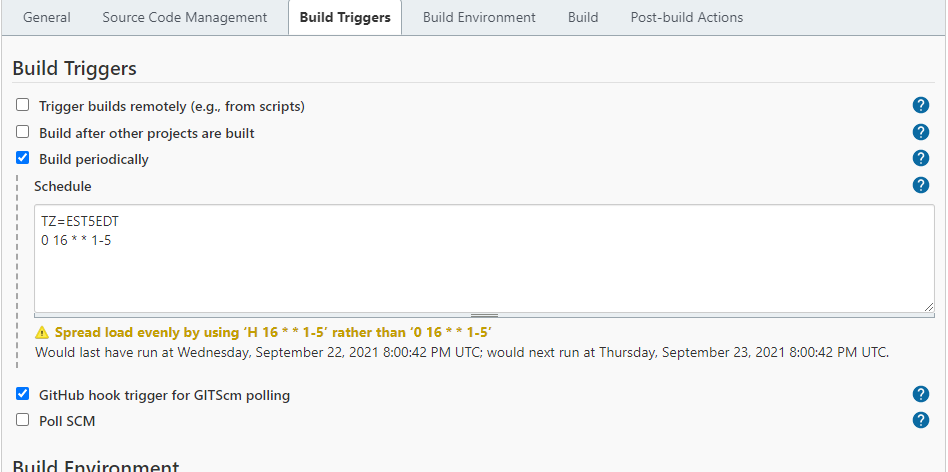
This means we are setting the timezone to be EST and setting the run time at 16:00 PM from Monday to Friday.
For more timezone codes, please refer to>Time Zones information at Java Locale for “English (United States)” (en-US) at LocalePlanet.
Jenkins schedule behavior
Jenkins evaluates the TZ prefix for the cron entry. Keep the timezone identifier and cron expression together in the schedule field, and verify the resulting run time in the Jenkins job history after saving.
Example interpretation
In TZ=EST5EDT followed by 0 16 * * 1-5, Jenkins schedules the job at 16:00 on weekdays in the specified Eastern time rules. Confirm daylight-saving behavior for the timezone used by your environment.
Last updated: AprilOctober 28,15, 20232026
If you have any feedback on this topic, please contact us at documentation@appvance.ai