
Parametrized Jenkins Project
Use case:
To update the URL of the AUT, based on the environment chosen
To run A scenario or B scenario depending on the environment chosen.
UseNOTE: aIn parameterizedthe Jenkinsbuild.xml projectfile, whenThe ant.lib/ant-contrib-1.0b3.jar file is needed for the conditional IF support needed in setupEnvironment target
The file can be downloaded from >here
Folder Structure:
Download the >zip from GITRepo which has the folder structure that has been used for this use case as an AIQ-relatedexample.
In controlledthe runtimeroot valuesfolder, suchyou aswill environment,find suite,build.xml
ant.lib executionfolder profile.holding Keepthe supporting lib required for the if statements used in build.xml
Inside Folder1, you will have ec2.creds file, controller.json file
Also, there are CSV files, Creds_prod.csv, Creds_Staging.csv files, these are the files that are mentioned in setUpEnvironment section, depending on the choice from Jenkins, the right file shall be picked and replaced inside the ExplicitValidation folder which holds the other CSV file
When Production is called, it only runs the production scenario, and also it picks the file that belongs to production and it replaces it with the actual CSV file used hence the production scenario is used with the right files
Setting the CI Tool (Jenkins used in the example)
Install and set up Jenkins
Login to Jenkins as Admin
Create the orchestrationproject
In General - provide the required description
Check This project is parameterized check-box and keepdepending AIQon configuration,the credentials,choice, choose the parameter, in this example, Choice Parameter was chosen to provide the choices of the Environment as Production and testStaging
Choose Source Code Management, select the repository, and provide your credentials.
Under branches, provide the branch if the files are in approveda locations.
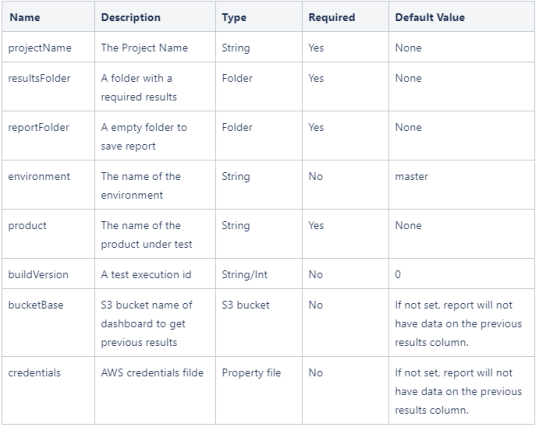
Recommended parameters
Target environmentbranch orbasemasterURL.if the files are in the master branch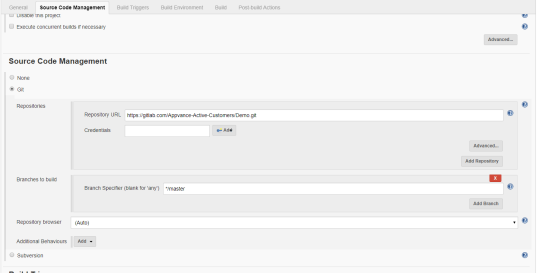
Under orBuild executionTriggers profile- name.Choose Delete Workspace before building starts
This will delete the previous results which are required so each time the dashboard is created fresh with fresh results. All the history files will already be stored in the mentioned S3 bucket in build.xml file
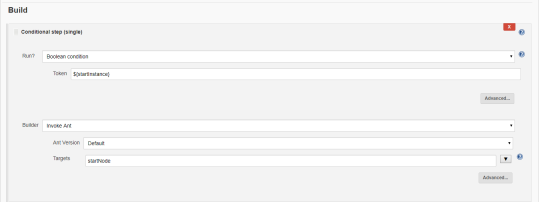
Under orthe Testbuild Nodeoption group- whenChoose applicable.the following
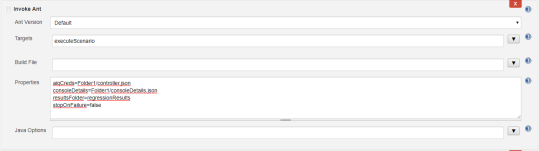
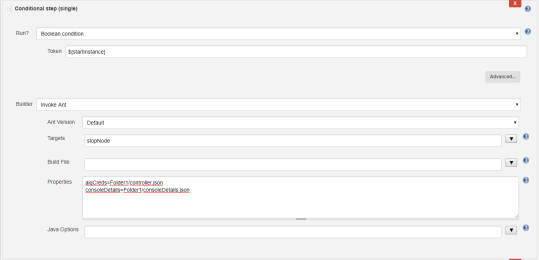
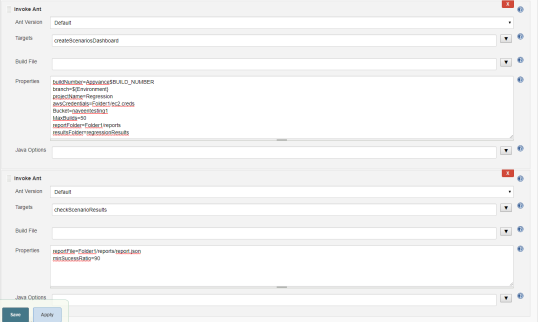
Save orthe releaseproject
Click Build with Parameters
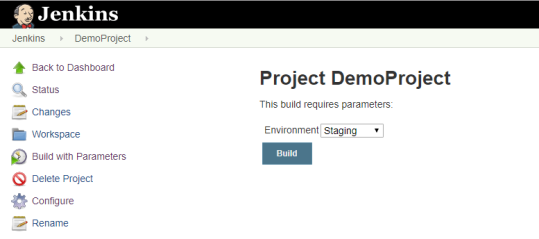
Good
Choose
UsetheclearEnvironmentparameterfromnamesthe drop-down anddefaultsclickthatBuildare
Jenkins non-productionwill execution.
Last updated: SeptemberJune 8,26, 20262023
If you have any feedback on this topic, please contact us at documentation@appvance.ai