
Correlation in JMeter with an Example
LastWhat reviewed:is Septembercorrelation 22,and 2026why it is required?
UseCorrelation is the most important aspect of scripting. It generally includes fetching dynamic data from preceding requests/calls and posting it to the subsequent requests.
Let's take an example to find out why exactly we need correlation
Suppose we have recorded a scenario in JMeterwhich
The user enters login details and clicks the OK button
The home page opens and the user takes further actions
Now, if we just playback this script, the test will fail even for a single user. This is because of the authentication mechanism used. When we log in to a website, session variables are dynamically created. These session variables are passed to the subsequent requests and help validation and authentication of the actions performed. So, one cannot just record and playback the requests having these variables. Here, we need to correlate the web requests with the dynamic valuesvariables. And for correlation, we need to use the "Regular Expression Extractor" which makes use of regular expressions.
A brief insight into regular expressions
Regular expressions are used to fetch data from onea string based on a search pattern. Basically, what we do is in order to extract any value (generally a dynamically created value) from a string (text response), we define a left bound of the variable than some wildcard characters and then a right bound (Left Bound)(Wildcard Characters)(Right Bound)
For example: If we have a text response mustlike;
.......__EVENTVALIDATION"value="weriudflsdfspdfusdjfsisdpfjpsdfohsdihffgdfgpdfjsdjfpj" />...
And we need to extract the value of the Event validation variable using regular expressions; the regular expression for the same will be
__EVENTVALIDATION" value="(.+?)" />
where, Left Bound = __EVENTVALIDATION" value="
Wildcard characters = (.+?)
Right Bound = " />
If you do not want to get deeper into regular expressions, then the wildcard characters (.+?) would suffice in most cases.
For more information on regular expressions and reusedmeaning of each wild card character visit;
http://www.regular-expressions.info/tutorialcnt.html
Regular Expression Extractor
Coming back to JMeter, consider an example where we have two operations-
The user launch website
The user fills in later requests during AIQ executions.
Recommended guidance
Identify session IDs, tokens, hidden fields,details andotherclicks on the OK button
Now, the call user launch website creates a dynamic valuesvariable beforeevent scalingvalidation load.
Steps for correlating the Event validation values
Run the script containing both the above-stated operations
Go to the Response tab (Text mode) in the "View Result Tree" listener of the "User launch website" operation. BTW, we see the second operation "User fill details and click OK button" in red because it is not yet correlated
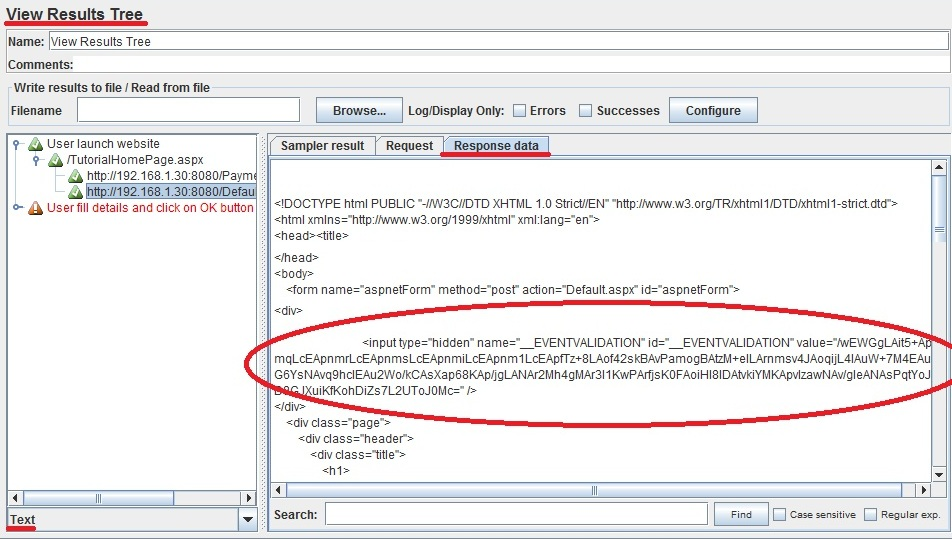
Create a Regular expression for extracting the value of the Event validation variable's value. As stated above the R.E. for this will be-
__EVENTVALIDATION" value="(.+?)" />
Go to HTTP request under "User Launch Website" transaction controller -> Add -> Post Processor -> Regular Expression Extractor.
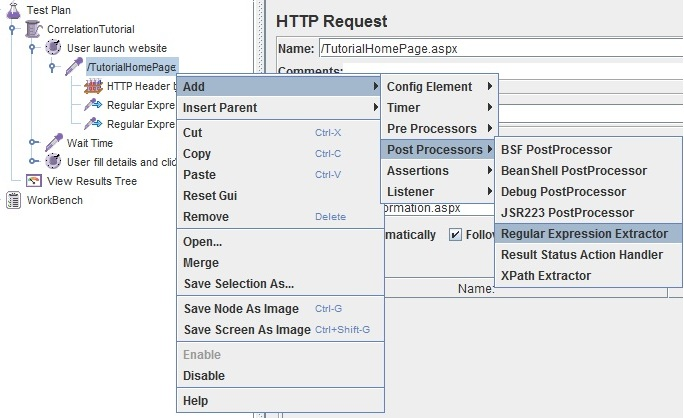
Adding "Regular Expression Extractor" control
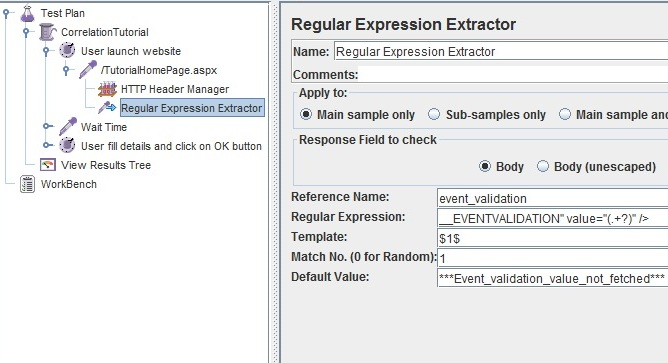
R.E. Extractor Parameters Filled
The reference name inserted is the name of the variable created that will capture the Event validation value generated by the HTTP request under the "User launch website" operation
Now pass this variable to the subsequent HTTP request under "User fill details and click OK button" as a post request- overriding the already present hard-coded values.
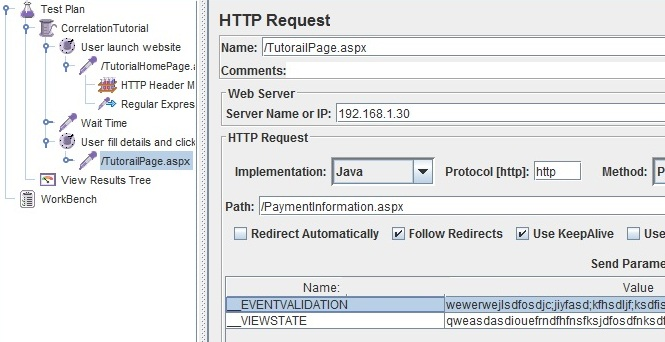
Request without correlation (Hardcoded values)
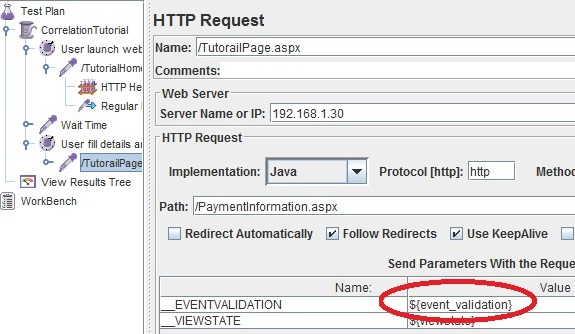
Request with onecorrelation user(Dynamic beforevalues)
Run the test plan again. All green? That's it.
This was all about correlation. In order to get a loadgood test.
Validationof workflow
correlation Record(orinspectscripting for that matter), we need to have a good understanding of two things- therequestdynamicsequencevariables generated by the programming languages andfindRegulardynamicexpressions.values.Addthe appropriate JMeter extractor for each value.Reference extracted variables in downstream requests.Run a single-user debug execution and confirm values update each iteration.Scale gradually and monitor errors that indicate missed correlation.
Note:SPREE APP
Missed
Let us take a working example of a Spree App where we will be recording the application and then correlating it
The URL for this Spree App is agiven commonbelow cause:
http://52.42.228.15:8888/
We will be using the above URL to record the below actions
Navigating to the home page
Navigating to the Login page
Entering credentials and clicking on Submit
Clicking on ruby-on-rails-tote
Adding to Cart
Clicking on Products
Clicking on apache-baseball-jersey
Adding to Cart
Clicking on MyAccount
Navigating to the Home page
Logging out
Actions from Step 5 to Step 7 may be repeated depending on the requirement of falsethe failuresuser. Once the above action is recorded user runs the recorded and checks the Output as shown below.
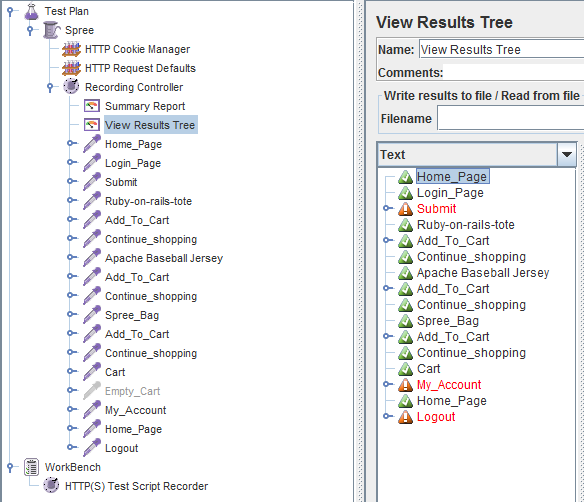
As you can see from the above screen-shot there are a few requests like “Submit”, “My Account” and “Logout” that have failed.
By Checking the “Login Page” response data we find that there is an authentication token that is generated that is unique and should be used for all the failed transactions. The screenshot is given below.
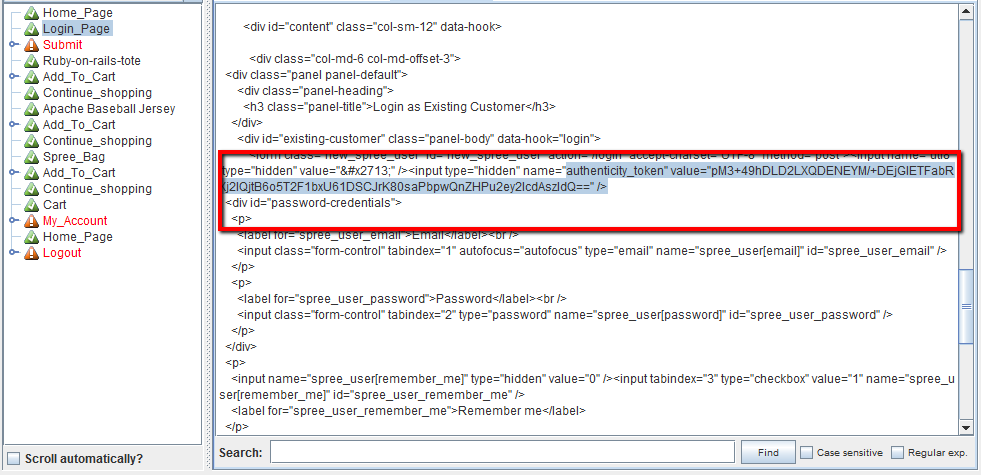
As shown above we will have to use the Regular Expression extractor to extract the token and to be used in performancethe tests.Submit transaction.
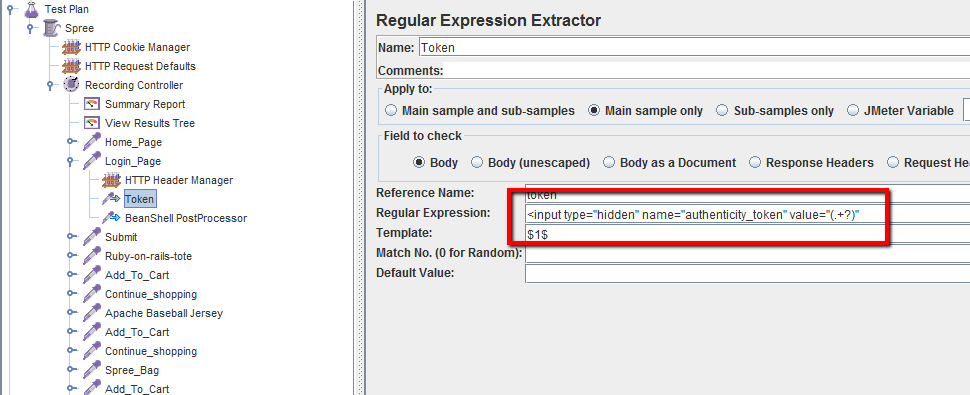
The Reference name should be noted and the same should be used in the Submit transaction as shown below.
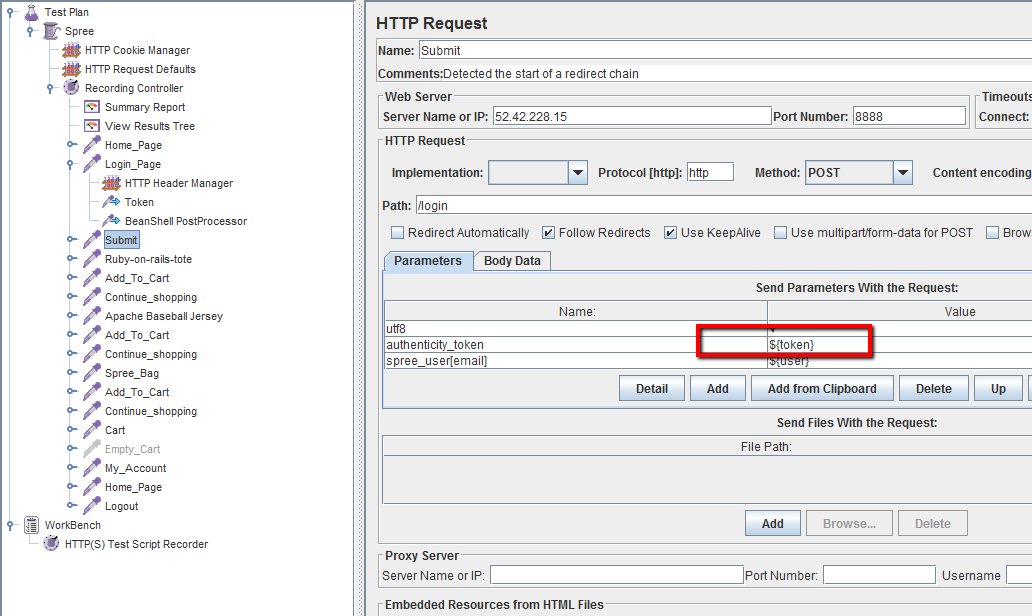
Replace the same in the transaction which needs the Authenticity token. Save the script and run the test again.
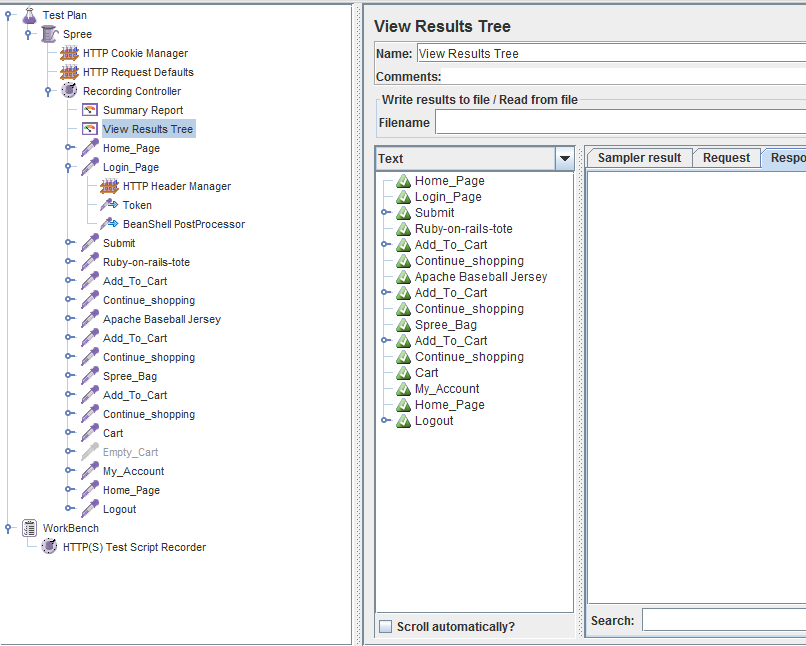
Since we have extracted the token and used it in the transactions wherever necessary all the steps would now pass.
Last updated: SeptemberJuly 22,05, 20262023
If you have any feedback on this topic, please contact us at documentation@appvance.ai.