
Create an AWS IAM Access Key for AIQ Integrations
To
Create create,an modify,AWS IAM Access Key for AIQ Integrations
Create an AWS IAM access key only when an AIQ integration requires programmatic AWS access and a role-based approach is not available. Follow the customer's cloud security policy and use the minimum permissions required.
Security checklist
- Prefer IAM roles, temporary credentials, or
deleteworkloadyouridentityownwhenIAM user accesssupported. - Create keys
(console)for - Attach
Useayourleast-privilegeAWSpolicyaccount ID or account alias, your IAM user name, and your password to sign inscoped to theIAM console.For your convenience, therequired AWSsign-in page uses a browser cookie to remember your IAM user nameservice andaccount information. If you previously signed in as a different user, chooseSign in to a different accountnear the bottom of the page to return to the main sign-in page. From there, you can type your AWS account ID or account alias to be redirected to the IAM user sign-in page for your account.To get your AWS account ID, contact your administrator.
In the navigation bar on the upper right, choose your user name, and then choose Security credentials.
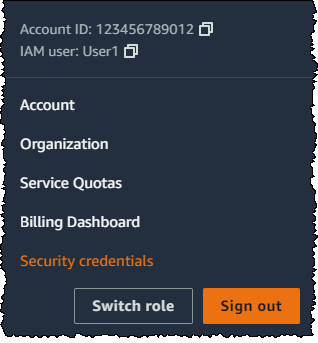
Do one of the following:
To create an access key:
In the Access keys section, choose Create access key. If you already have two access keys, this button is deactivated and you must delete an access key before you can create a new one.
On the Access key best practices & alternatives page, choose the Command Line Interface CLI option and then choose Next.
(Optional) Set a description tag value for the access key. This adds a tag key-value pair to your IAM user. This can help you identify and rotate access keys later. The tag key is set toStore the access key id.and Thesecret tagin valuean isapproved setsecret tomanager or secured AIQ configuration.
Validation workflow
- Test the integration with the minimum required permissions.
- Confirm logs do not print the access key
descriptionorthat you specify. When you are finished, chooseCreate accesssecret. - Document key
.owner, purpose, creation date, rotation date, and AWS account.
OnDisable the Retrievekey access keys page, choose either Show to revealif the valueintegration ofis your user's secret access key,retired or Downloadreplaced .csv file. This is your only opportunity to save your secret access key. After you've saved your secret access key inby a securerole-based location, choose Done.
For more details see the Amazon AWS documentation: Managing access keys for IAM users - AWS Identity and Access Management (amazon.com)
Last updated: October 31,8, 20242026
If you have any feedback on this topic, please contact us at documentation@appvance.ai