
Installing Glassbox on a TestNode
Glassbox monitoring helps diagnose performance bottlenecks in load tests. Install Glassbox on a TestNode with the following instructions.
Copy glassbox.war to Appvance_home/TestNetwork/TestNode/webapps
Restart the TestNode. If you are installing Glassbox on the localhost TestNode installed with AIQ then restart AIQ.
Browse http://localhost:8080/glassbox. This runs the Glassbox installer.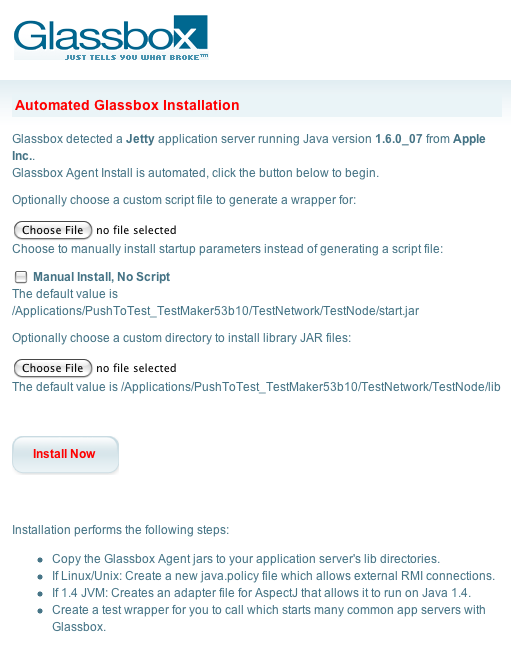
Click the Install Now button
The installation has the effect of creating a glassbox directory in Appvance_home/TestNetwork/TestNode/lib with several Glassbox files. AIQ comes with the AspectJ libraries already loaded and configured in the TestNode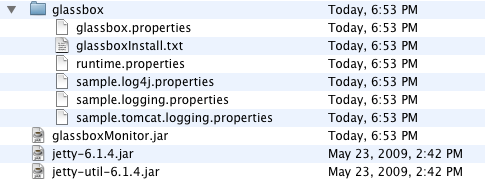
Stop the TestNode using the shutdown.bat (or shutdown.sh) command. If you are installing Glassbox on the localhost TestNode in AIQ then exit AIQ
If you previously installed the Example Services for the AIQ Tutorials, you must remove the Appvance_home/TestNode/webapps/openamr.war and calendar.war. These tutorial applications are not compatible with Glassbox
Use a text editor to add the following to Appvance_home/TestNetwork/TestNode/startup.bat for Windows or startup.sh for Unix, Linux, and Mac OS
-Dglassbox.install.dir=./lib/glassbox
Start the TestNode using the startup.bat (or startup.sh) command. If you are installed Glassbox on the localhost TestNode in AIQ then start AIQ
Browse http://localhost:8080/glassbox
Last updated: April 01, 2024
If you have any feedback on this topic, please contact us at documentation@appvance.ai