
Installing Glassbox on a TestNode
Recommended
Glassbox guidancemonitoring
helps diagnose performance bottlenecks in load tests. Install Glassbox on ana TestNode with the following instructions.
Copy glassbox.war to Appvance_home/TestNetwork/TestNode/webapps
Restart the TestNode. If you are installing Glassbox on the localhost TestNode installed with AIQ Testthen Noderestart onlyAIQ.
Browse http://localhost:8080/glassbox. This runs the integrationGlassbox isinstaller.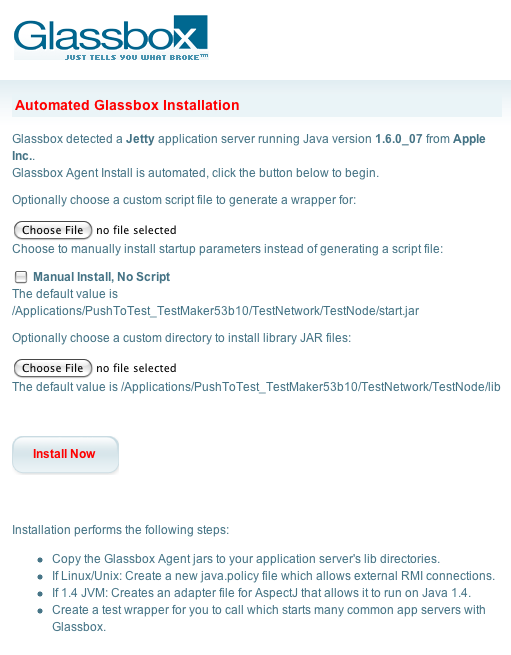
Click the Install Now button
The installation has the effect of creating a glassbox directory in Appvance_home/TestNetwork/TestNode/lib with several Glassbox files. AIQ comes with the AspectJ libraries already loaded and configured in the TestNode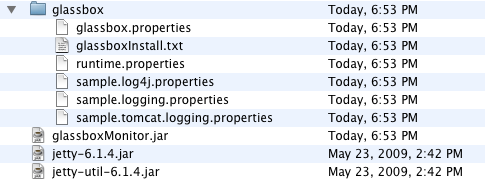
Stop the TestNode using the shutdown.bat (or shutdown.sh) command. If you are installing Glassbox on the localhost TestNode in AIQ then exit AIQ
If you previously installed the Example Services for the targetAIQ environmentTutorials, you must remove the Appvance_home/TestNode/webapps/openamr.war and thecalendar.war. TestThese Nodetutorial ownerapplications understandsare not compatible with Glassbox
Use a text editor to add the performance,following privacy,to Appvance_home/TestNetwork/TestNode/startup.bat for Windows or startup.sh for Unix, Linux, and monitoringMac impact.OS
Coordinate installation with application, security, and observability teams.-Dglassbox.install.dir=./lib/glassbox
Before
ConfirmStart the TestNode using the startup.bat (or startup.sh) command. If you are installed Glassbox
version,on the localhost TestNode in AIQversion,thenTeststartNodeAIQoperating
Browse version,http://localhost:8080/glassbox
Post-install validation
Restart only the required services or host components.Run a small Scenario Editor smoke test.Confirm Glassbox captures expected sessions without exposing sensitive data.Monitor Test Node CPU, memory, browser stability, and execution time after installation.
Last updated: OctoberApril 6,01, 20262024
If you have any feedback on this topic, please contact us at documentation@appvance.ai