
Legacy Team Foundation Server Integration Reference
BelowLast arereviewed: examplesSeptember with30, screenshots2026
This howpage tois configureretained TFSas toa setlegacy upreference andfor runteams that still maintain AIQ scenarios.
The integration of AIQintegrations with Team Foundation Server isor possibleAzure toDevOps achieveServer-era through the configuration of Ant tasks as an additional phase in the build process of the project within this system.workflows.
Appvance AI Plug-in for TFS is located in git at: https://gitlab.com/appvance/AppvanceRestClient.git
and the branch 'TFSIntegration' has the 'build.xml' where you will be adding the ant tasks to run scenario files.
The first step is to create your TFS account, go to Microsoft Visual Studio Page and click-free account under Visual Studio Team Services and create your free account using your Microsoft account
After successfully creating your account, log in to your TFS domain using the credentials and the domain created (Ex: https://appvance.visualstudio.com/)
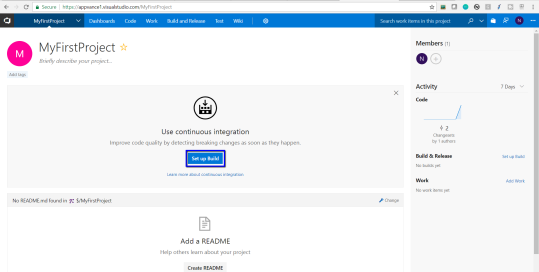
After you log in, you will see no projects by default, click the 'Set up Build' button under 'MyFirstProject'
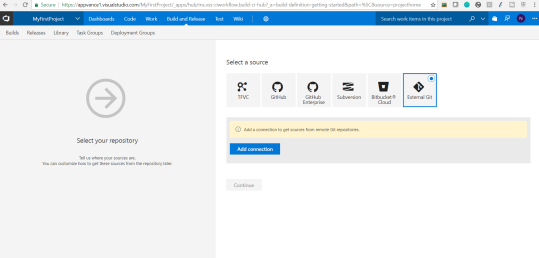
The next step would be to choose the source, since ours is External GIT, choose External GIT and click Add connection
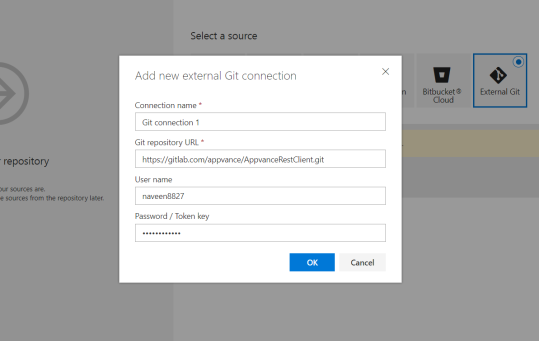
Provide Connection Name, GIT Repository URL, and your GIT account credentials, and click OK for the connection to be added
After clicking OK, a message would be displayed of connection authorization and you will have to mention the branch as 'TFSIntegration' since the related files and the 'build.xml' are located in that branch
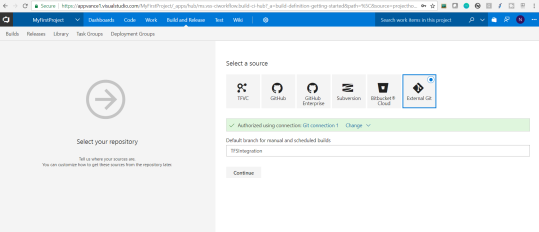
Click Continue
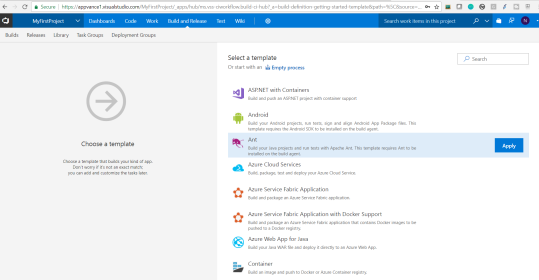
In the next step for selecting a template, Choose 'Ant' since our job is going to use 'Ant' builds. Click Apply
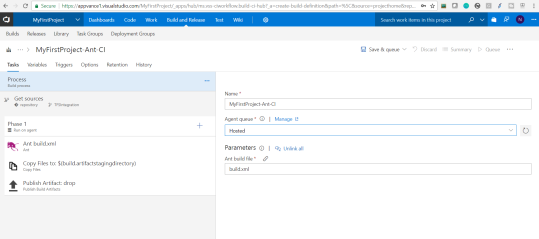
Under Tasks, mention the Agent queue to be 'Hosted' and Parameters to be 'build.xml'
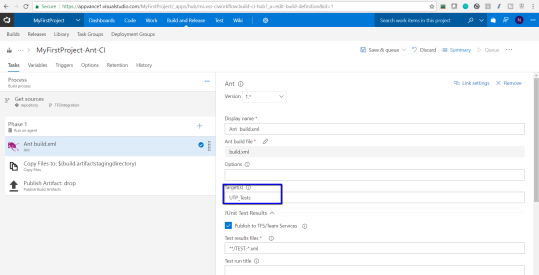
Select Ant 'build.xml', and mention the target to be 'UTP_Tests' as shown below
About Targets and 'build.xml' file:
Now lets talk about what is 'UTP_Tests' that is mentioned under Target and also about 'build.xml' file
amazonaws.com/appvanceivy/projects/CIPlugin/master/latest/ivy/CIPluginNoDeps.jar" dest="CIPluginNoDeps.jar"/>
<java classname="com.appvance.enterprise.ci.CIPlugin" failonerror="true">
<arg value="http://REMOTE_MACHINE_DNS:8080"/>
<arg value="$scenarioFilePath"/>
<arg value="$username"/>
<arg value="$password"/>
<classpath refid="IvyPath"/>
</java>
</target>
In this example: you will notice the following and also these are the ones that need to be
What changed based on your environment and examples.
<target name="UTP_Tests" description="Triggers custom task for AIQ Tests Scenario" depends="init_test_path">
In this, you will notice the target name that needs to be exactly matching with the target name in the TFS build.
<arg value="http://REMOTE_MACHINE_DNS:8080"/>
Remote Machine DNS: Public URL of the remote machine where AIQ will be running that will be used to run the test scenario located.
Example: <arg value="http://ec2-x-x-x-x.us-west-2.compute.amazonaws.com:8080"/>
<arg value="$scenarioFilePath">/
Scenario File Path: File path in the remote machine where the scenario file is located, you must provide the full file path including the .scenario file name.
Example: <arg value="C:\AIQ_Builds\appvance.scenario"/>
User-name (user-name): User-name to log-in into AIQ.
Password (password): Password of the given user name to log in to AIQ.
The next step in this processarticle
is
- Marked TFS integration as legacy because many teams have moved from Team Foundation Server to
modifyAzure DevOps Services or newer CI/CD integrations. - Added checks for repository URL, credentials/token handling, branch/path mapping, build triggers, artifact ownership, and migration planning.
- Warned against storing passwords in integration configuration and recommended maintained token-based access where supported.
Validation workflow
- Confirm whether the
project´senvironmentbuild.xmlstillfileuses TFS/Azure DevOps Server or should migrate toaddathecurrentcustomintegrationAntpath. - Validate
Taskrepositoryinaccess,ordertokentoscope,invokebranch/paththesettings,AppvanceandCIartifactPlug-inretrievalexecutor,withthisataskcontrolledmusttest. - Document
invokeownershiptheandmainmigrationclassstatusnamedso"CIPlugin"legacywhichTFStakes the above-mentioned arguments (all of themdependencies arerequired):not expanded accidentally.
You can add as many as Ant tasks to your 'build.xml' file to call many scenarios to run from TFS
ComingReview back to the build being created in TFS:note:
Once all the above are done, click the 'Save & queue' option, you will get a 'Save build definition and queue' dialog, and click the 'Save & queue' button again
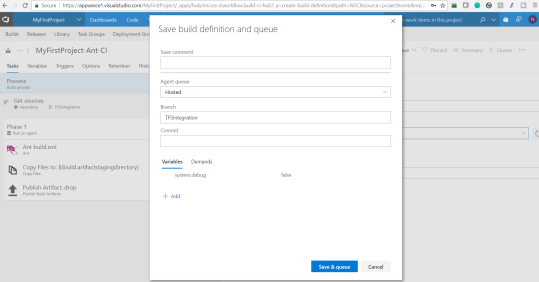
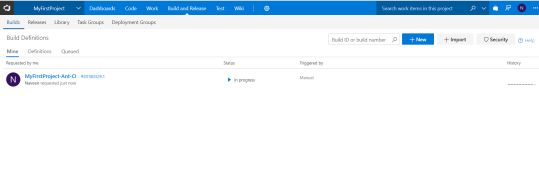
The project gets created and you will notice the status in the build definitions
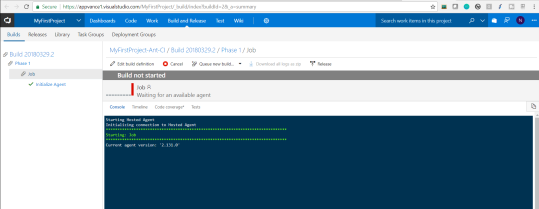
Clicking the job will show you details about the build, the buildpage is started,now theclearly progress,labeled andas thelegacy successrather orthan failurecurrent statusdefault ofintegration the buildguidance.
If failed, the logs shall show the reason for the failures for debugging purposes
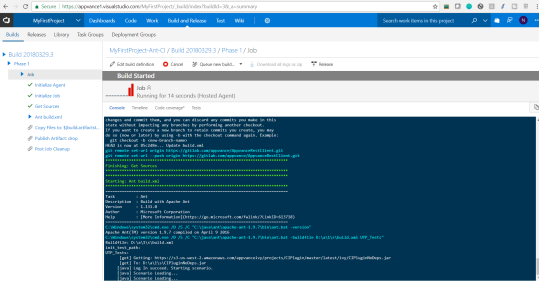
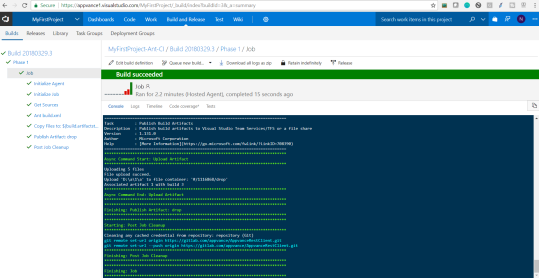
Now once those jobs are run successfully, you could log in to your server and check the results from Analyze page.
Last updated: September 01,30, 20232026
If you have any feedback on this topic, please contact us at documentation@appvance.ai.