
Repurposing Methodology and Architecture for AIQ Integrations
AppvanceLast Repurposingreviewed: MethodologyOctober applied2, 2026
Use this article to Seleniumplan enableswhen manyexisting typesautomation assets can be repurposed for AIQ integrations instead of testing:rebuilt from scratch.
Functional
What Testingchanged in this article
- Reframed the
FirefoxpageWebasBrowserintegration-planningRecordguidancetestratherscriptsthanusinganSeleniumabstractIDE,methodology note. - Added checks for asset ownership, current relevance, dependency health, data compatibility, runtime support, and maintenance cost.
- Added decision guidance for reuse, refactor, migration, or retirement of existing assets.
Validation workflow
- Inventory the existing asset, its owner, runtime, dependencies, data inputs, and known limitations.
- Decide whether the asset should be reused as-is, refactored, migrated, or retired.
- Validate the repurposed asset in AIQ with clear evidence and a
plug-inmaintenanceto the Firefox browser. Play the test scripts in the Firefox browser.owner.
BrowserReview Compatibilitynote: TestsThis -page Playnow recordedsupports Seleniumpractical testsintegration indecisions Edge, Safari, Chrome, and other browsers. Play the tests on a gridinstead of machines with multiple operating environments and multiple browser versions.
Functional Testing - Play recorded Selenium tests as smoke tests, regression tests, and integration tests.
Load and Performance Testing - Determine the Scalability Index of your application by observing the throughput of your application at increasing levels of concurrently running virtual users. Each virtual user operates a test use case with one or more Selenium tests.
Synthetic Test - Prove compliance with a Service Level Agreement (SLA) by periodically running a Selenium test script. AIQ sends notification emails when the Selenium script fails or encounters an error condition.
Stress Testing - Understand the behavior as your application comes under unexpected high load conditions.
In each of the above types of tests AIQ re-purposes a single Selenium test script. The AIQgeneric architecture makes re-purposing possible.language.
AIQ operates Selenium tests as load and performance tests by running the tests in one or more TestNodes. The TestNode operates the test in a browser (such as Edge, Safari, Chrome) or using HTMLUnit. HTMLUnit is a commercial headless browser framework that provides a programmatic simulation of a Web browser. HTMLUnit uses Rhino, the Mozilla JavaScript engine, to run JavaScript and Ajax programs. This approach makes it easy to run hundreds to thousands of simulated users in a load and performance test. The alternative would be costly test runs that start a browser for each simulated user.
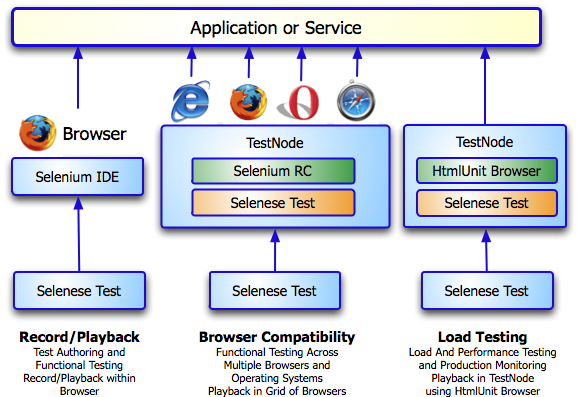
AIQ makes it easy to pivot from one type of testing to another. For example, functional testing is often the time to ensure the test scripts work as expected. With a click of a button in the Appvance Scenario Builder, a functional test becomes a load and performance test. While loading the application under test with several virtual users your test may uncover another functional issue. Pivoting back to functional testing is easy with AIQ.
Once you record a test, AIQ re-purposes the test to be a functional test, load test, and performance test.
Often AIQ users will follow this methodology:
a) Record a Selenium test in Selenium IDE using the Firefox browser. Save the test in the Selenese file format. Confirm the test runs by playing the test against the application in the Firefox browser.
b) Run the Selenium test in a TestNode in the Firefox browser. Create a AIQ TestScenario using the Appvance Scenario Builder. Identify one or more Selenium tests to run in a test use case in the Scenario Builder's Use Case tab. Use the Selenium RC test type and identify *firefox as the browser. AIQ sends the Selenium test to TestNode. The TestNode launches Firefox and plays the test. The TestNode records the time it takes for each step of the Selenium test to operate. AIQ plots a set of results charts to identify functional issues in the test and application.
c) Run the Selenium test in a TestNode in the HtmlUnit browser. Same operation but this time using the headless HtmlUnit browser.
d) Run the test as a Load and Performance test. Operates the Selenium test at several levels of load. Identifies the Scalability Index of the application. Surfaces performance bottlenecks and functional issues.
e) Run the test as a Synthetic test. Operates the Selenium test periodically to prove compliance with an SLA and to surface functional issues.
Last updated: October 25,2, 20232026
If you have any feedback on this topic, please contact us at documentation@appvance.ai.