
Run AIQ Tests from the Command Line
Operate
Run anAIQ Appvance Test ScenarioTests from the commandCommand lineLine
Last thereviewed: AppvanceSeptember IQ.21, 2026
AppvanceUse IQ Test scenarios can be run from command command-line integrationexecution usingwhen aAIQ CIPlugin that Appvance provides. CIPlugin enabled you to start test scenarios from ant tag (CI Tools) and if needed, from the command line as well.
Click the link to download the Appvance CI Plugin jar
Prerequisites
Appvance CI Plugin - As mentioned above with the download link
Java 1.8
Scripts and Appvance Test scenario created and available
Running the Test Scenario
Download the jar plug-in
Navigate to the folder where the plug-in is downloaded or moved
Open command prompt (make sure you have enough permissions or open CMD with Admin mode)
Copy the path of the test scenario that youtests need to run from thescripts, commandschedulers, promptor CI/CD agents. Keep commands repeatable and avoid embedding secrets in scripts.
When to use this guidance
- A pipeline or automation host needs to trigger AIQ tests.
- You need reproducible execution commands.
- Results
Frommustwindows:beBelowreturnedisto thesyntaxcallingtoprocess.
Recommended
javaapproach
-cp CIPluginNoDeps.jar com.appvance.enterprise.ci.CIPlugin http://localhost:8080 F:/Testing/Jmeter_and_Har/New-scenario.scenario appvance appvance
where
- Confirm the
firstsupportedparametersAIQare always the same (java -cp CIPluginNoDeps.jar com.appvance.enterprise.ci.CIPlugin)The next 4 parameters are:Server URL - Could be localhostcommand-line orwhereAPIAIQentryispointhostedforalongyour version. - Create a dedicated service account or token with
theleast-privilegeportaccess. - Parameterize
numberproject,Pathscenario,toenvironment,scenariodataset,fileand-thresholdScenariosettings. - Capture
pathexecutionUsernameoutput,-logs,usernameandof AIQPassword - The password that is used for the above username
From Mac: Below is the syntax to run
java -cp CIPluginNoDeps.jar com.appvance.enterprise.ci.CIPlugin http://localhost:8080 ~/repositories/appvance/HOME/sahiTestApi.scenario appvance appvance
The usage from the ant is illustratedreports in the linkautomation explainingsystem.
Note: 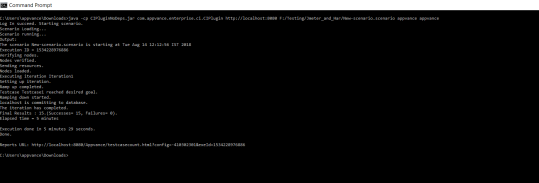
Last updated: JuneSeptember 28,21, 20232026
If you have any feedback on this topic, please contact us at documentation@appvance.ai.