
Command-Line Integration
Run
Operate AIQan TestsAppvance Test Scenario from the Commandcommand Lineline using the Appvance IQ.
UseAppvance command-IQ Test scenarios can be run from command line executionintegration whenusing AIQa testsCIPlugin that Appvance provides. CIPlugin enabled you to start test scenarios from ant tag (CI Tools) and if needed, from the command line as well.
Click the link to download the Appvance CI Plugin jar
Prerequisites
Appvance CI Plugin - As mentioned above with the download link
Java 1.8
Scripts and Appvance Test scenario created and available
Running the Test Scenario
Download the jar plug-in
Navigate to the folder where the plug-in is downloaded or moved
Open command prompt (make sure you have enough permissions or open CMD with Admin mode)
Copy the path of the test scenario that you need to run from scripts,the schedulers,command prompt
From windows: Below is the syntax to run
java -cp CIPluginNoDeps.jar com.appvance.enterprise.ci.CIPlugin http://localhost:8080 F:/Testing/Jmeter_and_Har/New-scenario.scenario appvance appvance
where the first parameters are always the same (java -cp CIPluginNoDeps.jar com.appvance.enterprise.ci.CIPlugin)
The next 4 parameters are:
Server URL - Could be localhost or CI/CDwhere agents.AIQ Keepis commandshosted repeatablealong andwith avoidthe embeddingport secrets in scripts.number
When
Path to usescenario thisfile guidance-
Username - username of AIQ
Password - The password that is used for the above username
From orMac: automationBelow hostis needsthe syntax to triggerrun
java tests.
The tousage from the callingant process.
Recommended approach
Confirm the supported AIQ command-line or API entry point for your version.Create a dedicated service account or token with least-privilege access.Parameterize project, scenario, environment, dataset, and threshold settings.Capture execution output, logs, and reportsillustrated in theautomationlinksystem.explaining how to start scenarios from Jenkins Ci Tool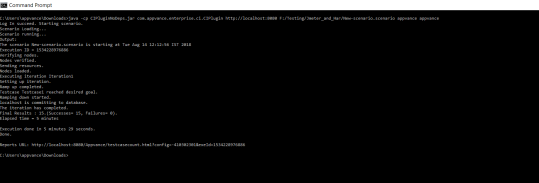
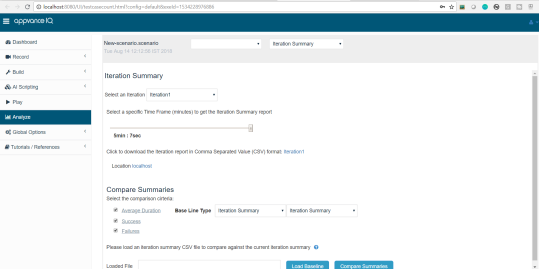
Handlenon-zero exit codes and failed quality gates clearly.
Note:
Last updated: SeptemberJune 21,28, 20262023
If you have any feedback on this topic, please contact us at documentation@appvance.ai